
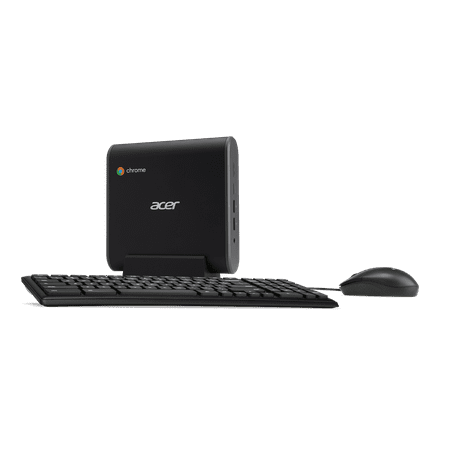
Acer Chromebox, Intel Core i3-7130U Processor, 8GB DDR4, 64GB SSD, Chrome, CXI3-I38GKM
- Brand:
- Acer
- Model Number:
- CXI3-I38GKM
- UPC:
- 191114607688
- EAN:
- 0191114607688
- ASIN:
- B07BGHSSR5
- Walmart SKU:
- 986003972
At $349.00, pricing shows 0.0% discount compared to typical $0.00 levels.
| Price Type | Price | Date |
|---|---|---|
|
Highest Price
|
$954.49 | |
|
Lowest Price
|
$435.48 | |
|
Most Recent Price
|
$435.48 |
| Price Type | Price | Date |
|---|---|---|
|
Highest Price
|
$349.00 | |
|
Lowest Price
|
$349.00 | |
|
Most Recent Price
|
$349.00 |
Tracking History: We have tracked Acer Chromebox, Intel Core i3-7130U Processor, 8GB DDR4, 64GB SSD, Chrome, CXI3-I38GKM since 12/5/2022. The most recent price update was on Aug 21, 2023.
Price Range: Over the past 90 days, the price has ranged from $349.00 (lowest on 12/5/2022) to $349.00 (highest on 12/5/2022). The average price during this period is $349.00.
Current Trend: No Walmart.com pricing data available for analysis.
Customer Insights: Rated 4.6/5 from 20 reviews.
I had idea what to expect from this little mighty box. Straight out of the package, hooked up to our not so smart TV, so it could become a smart one. Set up was very easy. I couldn't get the Netflix app to work, at first. I updated the box and still no Netflix. After searching the issue, on Google, it recommended restoring it. I did that and boom! It's worked every since. The free channels (apps) seem to work. There's been no freezing incidents. We only using it for streaming movies. I've not used it for gaming and not sure I ever will. So, for movies, it's great! It powers up quickly and shuts down quickly. It's a mighty little box - takes up Harding any space, but does a big job streaming.
My desktop recently stopped working so I replaced it with this Acer Chromebox. When I unpackaged the device, I couldn't believe the size! It was so little compared to my current modem. I was a little skeptical of how this would compare to my old desktop but I was pleasantly surprised. This thing is awesome! This comes with the Chromebox, the keyboard and the mouse. Setting up this device was super simple you just attach it to your monitor or TV and you're ready to go. When I first turned this on, I was so impressed with the speed! I continue to have no lags or disruptions, everything loads instantly. I also like that this Chromebox is super quiet and I only hear the fan when it is turning on. Another awesome feature is that this Chromebox has virus protection built-in right in and there is no need to do any updates, as they're done automatically! I travel a lot so I love the portability of this, as within a few minutes I can access the web and my google chrome apps no matter where I am. I definitely recommend this Acer Chromebox!
This is perfect for me to hook up to my TV! It came with a nice keyboard & mouse, too. It's plenty fast enough for me to have some apps(like Peacock TV, which I love!) and do other things that my "smart" TV won't let me do. The small size make it really easy to fit by my TV. It's not quite twice the size of my router(which is small). Most of the time, the router sits on top of this Chromebox. I've had Acer products in the past with no problem so I expect I'll have this for a good long while.
Chromebox is a super fast Google internet client that can be transported very easily. It is mostly cloud based and needs internet service, a Gmail account, and a Display. It didn't connect with my 4K TV but according to other users it will connect with HDTV so this may be a good option for a HDTV to get streaming as well as full internet search. It comes with a keyboard and mouse.
Previously I had been using a regular laptop computer and a tablet. I had been seeing lots of commercials ads for Chromebox and was always interested but figured it to be too expensive of a purchase to take a chance on my getting and then being unsatisfied. I received a Chromebox as a gift and I appreciated the gift, but let it sit inside the box for over a week believing that it was going to be an arduous task to connect and set up. Finally, I decided to open the box and take my attempt at setting it up. There was practically no set-up procedure involved, as it was only three simple steps, the most intricate being to plus a cord into an electrical outlet (and not even a three prong)! ...It was so simple to set up, that I couldn't believe it! It was set up in [literally] under two minutes! The instructions were so simple, and the device immediately offered to transfer (share) all of my personal information and 'Favorites' etc. from my old tablet over to my new device, and once I okayed the procedure, it took a matter of seconds to do - and all my personal information was now in my Chromebox device! ...The fact that this thing is free of the risk of viruses alone, makes it well worth the investment! I am beyond satisfied with my Chromebox, and had I known what I know now, I would have invested in one much sooner; it would have been a gift to myself as opposed to someone else having to gift it to me.
Right out of the box this Chromebox was a surprising quality product. At first I hooked up the included keyboard and mouse using my computer monitor. Fast boot up and everything performed as expected. Initial setup was a snap including finding our internet connection. Logged on to my existing Google account and almost everything i use was there. Later I hooked it up to our 52" smart TV via an HDMI cable and used a wireless keyboard and mouse that I had, no trouble booting up. Now I can sit in my recliner and read email, play games, read eBooks and do a variety of other tasks at leisure. Screen shots attached are not truly representative of the actual picture quality, taken with an iPhone camera by an amateur photographer with improper lighting. Have a lot more exploring to do, I haven't found the limit on what this machine can do.
The Acer Chrome box is a great compact system. I love the fact that it is very small and it takes up less space than a laptop or a desktop. The system was easy too setup. Someone with no computer knowledge would be able to follow the instructions. It came with a mouse, a mounting board, and a keyboard. The system booted up fast and easy. I was able to download applications to the system which the speed was so fast it took a few minutes to do. I also was able to add photos from my Google account in an instant. I hooked the chromebox to a monitor using an hdmi cord. The speed was very fast and the sound card made the vocals in the song so crisp and clear. I would recommend this to people.
When I received this I was very surprised because it didnt just come with the Acer chromebook, it also came with a keyboard and mouse which I am totally using as of now. But the chrome box itself it pretty neat and another way of saving more of your things from your computer. I however wish it was maybe a little bit thinner so you can fit it into smaller spaces and it doesnt stick out as much. Overall, I am happy with it and will keep on saving.
The Acer Chromebox, Intel Core i3-7130U Processor, 8GB DDR4, 64GB SSD Chromebox is a nice little set up to have. I really liked that it comes with a keyboard and mouse. The keyboard is not a standard size one it's a little smaller which is not a problem for me and the mouse is not wireless. All you have to do is hook this set up to a tv and it's like having a giant phone screen. It is best used for Google play apps , some games do run rather slow and are a little laggy but a majority of the games work well. It definitely is not something used for regular computer games. It is like having your phone apps hooked up to a bigger screen. Which will work fine for our son to play some games instead of his eyes glued to the tiny screen on his phone. It has enough storage to hold a lot of apps. It runs really smooth and looks great on our hd tv.
Received the Acer Chromebox CX13-138GKM to set up. Only problem I moved and do not have a moniter anymore. So I could not use iit. Looking over the server and keyboard which look like they are good quality. The keys on the keyboard look like they will work great when typing. The mouse seems to be a good one to use. The design of the items sent all seem to be of good quality and will work once I get a moniter to use.
Detailed price history for the past 90 days
No Walmart.com pricing data available for analysis.
Third-Party Sellers prices have ranged from $435.48 (Jun 7) to $435.48 (Jun 7) over the past 90 days. Current price is close to the 90-day average of $435.48.
| Date | Price | Change | % Change |
|---|---|---|---|
| $435.48 | $+0.00 | +0.0% | |
| $435.48 | $+0.00 | +0.0% | |
| $435.48 | $+0.00 | +0.0% | |
| $435.48 | — | — |