
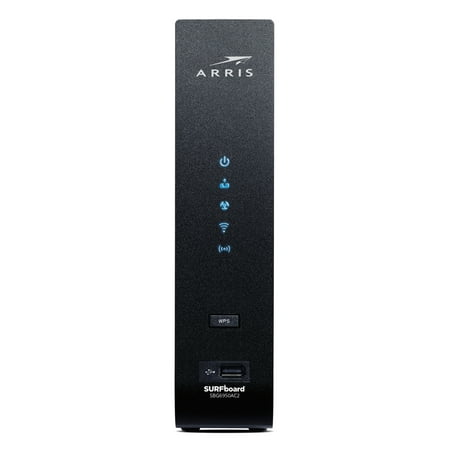
ARRIS Surfboard Cable Modem Dual-Band Wi-Fi Router DOCSIS 3.0, AC1900 (16x4) Up to 300 Mbps
- Brand:
- ARRIS
- Model Number:
- SBG6950AC2
- UPC:
- 612572214053
- EAN:
- 0612572214053
- ASIN:
- B0764HVN5J
- Walmart SKU:
- 132966881
Price momentum shifted downward , bringing the cost to $89.00. This represents a 0.0% discount to typical levels.
| Price Type | Price | Date |
|---|---|---|
|
Highest Price
|
$199.99 | |
|
Lowest Price
|
$57.00 | |
|
Most Recent Price
|
$110.00 |
| Price Type | Price | Date |
|---|---|---|
|
Highest Price
|
$121.99 | |
|
Lowest Price
|
$79.99 | |
|
Most Recent Price
|
$89.00 |
Tracking History: We have tracked ARRIS Surfboard Cable Modem Dual-Band Wi-Fi Router DOCSIS 3.0, AC1900 (16x4) Up to 300 Mbps since 12/5/2022. The most recent price update was on Jun 24, 2026.
Price Range: Over the past 90 days, the price has ranged from $79.99 (lowest on 2/11/2024) to $121.99 (highest on 6/28/2023). The average price during this period is $100.66.
Current Trend: Walmart.com prices have ranged from $89.00 (Jun 24) to $89.00 (Jun 24) over the past 90 days. Current price is close to the 90-day average of $89.00.
Customer Insights: Rated 4.1/5 from 268 reviews.
This modem/wi-fi router is fast and set to handle the Xfinity/Comcast network speeds up to 400Mbps download and 12Mbps updloads. Had some issues in the beginning, turned out to be mis-match between the Xfinity MAC address on file and the actual MAC address of the modem connected. Xfinity tech and their support team worked for about 2-hours to resolve the conflict. Modem range is about 1400sqft - your range may vary depending on the location you place the unit. Mine is located in the basement and still supports wi-fi connection at the both ends of the house. You can custom program both 2.4 and 5.0GHz settings to accommodate your needs. Be sure to contact your ISP (internet service provider) to help add the modem to the network or closely follow the on-line self install the unit.
[This review was collected as part of a promotion.] Setup for this modem/router combo was a breeze. After disconnecting the existing modem that came from my cable company, I connected the coax cable to the back of my new modem and downloaded the Surfboard app to my phone. In the app, I scanned the QR code on the side of the modem which pre-populated the SSID and password for the WiFi, so I didn't have to manually type in the information. I am mildly dyslexic, so I found this to be extremely helpful. Next, I opened a web browser which automatically took me to my internet provider's Self-install page. I entered my account information and the MAC number off of the included Product Info card but the self-install site complained that the modem wasn't compatible. I called the cable company and they were able to activate it from their side (I might have entered the number incorrectly). After hanging up the phone with them, I attempted to connect my devices to the WiFi, to no avail. So, I decided to reboot the modem. Joy! My devices connected. Since my Smart Home devices had all been configured for my previous router's SSID and password, I used the Modem's IP address to reconfigure everything to match the previous router's config. At first, nothing seemed to connect … until I rebooted. That did the trick! Everything had been working for days when I decided I would run a Speed Test. The test indicated that I was getting 56mbps via WiFi, but I expected to get around 300+mbps. So, I decided to unplug the modem for thirty seconds. After plugging it back in and running Speed Test, it rated at 424mbps! Speeds have been consistently fast ever since. With the new modem in place, my programs stream with no difficulty, even when I am transferring large files from my computer at the same time. It has been really nice not having buffering symbols on my television al the time. Overall, here are the Pros and Cons that I have noted: Pros: * The modem's settings are accessible from the phone app so you don't need to connect via computer and Ethernet cable. * The app shows all of the devices that are connected at any given time. This is perfect for diagnosing connectivity issues, but also great for managing households with children. * You can name the 2.4ghz and 5ghz bands the same WiFi name which will simplify connectivity, especially in a Smart Home setting. Cons: * The lights are extremely bright and can disrupt a person's sleep if anywhere near a bedroom. I found the setting to disabled all the lights (except for Power), but I don't like it because I like to be able to see when my internet is working (sometimes it goes down in our area). We have just been placing a strip of electrical tape over it at night. * It took two reboots after everything was set up, in order to attain full functionality. This is more of an annoyance, really, but still worth noting.
love it
[This review was collected as part of a promotion.] I recently got the Arris Surfboard Cable Modem to setup the WiFi in my new home. The instructions are pretty straightforward and easy to setup with some basic understanding of wifi. The box is sleek and fits nicely.
[This review was collected as part of a promotion.] I absolutly love this ARRIS Surfboard DOCSIS 3.0 CABLE MODEM & WI-FI ROUTER. It has already saved me money because we don't need to rent the one we used to have anymore, it eliminates monthly rental fees. It's compatible with major U.S. CABLE PROVIDERS including COX, CHARTER SPECTRUM AND XFINITY. I would highly recommend this because it will save you so much money and it works great.
Item stated that it would work with my local service provider, but when I tried to have them help me, they said this modem was not supported. Perhaps it was a recent change, but the result is the same. I could not use this modem with the current Spectrum service.
Had less than a year and it won't work, product has 2 yr warranty but only good if purchased from dealer, not Walmart. Reordered with a 3yr warranty thru walmart 3rd party offer.
it says on the box that its compatible with spectrum spent over $100 on this item juat to get it home spend an hour trying to get it hooked up just to be told it is incompatible with spectrum.
check with your Internet service provider before purchasing this model...they claim it is compatible with Spectrum when in actuality Spectrum has it "black listed" and does not support it.
not compatible with Spectrum
Detailed price history for the past 90 days
Walmart.com prices have ranged from $89.00 (Jun 24) to $89.00 (Jun 24) over the past 90 days. Current price is close to the 90-day average of $89.00.
| Date | Price | Change | % Change |
|---|---|---|---|
| $89.00 | — | — |
Third-Party Sellers prices have ranged from $73.50 (Jun 8) to $199.99 (Jul 30) over the past 90 days. Current price is close to the 90-day average of $107.43.
| Date | Price | Change | % Change |
|---|---|---|---|
| $110.00 | $+19.00 | +20.9% | |
| $91.00 | $-19.00 | -17.3% | |
| $110.00 | $-9.99 | -8.3% | |
| $119.99 | $-16.01 | -11.8% | |
| $136.00 | $+0.00 | +0.0% | |
| $136.00 | $+17.01 | +14.3% | |
| $118.99 | $-17.01 | -12.5% | |
| $136.00 | $+0.00 | +0.0% | |
| $136.00 | $+27.00 | +24.8% | |
| $109.00 | $+0.00 | +0.0% | |
| $109.00 | $-2.07 | -1.9% | |
| $111.07 | $-1.92 | -1.7% | |
| $112.99 | $-2.00 | -1.7% | |
| $114.99 | $-0.67 | -0.6% | |
| $115.66 | $+0.00 | +0.0% | |
| $115.66 | $+0.00 | +0.0% | |
| $115.66 | $-84.33 | -42.2% | |
| $199.99 | $+111.00 | +124.7% | |
| $88.99 | $-0.01 | +0.0% | |
| $89.00 | $-13.00 | -12.7% | |
| $102.00 | $+13.00 | +14.6% | |
| $89.00 | $-13.00 | -12.7% | |
| $102.00 | $+13.00 | +14.6% | |
| $89.00 | $-6.99 | -7.3% | |
| $95.99 | $-104.00 | -52.0% | |
| $199.99 | $+104.00 | +108.3% | |
| $95.99 | $+0.00 | +0.0% | |
| $95.99 | $+2.67 | +2.9% | |
| $93.32 | $+0.00 | +0.0% | |
| $93.32 | $-2.67 | -2.8% | |
| $95.99 | $+0.00 | +0.0% | |
| $95.99 | $+2.67 | +2.9% | |
| $93.32 | $-1.67 | -1.8% | |
| $94.99 | $+5.99 | +6.7% | |
| $89.00 | $+0.00 | +0.0% | |
| $89.00 | $+0.00 | +0.0% | |
| $89.00 | $-36.00 | -28.8% | |
| $125.00 | $+36.00 | +40.4% | |
| $89.00 | $+0.00 | +0.0% | |
| $89.00 | $+15.50 | +21.1% | |
| $73.50 | $-4.50 | -5.8% | |
| $78.00 | $-6.95 | -8.2% | |
| $84.95 | — | — |