
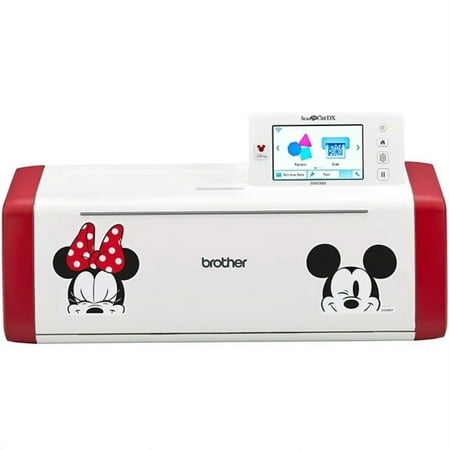
Brother Disney ScanNCut DX
- Brand:
- Brother
- Model Number:
- SDX230Di
- UPC:
- 012502666899
- EAN:
- 0012502666899
- Walmart SKU:
- 2171130000
Current pricing at $529.99 reflects recent market activity, running 0.0% below the 90-day average.
| Price Type | Price | Date |
|---|---|---|
|
Highest Price
|
$738.78 | |
|
Lowest Price
|
$481.71 | |
|
Most Recent Price
|
$594.19 |
| Price Type | Price | Date |
|---|---|---|
|
Highest Price
|
$529.99 | |
|
Lowest Price
|
$512.35 | |
|
Most Recent Price
|
$529.99 |
Tracking History: We have tracked Brother Disney ScanNCut DX since 9/18/2025. The most recent price update was on Dec 4, 2025.
Price Range: Over the past 90 days, the price has ranged from $512.35 (lowest on 9/18/2025) to $529.99 (highest on 12/4/2025). The average price during this period is $518.23.
Current Trend: No Walmart.com pricing data available for analysis.
Customer Insights: Rated 4.44/5 from 32 reviews.
[This review was collected as part of a promotion.] I received this product for free from Brother in exchange for my honest opinion/review of the product. It is a great tool and has already helped immensely in preparing crafts for the holidays. Its cutting function is easy to set up, and it comes out accurate and precise whether it is a picture, script, or numbers. The scanning function is a very big plus as it makes it much easier to get the piece of work you want to cut. It is also extremely fun to see all of the different crafts you can make with the machine. Highly recommended for that craft loving family member
[This review was collected as part of a promotion.] I received this product for free from Brother in exchange for my honest option/review of the product. We love our Brother ScanNCut! It allows us to customize so many things and create really cool crafts that we give as gifts to friends and family. We have never used a cutting machine like this and it was super easy to use right out of the box. We have made cards, t-shirts, stickers, and vinyl decals with it. The best part is my kids love it because they can draw on sticker paper and the ScanNCut can scan their design and cut it into a customer sticker, which my son loves to give out at school to his friends. I love cutting customer vinyl decals to put on our cars and give as gifts. My wife has started making t-shirt designs. It comes ready to use out of the box and you don't even need a computer to start making things. It can also be used with Brother's Canvas app which has tons of other items that can be sent right to the cutter via wifi. The storage compartment in the door is a great feature and is where I keep all of the tools needed for any project. It is quiet and quick when working and we have used it to make over 100 items and the blade still cuts like it is brand new. We look forward to making more projects with the Brother ScanNCut and may even start selling some of them.
[This review was collected as part of a promotion.] I received this product for free from Brother in exchange for my honest opinion/review of the product. I can't say enough good things about this little machine. I got it ten days ago and haven't stopped using it. I don't know where to begin? It can make greeting cards, vinyl decals, stickers, t-shirts, quilt patterns, the possibilities are endless! I can scan my own artwork and the Scanncut will draw it on paper or fabric, leather or cut out vinyl, make a stencil or stamp. The best part is I can do this all from the machine. It scans, edits, draws, cuts then saves my work! I can also send a design wirelessly, from my computer or thumb drive. I made some greeting cards and the machine cuts intricate designs beautifully! I also cut out stickers, full and half cut and I couldn't be more pleased! Today, I bought vinyl. It's time to label everything in the kitchen lol. Pros - it's quiet! You don't have to worry about bothering someone sleeping or watching TV. - the blade automatically adjusts to whatever material you're cutting. - it has a color LCD touchscreen with built-in storage. - it doesn't have to be hooked up to a computer or WiFi. - there's no monthly fee. Their Canvas Workspace has a ton of really nice projects too. - you have to download the manual from their website because they're saving trees! Cons - the accessories are pricey. (The universal pen holder is so worth it!) - the low tack mat isn't very sticky. - the spatula that comes with the kit is dull. I can't think of anything else. I'm so happy!
[This review was collected as part of a promotion.] I received this Brother ScanNcut DX SDX230Di Disney Electronic cutting machine in the mail and it is a really nice machine. My wife has a cricut machine and she is replacing it with this. It is so much nicer and does so much more. For one it is Wi-Fi connected so no need to run it through our laptop anymore. The layout is so much better, you can cut 6 inches wider and longer with the layout. My wife is still trying to figure it out but is loving it so far. The Disney edition gives you so many more options for layouts. The cuts are so much better and cleaner also.You can do quilt patterns and so much more. I have a business so this will really be good to do my decals and stuff for my advertisement. We are really gonna love this machine
[This review was collected as part of a promotion.] The Brother ScanNCut DX SDX230Di Disney electronic machine is excellent. It works amazing. It has built-in scanner and 152 built-in Disney designs. The designs are beautiful and unique. The images of Mickey Mouse and Minnie Mouse on the front of the machine are gorgeous. I like the fact that this machine automatically detects material thickness to cut precise patterns and cuts up to 3mm thick. I am able to create and edit designs quickly and easily on the touchscreen display. I make decorations, greating cards, signs and they look wonderful. Also this machine has PES/PHX file readability so that you can create embossing, applique and drawings for home decor. I like the high quality and durability of this machine. Overall I am very satisfied with this product and I highly recommend to everybody.
[This review was collected as part of a promotion.] I received this product free from Brother in exchange for my honest opinion/review of the product. I am truly impressed with the ease of use of the ScanNCut DX Disney Edition. I have used other similar products before, and they were more difficult to figure out and not nearly as user friendly. The instructions for set up are extremely detailed and easy to follow, and they encourage you to learn while using - and include a test project for you to practice with. I love how compact it is and the storage options for all of its components are wonderful to keep items together. I also really love that it doesn't have to be connected to a computer to use - a lot of features are built right into the device itself. I think the only negative I can find is that in order to have access to some of the official Disney files, you have to pay separately for each collection. However, there are plenty of options that come preloaded to the device itself, so this is not a huge drawback for me. I also love that you can cut different materials with it, and that it automatically senses the thickness of the paper and there are minimal adjustments for the user to make. I am really excited to spend more time with this machine!
I can't say enough about my Disney ScanNCut DX. I love it it's so much easier than my Cricut. I have used it almost every day since I opened it. Thank you so much for all the videos on you tube.
[This review was collected as part of a promotion.] I am blown away by this Scan and Cut machine (Model SDX230Di)! Even though it might look intimidating at first, the basic functions are very easy to learn. The machine is extremely sturdy, easy to set up, and includes everything that is needed to get started right away. Besides the “essentials”, such as the cutting blade and cutting mats, it also comes with a stylus, a spatula (which is a must have to remove the material from the cutting mat), 6 different colored pens, a pen holder, and a storage pouch. I love the two storage compartments which also serve as a “feeding tray” for the cutting mat, and allow you to store all of your tools and accessories nearby. The machine comes preloaded with tons of different designs, from basic shapes and banners, to very intricate and detailed frames, as well as various Disney designs including popular Disney characters. The machine is fairly quiet when cutting and cuts even the tiniest details without any issues. There is no need to adjust the cutting blade since it detects the thickness of the material used. The blade is able to cut various different materials including regular printer paper, vinyl, card stock, and fabric up to 3mm in thickness. I absolutely love the scanning function! The machine is able to recognize the edges of any material which allows you to adjust your design accordingly. This function is especially useful when using scraps. Using the scan function, you can also cut out your child's artwork or create custom stickers. My favorite feature is the colorful touchscreen which is extremely responsive when being touched with a finger or the included stylus. I don't have a lot to desk space and love that designs can be edited and the machine can be operated directly from the touchscreen. I've used a cutter machine in the past to create iron on vinyl designs for custom T-Shirts and party decorations made out of card stock, but my old cutting machine does not even compare to this one! Scan and Cut is perfect for young and old, beginners and avid crafters. Once you get the hang of how to use it, the machine does most of the work and you'll be creating amazing crafts in no time. The designs and possibilities are endless and only limited by your imagination!
I was very excited to receive my machine. I looked at so many videos and felt i could start playing with the little knowledge i thought i had. The machine is not novice friendly. Every time i called for technical help i was told to look at another video. Needless to say my enthusiasm has been destroyed.
My scan n cut has never recognized a mat. Used multiple mats and still nothing Watch multiple videos and still won't recognize any mat I purchase. I have only been able to do the project the scan n cut came with.
Detailed price history for the past 90 days
No Walmart.com pricing data available for analysis.
Third-Party Sellers prices have ranged from $573.37 (Jun 20) to $598.11 (Jul 22) over the past 90 days. Current price is close to the 90-day average of $591.66.
| Date | Price | Change | % Change |
|---|---|---|---|
| $594.19 | $-3.30 | -0.6% | |
| $597.49 | $+0.00 | +0.0% | |
| $597.49 | $+0.00 | +0.0% | |
| $597.49 | $+5.34 | +0.9% | |
| $592.15 | $+3.35 | +0.6% | |
| $588.80 | $+0.02 | +0.0% | |
| $588.78 | $+0.02 | +0.0% | |
| $588.76 | $+0.00 | +0.0% | |
| $588.76 | $-4.16 | -0.7% | |
| $592.92 | $+1.70 | +0.3% | |
| $591.22 | $-6.89 | -1.2% | |
| $598.11 | $+4.39 | +0.7% | |
| $593.72 | $+20.35 | +3.5% | |
| $573.37 | — | — |