
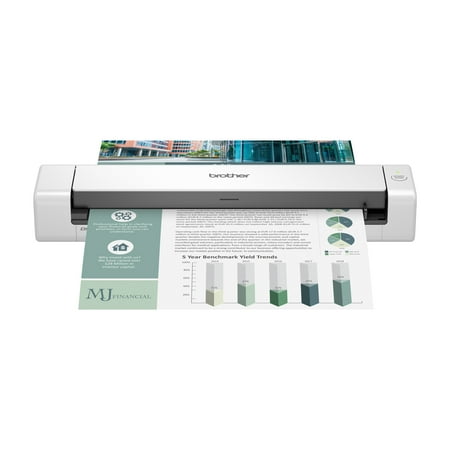
Brother DS-740D Duplex, Compact, Mobile Color Document Scanner, Desk Saving Design
- Brand:
- Brother
- Model Number:
- DS740D
- UPC:
- 012502657484
- EAN:
- 0012502657484
- ASIN:
- B083R3XYQN
- Walmart SKU:
- 691128237
Market direction turned downward with current $169.99 representing 0.0% under standard pricing.
| Price Type | Price | Date |
|---|---|---|
|
Highest Price
|
$148.99 | |
|
Lowest Price
|
$138.99 | |
|
Most Recent Price
|
$148.99 |
| Price Type | Price | Date |
|---|---|---|
|
Highest Price
|
$169.99 | |
|
Lowest Price
|
$149.98 | |
|
Most Recent Price
|
$169.99 |
Tracking History: We have tracked Brother DS-740D Duplex, Compact, Mobile Color Document Scanner, Desk Saving Design since 12/5/2022. The most recent price update was on Jun 28, 2026.
Price Range: Over the past 90 days, the price has ranged from $149.98 (lowest on 12/5/2022) to $169.99 (highest on 11/1/2025). The average price during this period is $158.78.
Current Trend: Walmart.com prices have ranged from $169.99 (Jun 28) to $169.99 (Jun 28) over the past 90 days. Current price is close to the 90-day average of $169.99.
Customer Insights: Rated 4.2/5 from 71 reviews.
This portable scanner is efficient and easy to use. I have looked for many years to find a reliable scanner like this. You won't be disappointed.
ONCE IFIGURED OUT HOW TO INSTALL (AND THAT WAS MY FAULT ) IT WAS SUPER EASY TO DIGITIZED A MOUNTAIN OF PAPERWORK i PREVIOUSLY HAD PURCHASED A NEAT SCAN FROM AMAZON IT WAS TERRIBLE SO I RETURED IT AND FOUND THIS ONE ON WALMART WEBSITE GREAT PURCHASE DOES JUST WHAT i NEED ITS PERFECT !
I have a lot of two sided documents that require scanning. I've been using a scanner that is non-duplex, requiring that I remove the document, turn it over, and scan again. Since purchasing this little scanner, my workload has decreased by 50%, making the process much faster—one of the best peripherals that I've purchased. Also, love that it's MAC compatible.
So far, this item has worked well for what my needs are. You can scan individual documents or scan multiple to build a PDF file.
The scanner you're supposed to be able to put in several sheets of paper, but I find you can only put in one piece of paper or it tells you got a paper jam and you have to pull the plug. Wait a few minutes plug it back in to continue scanning any documents.
The DS-740D is a good, small document scanner. We use it bi-weekly to process whatever has accumulated — the occasional health insurance documents (explanation of benefits) and assortment of signed contracts (ex: landscaping). The scanner comes with a USB-A cable. But the end that plugs into the scanner uses a standard, but very rare USB connection. I wish they had used a more common connector. I use a USB-C based iPad as my daily computing device. I wish this scanner was directly compatible with iPad. I'm not a fan of WiFi models, and would love the convenience of connecting it directly to my iPad. Instead I wait and connect it to a household shared Mac mini when I need to scan things. The scanning software is what I expect from a printer/scanner company. (the bar is very low) It's not pretty. It's not intuitive. It works.
I've had the 740D for about 1 month now, I have not used all that much, but so far it's been relatively working well. I love the convenience of it especially the duplex scanning, portability and size. Seems well made. However, I have a few issues with it thus far. Document jams: on a few occasions, when feeding a page, if the scanner doesn't accept the document 100% perfectly, it stops, I then easily remove the page from the feeder. The iPrint app displays the "document jam" error and the only way to continue is to either close the app or unplug the unit from my laptop. Next issue is that seems like the unit is not very generous in accepting paper that is a somewhat heavier stock. Jams frequently. Last minor issue is with the iPrint app. I have a 2nd Brother Multi-function print/scanner connected, so if I decide to use the alternate device when scanning, the drop down menu only shows the current device and not the alternate printer. User must click add device and then takes you back to the devices connected page and choose from there. It's not a major issue but, my viewpoint is what's the point of the device drop-down menu if it only displays the 1 device, although there's 2 connected to the laptop. Mind you, the alternate printer L2710DW is connected both wireless and USB. I briefly procrastinated about returning it but decided that I could live with it. I'll conclude by saying that of all the years I've been using printer scanner technologies, Brother has been definitely the most reliable.
Been looking for something like this for a long time. After a couple of months of use the only thing on my wish list for this is if it would let you scan longer documents like car loan documents or loan documents. I could not find a setting to customize for much longer document sizes.
If you are running Win 11 OS, DO NOT BUY this Scanner. Win 11 will not detect device, and if it does it freezes up. Only 10% of software downloads, then freezes up. Will not complete installation. Nightmare set up.
Doesn't work
Detailed price history for the past 90 days
Walmart.com prices have ranged from $169.99 (Jun 28) to $169.99 (Jun 28) over the past 90 days. Current price is close to the 90-day average of $169.99.
| Date | Price | Change | % Change |
|---|---|---|---|
| $169.99 | $+0.00 | +0.0% | |
| $169.99 | $+0.00 | +0.0% | |
| $169.99 | $+0.00 | +0.0% | |
| $169.99 | — | — |
Third-Party Sellers prices have ranged from $148.99 (Jun 5) to $148.99 (Jun 5) over the past 90 days. Current price is close to the 90-day average of $148.99.
| Date | Price | Change | % Change |
|---|---|---|---|
| $148.99 | $+0.00 | +0.0% | |
| $148.99 | — | — |