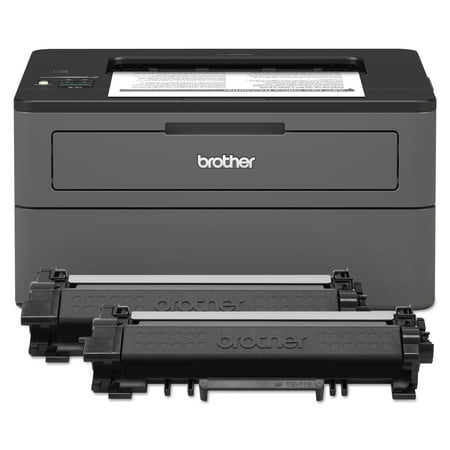
Brother HL-L2370DW XL Extended Print Monochrome Laser Printer,up to 2 Years of Toner In-box
- Brand:
- Brother
- Model Number:
- HL-L2370DWXL
- UPC:
- 012502650362
- EAN:
- 0012502650362
- Walmart SKU:
- 188265636
At $299.99, pricing shows 0.0% discount compared to typical $0.00 levels.
| Price Type | Price | Date |
|---|---|---|
|
Highest Price
|
$599.99 | |
|
Lowest Price
|
$248.96 | |
|
Most Recent Price
|
$413.99 |
| Price Type | Price | Date |
|---|---|---|
|
Highest Price
|
$299.99 | |
|
Lowest Price
|
$259.98 | |
|
Most Recent Price
|
$299.99 |
Tracking History: We have tracked Brother HL-L2370DW XL Extended Print Monochrome Laser Printer,up to 2 Years of Toner In-box since 8/12/2023. The most recent price update was on Sep 9, 2025.
Price Range: Over the past 90 days, the price has ranged from $259.98 (lowest on 8/12/2023) to $299.99 (highest on 7/3/2025). The average price during this period is $275.18.
Current Trend: No Walmart.com pricing data available for analysis.
Customer Insights: Rated 4.4/5 from 1652 reviews.
This printer was easy to set up. However, a little bit more instruction as to how to hook it up to Wi-Fi would be beneficial for some people. The instructions don't really give you an explanation as to how to enter a password. I figured it out relatively quickly, but not very intuitive.
I have had an older Brother Laser printer for over 10 years and it has been flawless. This one so far has been great also. It has a few more options to review than my old one but I am getting it figured out1
Reviewing HL-L2370DW Brother B&W printer: Owned for 3+ months. I was able to set this up using only the big Quick Setup Guide sheet included in the box. After unboxing and sliding in the cartridge, I downloaded the software to my laptop from the URL (in step 6). After running the software on my laptop and nursing it through all the steps, okays, approves, etc. it connected wirelessly very easily. I also then used the software to make it download updates for the printer driver and laptop software. This was a lot to do, but it really took under half an hour. I print from a Lenovo ThinkPad with Windows 10 and an iPhone (using AirPrint). I have no problem printing while the printer is in sleep or deep sleep mode. I like that it has deep sleep mode to save energy. Comments about it using a lot of energy are misleading because it only uses that energy while printing. Most of the time, it is sleeping. Information in the most popular review is wrong. It does have a power button (maybe they were reviewing a different model) There was a black vertical line on the printed pages at first, but I followed the instructions on the Brother site for this printer & problem, cleaned it with a couple of alcohol wipes , and was up and running in another 10 minutes. Shouldn't have to do that, but I won't knock them for what is an otherwise very easy half-hour setup, a good looking and easy to use printer. It's also light and compact which is very welcome. I hope this was helpful information for everyone!
I like the compact size of this computer and it is very economic. What I don't like is it is very hard to work the settings. The buttons are tiny, not well lit, and hard to read. I am ready to replace the printer and would buy another Brother if the settings were more user friendly.
It's a great black-and-white laser printer. My own complaint is occasionally it loses Bluetooth connections with my computer computer thank you thank you
it probably worked, but it blew my arc fuses. Power surge. I tried to call, chat and email them with delayed success. By then I returned it. Now I am replacing my outlet that works with everything else, including my HP printer. Maybe if they were reachable.... No idea how good the printer was.
Great printer when and if it works. connectivity issues abound with these Garmin devices. Sometimes it works on wifi, most the times not. Then I plug it in and the same issues. The other issues are when these things happen there is little to no support available. Im not sure in this day and age why this will not stay connected and why it's so hard to get these set up with a network to begin with. I am not sure how many times I have had to do a full factory reset when all I wanted to do was print just one or two sheets and go on about my business. I have a hard time recommending this or any brother printer due to these inherent issues.
This printer generally operates in a quiet-enough manner, but when I first turn it on it makes loud clicking sounds, like it is trying to feed paper and it can't. Also, I usually have to have the paper tray completely (or almost completely) full, or I'll get an out-of-paper message. The LONG online "help" page (with about 20 steps: clean this, adjust that, feed pages manually, etc) is too confusing (I think) and doesn't address and/or help me solve the problem I'm having.
This issue is with the vendor and poor business practices. There was a shipping error and the vendor assumed and provided accusations before learning what happened. There was no attempt to correct the situation or refund me.
If I could give this print fewer stars, I would. It jams all the time.!It is not uncommon for it to jam 4 or 5 times when one is trying to print a single page. 443 jams out of 3342 print jobs. That's 13.2% of the time it jams. When it does finally print without jamming, the quality is good. I have printed #10 envelopes, labels, and 2 sided pages, and have been pleased with the end result.
Detailed price history for the past 90 days
No Walmart.com pricing data available for analysis.
Third-Party Sellers prices have ranged from $413.99 (Jul 2) to $413.99 (Jul 2) over the past 90 days. Current price is close to the 90-day average of $413.99.
| Date | Price | Change | % Change |
|---|---|---|---|
| $413.99 | $+0.00 | +0.0% | |
| $413.99 | $+0.00 | +0.0% | |
| $413.99 | $+0.00 | +0.0% | |
| $413.99 | $+0.00 | +0.0% | |
| $413.99 | $+0.00 | +0.0% | |
| $413.99 | — | — |