
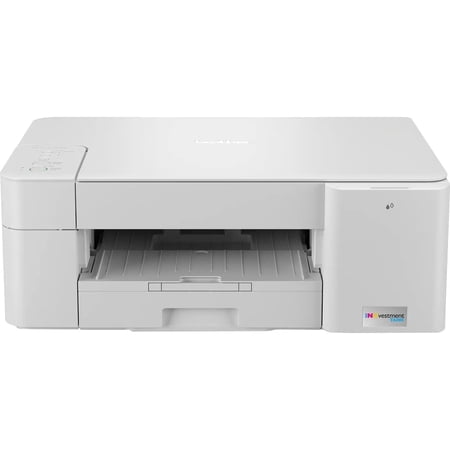
Brother MFC-J1205W INKvestment Wireless Multi-Function Three-in-one Color Inkjet Printer
- Brand:
- Brother
- Model Number:
- MFCJ1205W
- UPC:
- 012502663867
- EAN:
- 0012502663867
- ASIN:
- B092YXNZT6
- Best Buy SKU:
- 6461474
- Walmart SKU:
- 839428114
Market direction turned downward with current $129.99 representing 0.0% under standard pricing.
| Price Type | Price | Date |
|---|---|---|
|
Highest Price
|
$189.99 | |
|
Lowest Price
|
$109.98 | |
|
Most Recent Price
|
$179.99 |
| Price Type | Price | Date |
|---|---|---|
|
Highest Price
|
$129.99 | |
|
Lowest Price
|
$106.40 | |
|
Most Recent Price
|
$129.99 |
Tracking History: We have tracked Brother MFC-J1205W INKvestment Wireless Multi-Function Three-in-one Color Inkjet Printer since 3/14/2023. The most recent price update was on Jun 20, 2026.
Price Range: Over the past 90 days, the price has ranged from $106.40 (lowest on 3/14/2023) to $129.99 (highest on 4/13/2026). The average price during this period is $126.06.
Current Trend: Walmart.com prices have ranged from $129.99 (Jun 20) to $129.99 (Jun 20) over the past 90 days. Current price is close to the 90-day average of $129.99.
Customer Insights: Rated 4.1/5 from 921 reviews.
much better than the Ep%26%23% I had the ink was expensive and did not last. I had to clean heads almost every time I wanted to make a print
Left my Epson in the dust. Almost everytime I needed to make a copy with it, I had to clean the heads . After doing that, maybe a few times I would need to replace ink. and/or paper from ink test. which was expensive. Not to mention the fact of having to go and buy it. After all this I finally get to print my copy, With any luck. With my Brother MFC-J1205W I hit the print button....THATS IT !!!!
Been using this for 2½ years. First Bro printer I've owned. Surprised it remains in top notch condition. Love the space saving design; front loading only; the tray only protrudes outward if expanded for Legal paper, but most of us only use Letter or smaller. Tray is of practical design with easy adjustments. Borderless printing spot on (I tried 4x6 glossy so far)! Glossy photos lack a bit of burst in color brightness (a slight fade) but overall still impressive. In 2½ years, only one single Letter paper jam. I've done a few maintenance cleanings of the inkjets but overall the built-in automatic daily cleaning works well and prevents a lot of frustration that past printer generations were known for. Phone app (android) feels very useful & modern. Only issue is when closing & reopening the app only seconds later and showing the printer as offline when it is not (I have to keep readding the printer to the app to revive it). People's printing needs are all unique – in 2½ years, I have replaced the cartridges this many times (pulled from web interface stats); (C)1, (M)1, (Y)2, (BK)0, with it producing 96 4x6 glossy photos and 544 of ~mostly~ black text documents. So the BK not replaced yet has 14% left. 2½ years of auto daily cleaning uses a bit of ink which is fine. This somewhat affordable model suits my minimal home needs, whereas if I printed more, I would certainly consider a different unit. The above number stats for BK ink is with the starter BK ink that has a larger ink yield (I forget the yield# – over 1K) to support their claim of 1 year of average home printing. But when buying refills, BK refills only have a smaller yield (750) even though the printer could handle more which is a bit deceiving of a business move. Surprised there is not higher standard yields yet to compete with true tank printers. Besides the lower yields making it a BIT less affordable, I love this device overall!
Ended up sending $10 for a cable to go between the laptop %26 printer. I install brand new ink but, still had an ink empty message
I just bought the Brother printer last month, and I'm pretty happy with its performance so far. It was easy to set up: loading paper, connecting the power cord, and installing four ink cartridges. Once the cartridges were installed, it took several minutes to print the check sheet, automatically. Connecting to Wi-Fi is not difficult at all, just download Brother Mobile Connect App and follow the on-scren instructions. It took only a few minutes and worked just fine. I test-printed several documents with regular copy paper, including four full-bleed images, one 4"x6" image and one color text document. The print quality was good! However, the only thing remains uncertain is indeed the page yield. It claimed that the printer can provide "uninterrupted printing for up to 1 year with in-box ink (approximately 100 pages per month)". I hope that's true!
I love how I can communicate with the printer through my phone, but the product is misleading, the ink is not lasting as long as I thought it would, I maybe print 10 pages every other day, it's been a month with the printer and I'm almost to the reserve tank..
I have two (3) Apple products: an iMac, a MacBook Pro and an iPad. The Brother printer works well with the iMac, is unusable with the iPad and does not function with the MacBook. I have downloaded and installed the printer driver for the MacBook - twice. The printer sends a message each time I try to print, "printer not found." I can do a "work-around" for printing PDF, but cannot print from "Word" documents or any other non-PDF formats. I am a composer and need the printer to function for music manuscripts, as well as other documents. I have not yet called for support services, but if anyone out there can give some advice or user insights, I would certainly be grateful.
Save Ink where? This is supposed have the ink last a year and it doesn't. It lasts maybe a month if I'm lucky. And I'm just printing pages of books. So this is a fail.
I had used another brand-name printer for one year, exactly 365 days. I tried to use this printer, but unfortunately, it was very bad. Daily, you have to clean the printing head. Later, after 365 days, the printer stopped working and asked to change the absorber pad, and it's not covered by the warranty. If I were to fix you should do it with the authorized dealer, and for sure will cost a lot. The ink is very expensive, so don't waste your time and money on this printer
I normally love Brother printers having owned several models but this unit just drinks ink. I've printed maybe 50 pages at most and all three of my colour tanks are almost empty and the black is down 50% even though most of those 50 pages were mostly all black & white documents. The replacement ink basically costs as much as this printer. This model is a true dud which is very unfortunate as I've always told everyone to get a brother printer their great, put skip this model as I \'m going to have to send it to the landfill with this excessive ink use
Detailed price history for the past 90 days
Walmart.com prices have ranged from $129.99 (Jun 20) to $129.99 (Jun 20) over the past 90 days. Current price is close to the 90-day average of $129.99.
| Date | Price | Change | % Change |
|---|---|---|---|
| $129.99 | $+0.00 | +0.0% | |
| $129.99 | $+0.00 | +0.0% | |
| $129.99 | $+0.00 | +0.0% | |
| $129.99 | $+0.00 | +0.0% | |
| $129.99 | — | — |