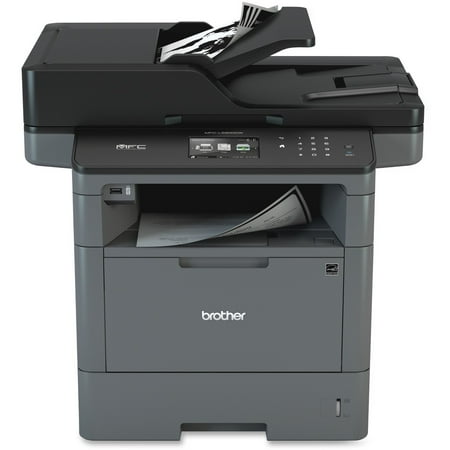
Brother MFC-L5900DW Laser Multifunction Printer, Monochrome, Duplex
- Brand:
- Brother
- Model Number:
- MFC-L5900DW
- UPC:
- 012502642039
- EAN:
- 0012502642039
- ASIN:
- B01BHSLJGC
- Walmart SKU:
- 50745020
Market direction turned downward with current $699.95 representing 0.0% under standard pricing.
| Price Type | Price | Date |
|---|---|---|
|
Highest Price
|
$664.50 | |
|
Lowest Price
|
$479.99 | |
|
Most Recent Price
|
$664.50 |
| Price Type | Price | Date |
|---|---|---|
|
Highest Price
|
$699.95 | |
|
Lowest Price
|
$479.98 | |
|
Most Recent Price
|
$699.95 |
Tracking History: We have tracked Brother MFC-L5900DW Laser Multifunction Printer, Monochrome, Duplex since 4/9/2023. The most recent price update was on Aug 30, 2026.
Price Range: Over the past 90 days, the price has ranged from $479.98 (lowest on 8/27/2023) to $699.95 (highest on 11/7/2025). The average price during this period is $651.03.
Current Trend: Walmart.com prices have ranged from $699.95 (Aug 30) to $699.95 (Aug 30) over the past 90 days. Current price is close to the 90-day average of $699.95.
Customer Insights: Rated 4.2/5 from 230 reviews.
Worked right out of the box which was taken to my car and loaded by a Wal Mart person. It was an amazing experience. Set up the next day and it worked right out of the box. Originally set up using wireless but then decided to use ethernet and needed some help to convert. Brother technical support walked me through the process which took less than 5 minutes. Also needed a bit of help for printer to recognize second computer. Again, Brother support was excellent. Able to print now from either of 2 Macs, either of two iPads and both iPhones. Have always been an HP fan until now but Brother has earned my future business.
Traded up from the 2700 series because of the dual page and multi page scan bundling capabilities- talk about reducing clutter and reducing scan time. one of the greatest feature is the ability to scan directly to a USB flash drive-you dont need a computer. Major convenience. Could not be happier with this purchase.
I have been using brother for the last 11 years and I never regretted. This MFC-L5900DW was upgrade from my 7 year Brother printer and it has been a month. I was impressed the features that it was brought in and the speed that it brings with the quite sound. I have more than 10 devices connected to this printer and I never shutdown once or connectivity issue. My devices include Google cloud print, remote printing capabilities, mac and Windows and it worked find on these options. The most feature that I was impressed the scaning speed and content managment tool that comes with it or save it to the google drive. The other printer companies may be offering these features. My only suggestion is, for this given price and features, this is amazing. I am fairly techie where I did research before I bought this printer and I am completely satisfied. Remember, any electronics, nobody gurantees 100% but for me, I can't complain about this printer for my heavy usage of this printer.
Ive had this machine for about a month. So far its great! The feeder works very well, is fast, and handles a big stack of papers well. The scanning software has many options and is overall user friendly (Better than the older Samsung & Canon units I have). I'm considering purchasing more, but I'm waiting to see if I have any ink streaking problems that I've read in reviews online. I am glad to see there is an 3000 copy toner cartridge, an 8000 cart AND a 12,000 copy toner cartridge. Looking forward to see how long they really last. I use Supplies Outlet generic cartridges for all my other machines (Canons and Samsungs) without problems, hoping to have the same success with this Brother machine too
Very good value. Brother support and promotions have been good too and we have saved quite a bit by purchasing toner thru their discount program rather than via a 3rd party seller. The unit is fast and so far reliable. I would give it 5 * but the duty cycle is a bit light. And we did have some issues with network (wifi) connectivity. I would purchase another without a second thought.
Prints faster copy good overall good product. Low capacity paper tray. You can't expect everything to be perfect the way you want
i want to return, this printed eat up and rips my work, its a nightmare. It doesnt do the job it makes my life harder. I want this defective product out my hands.
I work for a small rural health clinic and they bought this machine before I was hired and have had constant issues with it. It is used with an email coming in as a fax. Problem being that the machine will not print off a PDF in an attachment. The clinic has had numerous service calls done to try to fix the printer and it still won't function like it was implied it should.
We purchased this printer,4 months later a a black line started to appear when we use the feeder to copy. Called Brother Customer Support, they asked me to clean the scanner lens. Two days later the same problem came back. Called Brother again, i had to repeat my phone number 6 times , the email address 8 times before the lady got my details correct, informed her the problem she said there is nothing they can do keep cleaning the scanner lens every two days. i pointed out the feeder is depositing some grease on the lens and we have bought a expense printer and cannot keep cleaning the lens every two days she said there is nothing she can do, we asked to speak to the manager they replied he is not here, i asked if he can call me back she said no they don't call back, asked if i can have his name i will call him back there answer no. Requested the number of the head office she was unable to provide me with that as well, she told me the call center was located in Jamaica probably why i have had to repeat my information so many times. The printer is still under warranty and they do not want to to fix the problem and kept threatening me i will have to pay for the repairs, sad when you buy one of there higher end products and they don't want to know.
This machine steals your ink. I have been tossing away perfectly good ink cartridges because this machines tells me I'm empty. It uses a page counter system to tell you how much ink is left and will just stop working once it reaches that count forcing you to replace the cartridge before it will work again. I did a quick youtube search and learned how to by pass the counter and basically reset it. But I have printed well over 500 pages since it told me it was out of black in and have not had any issues. I have wasted hundreds of dollars on wasted ink.
Detailed price history for the past 90 days
Walmart.com prices have ranged from $699.95 (Aug 30) to $699.95 (Aug 30) over the past 90 days. Current price is close to the 90-day average of $699.95.
| Date | Price | Change | % Change |
|---|---|---|---|
| $699.95 | $+0.00 | +0.0% | |
| $699.95 | $+0.00 | +0.0% | |
| $699.95 | $+0.00 | +0.0% | |
| $699.95 | $+0.00 | +0.0% | |
| $699.95 | — | — |
Third-Party Sellers prices have ranged from $664.50 (Sep 17) to $664.50 (Sep 17) over the past 90 days. Current price is close to the 90-day average of $664.50.
| Date | Price | Change | % Change |
|---|---|---|---|
| $664.50 | — | — |