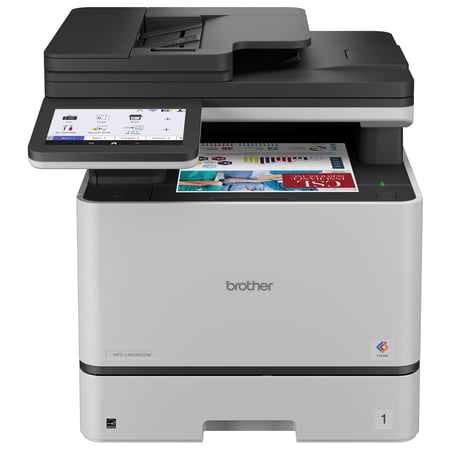
Brother MFC-L8930CDW Business Color Laser All-in-One Printer with Duplex Print, Scan, Copy, Low-Cost Printing, and Advanced Security Features price history and forecast - Brother MFC-L8930CDW
Brother MFC-L8930CDW Business Color Laser All-in-One Printer with Duplex Print, Scan, Copy, Low-Cost Printing, and Advanced Security Features

Brother MFC-L8930CDW Business Color Laser All-in-One Printer with Duplex Print, Scan, Copy, Low-Cost Printing, and Advanced Security Features

Brand:
Brother
Model Number:
MFC-L8930CDW
UPC:
012502677482
EAN:
0012502677482
Best Buy SKU:
6646009
Walmart SKU:
18309258234
Key Takeaway

The two weeks at $699.99 represents stable pricing, running closely tracking the 90-day average of $698.91.

Third-Party Seller Summary

Third-Party Seller Price History Summary
Price Type Price Date
Highest Price
$918.50
Lowest Price
$699.99
Most Recent Price
$899.99
Average Price
$795.20
First Tracked
Last Update

Walmart.com Summary

Walmart.com Price History Summary
Price Type Price Date
Highest Price
$883.73
Lowest Price
$680.00
Most Recent Price
$699.99
Average Price
$703.44
First Tracked
Last Update

Price Analysis

Tracking History: We have tracked Brother MFC-L8930CDW Business Color Laser All-in-One Printer with Duplex Print, Scan, Copy, Low-Cost Printing, and Advanced Security Features since 7/29/2026. The most recent price update was on Nov 21, 2026.

Price Range: Over the past 90 days, the price has ranged from $680.00 (lowest on 10/4/2026) to $883.73 (highest on 8/5/2026). The average price during this period is $703.44.

Current Trend: Walmart.com prices have ranged from $680.00 (Oct 4) to $699.99 (Nov 21) over the past 90 days. Current price is close to the 90-day average of $698.91.

Customer Insights: Rated 4.72/5 from 36 reviews.

Customer Reviews

36 reviews

Customer Reviews

4.7
Based on 36 reviews
5
29
4
6
3
0
2
0
1
1
Filter Reviews:
Sort By:
Showing 10 of 36 reviews
Anonymous February 16, 2026

So far I feel like I've died and going to heaven, after having a series of inkjet printers over the years. This is a pretty large printer for a home office, but the footprint isn't that much bigger than my Inc. jet it's just taller. It's quiet. So far it's run flawlessly. I haven't tried scanning or copying just printing. I have had to catch up on a lot of printing for a project. I'm working on so even with the much larger tray I seem to run out of paper frequently, but then I've gone through two reams of paper in just a few I knew when I bought it that the initial ink cartridges were going to be less than what you would get in a regular cartridge so I was a little bit surprised that I was already getting indications that the ink is less than half full. Just as a sidenote, I was actually looking at the earlier model and it was sold out everywhere and then I found this one for $400 less and even though it was way more money that I wanted to spend on a printer I'm kind of glad every place was out of stock on something that was virtually the same but price tire

Was this review helpful?

Driverless IPP Everywhere, Airprint

asddsa January 5, 2026

This works with CUPS on Linux using driverless IPP Everywhere support. There's no need to install any vendor-specific drivers or PPD files or similar. Just add ipps://hostname-or-ip/ipp/print to CUPS and you're done. It also works with Airprint on macOS and works with Windows 7's old support for IPP; note that Brother's drivers for Windows seem to be required for W7 IPP. I don't know if newer versions of Windows support driverless IPP Everywhere. I haven't tried the scanner, copy, or fax functions yet. But scanning looks reasonable: the documentation claims support for scanning to a USB thumb drive and scanning to an SFTP server. Cloud/internet features are disabled by default. IPv4 and IPv6 can be configured independently. The printer has an HTTPS web administration interface that looks reasonable. This is great for a home office.

Was this review helpful?

Solid, reliable color laser for the office

Anonymous September 20, 2026

I think this machine is a good fit for our use case. Setup was quick, print quality is sharp for both color and black-and-white documents, and duplex scanning saves real time. It keeps up with a busy workload without any fuss so far. It's a big, sturdy machine, so measure your space first — but overall, reliable and worth it.

Was this review helpful?

Fast, Powerful and Built for Serious Printing

MohawkMoments October 11, 2026

Business-Class Features and Excellent Printing Capability The Brother MFC-L8930CDW is a substantial color laser all-in-one designed for far more than occasional home printing. It combines fast color printing with scanning, copying, automatic duplexing and strong connectivity options in one machine. Pros: Prints and copies up to 33 pages per minute Sharp color output with up to 2400 dpi print resolution Automatic two-sided printing Fast two-sided scanning up to 104 images per minute Large 80-page automatic document feeder Wi-Fi, mobile printing and Gigabit Ethernet Includes genuine Brother toner rated for 3,000 black and 1,800 color pages Super-high-yield replacement toner options are available Large 70,000-page maximum monthly duty cycle Touchscreen access to scanning and other functions Cons: At 58.4 pounds, this is a heavy printer that needs a dedicated space Maximum print width is 8.5 inches, so it does not handle wider-format printing Warranty is limited to one year Overall, the MFC-L8930CDW offers an impressive combination of speed, capacity and professional-level features. It is particularly well suited to someone who prints frequently and wants one machine capable of handling color documents, scanning, copying and larger multipage jobs. Its size and weight are worth considering, but the capabilities are equally substantial.

Was this review helpful?

I like it

anzhelaa3_934 February 1, 2026

[This review was collected as part of a promotion.] I'm extremely happy with this printer. The setup was straightforward and well explained, even for someone who doesn't like dealing with tech. Everything connected smoothly, and I was ready to print within minutes. The print quality is excellent, sharp text, clean colors, and very professional results. Making a copy is fast and intuitive, which is perfect for everyday office use. The cartridge system feels reliable and efficient, and it's clear this machine is designed for long-term use rather than constant replacements. What really stands out is the durability. The printer feels solid, well-built, and clearly made to handle frequent printing without issues. Overall, this is a high-quality, dependable printer that delivers consistent performance and great value. Highly recommended.

Was this review helpful?

Great size. Powerful and low printing cost.

Anonymous January 8, 2026

[This review was collected as part of a promotion.] Great size printer for business especially for home office. Very compact size. Easy to install and connect. The printer have a big touchscreen help using more easily. Fast scanning and printer. Can scan multiple pages at once. The quality of the printer is very great and high definition. Beautiful design and high quality of build.

Was this review helpful?

Fast, Reliable and Perfect for My Home Office

vanesavila_8540 January 9, 2026

[This review was collected as part of a promotion.] I am genuinely impressed with how much smoother my workdays feel since getting the Brother MFC L8930CDW. The printing quality is crisp and vibrant, the scanner is fast, and the connection is always stable whether I am using WiFi or my laptop. I also love how quietly it runs even when I am printing a lot of pages for my business. The touchscreen is very intuitive and makes switching between printing, scanning and copying feel effortless. It has honestly taken a huge weight off my workload because everything is fast, organized and consistent. This printer feels like a real upgrade to my office and I am so happy with it.

Was this review helpful?

Excellent all-in-one printer

tn11_8228 January 11, 2026

[This review was collected as part of a promotion.] We've been very happy with this Brother printer. Setup was easy, and the wireless connectivity and software make printing from laptops and mobile devices seamless. Print quality is sharp for both color and black-and-white documents, and it handles larger jobs quickly without slowing down. The touchscreen is intuitive and easy to use, and the all-in-one features (print, scan, copy, and fax) work reliably. The automatic duplex printing helps save paper, and the option for high-yield toner keeps operating costs reasonable. Overall, this printer feels solid, dependable, and well-suited for a home or small office that needs professional results. Highly recommend!

Was this review helpful?

Works beautifully, easy to setup

MaryS February 17, 2026

[This review was collected as part of a promotion.] This is the second Brother printer that I've owned and I'm always so pleased with the operation. Setup is a breeze with the assistance of the setup wizard. I use this primarily for scanning and color printing and both work beautifully. Not too large in size but big enough to handle large jobs. Prints quickly and the scan feature is extremely high quality. A good value if you're looking for an office printer.

Was this review helpful?

Won't print on low toner and beeps constantly!

AKA_ May 15, 2026

We bought this printer for business because Brother is supposed to be good with toner, but the cartridges depleted very quickly and the machine refuses to print anymore when toner is low. We have searched high and low for a way to make it ignore the low toner and finish the cartridges, but the manual has no solution and the online solutions that worked for older machines DO NOT WORK. Awful! What's more, the machine will not stop beeping every time it prints. I have turned off the beep in the settings and set the volume to mute. I even updated the firmware to see if that fixes the issue. It still beeps as loudly as it can. Obnoxious! Do better, Brother!

Was this review helpful?

Price History

Historical price data graph for Brother MFC-L8930CDW Business Color Laser All-in-One Printer with Duplex Print, Scan, Copy, Low-Cost Printing, and Advanced Security Features

Recent Price Changes

Detailed price history for the past 90 days

Walmart.com Pricing

36 records

Walmart.com prices have ranged from $680.00 (Oct 4) to $699.99 (Nov 21) over the past 90 days. Current price is close to the 90-day average of $698.91.

Walmart.com price history for Brother MFC-L8930CDW Business Color Laser All-in-One Printer with Duplex Print, Scan, Copy, Low-Cost Printing, and Advanced Security Features showing recent price changes over the past 90 days
Date Price Change % Change
$699.99 $+0.00 +0.0%
$699.99 $+0.00 +0.0%
$699.99 $+0.00 +0.0%
$699.99 $+0.00 +0.0%
$699.99 $+0.00 +0.0%
$699.99 $+0.00 +0.0%
$699.99 $+0.00 +0.0%
$699.99 $+0.00 +0.0%
$699.99 $+0.00 +0.0%
$699.99 $+0.00 +0.0%
$699.99 $+0.00 +0.0%
$699.99 $+0.00 +0.0%
$699.99 $+0.00 +0.0%
$699.99 $+0.00 +0.0%
$699.99 $+0.00 +0.0%
$699.99 $+0.00 +0.0%
$699.99 $+0.00 +0.0%
$699.99 $+0.00 +0.0%
$699.99 $+0.00 +0.0%
$699.99 $+19.99 +2.9%
$680.00 $-1.21 -0.2%
$681.21 $-18.78 -2.7%
$699.99 $+0.00 +0.0%
$699.99 $+0.00 +0.0%
$699.99 $+0.00 +0.0%
$699.99 $+0.00 +0.0%
$699.99 $+0.00 +0.0%
$699.99 $+0.00 +0.0%
$699.99 $+0.00 +0.0%
$699.99 $+0.00 +0.0%
$699.99 $+0.00 +0.0%
$699.99 $+0.00 +0.0%
$699.99 $+0.00 +0.0%
$699.99 $+0.00 +0.0%
$699.99 $+0.00 +0.0%
$699.99 — —

Third-Party Seller Pricing

1 records

Third-Party Sellers prices have ranged from $899.99 (Sep 3) to $899.99 (Sep 3) over the past 90 days. Current price is close to the 90-day average of $899.99.

Third-party seller price history for Brother MFC-L8930CDW Business Color Laser All-in-One Printer with Duplex Print, Scan, Copy, Low-Cost Printing, and Advanced Security Features showing recent price changes
Date Price Change % Change
$899.99 — —