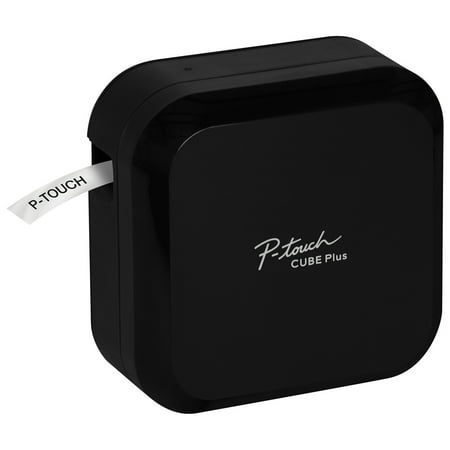
Brother P-touch CUBE Plus PT-P710BT Versatile Label Maker with Bluetooth® Wireless Technology, New
- Brand:
- Brother
- Model Number:
- PT-P710BT
- UPC:
- 012502653004
- EAN:
- 0012502653004
- ASIN:
- B07HB8LNSY
- Walmart SKU:
- 935458766
| Price Type | Price | Date |
|---|---|---|
|
Highest Price
|
$129.91 | |
|
Lowest Price
|
$84.99 | |
|
Most Recent Price
|
$99.99 |
Price history data is not available for this product at the moment.
Current Trend: No Walmart.com pricing data available for analysis.
Customer Insights: Rated 4.1/5 from 186 reviews.
Very reliable label maker that was easy to setup. I am extremely happy with this purchase.
I liked this very much. The instructions were clear. In other websites, there were comments about buyers having to discard tapes they bought for other machines from Brother. These tapes are costly, but I found one can use many of the other tapes up to 24 mm wide. One has to keep the iPhone close to the machine, since it works with bluetooth. I didn't dislike anything about this. The additional 2 year warranty from Walmart helps too, at $8. I have not used all the graphics or gimmicks, but I can say it helps me with my labeling needs, such as circuit breakers, ethernet cables, and other items in day-to-day life.
I had been using a battery label maker from the same manufacturer but the batteries would always die and could only use 1/2 inch tape. I took the plunge and although it cost three times more I will probably save that on batteries alone. I have this one set so I can print from my phone when I'm in the workshop or from my laptop. The computer software has a ton of options like adding pictures and I can print with different size tapes, fonts and directions. Hopefully the last label maker I will ever purchase, I definitely recommend it if you want to do more than simple one size labels.
I've had several P-Touch printers over a period of years. In fact I still have my PT-P700 connected to my PC. The print quality of the P700 and PT-710BT both excellent. But nice things about the 710BT are 1) The built-in Li-ION rechargeable battery. You can connect the printer by USB and it's always charged and ready to use without need of an AC power adapter. 2) Instant bluetooth connectivity when you need to carry it around without USB. For example, designing and printing labels through the app rather than the P-Touch Editor software (PC/Mac) even though I do prefer the P-Touch editor which is full-featured and easy to learn. Not sure about Mac, but for windows 10/11 I do recommend downloading and installing the driver and printer settings tool from Brother's site. Yes, windows does recognize the printer regardless, but more features and setting preferences are available when you manually install the drivers. And of course, get the P-Touch editor as well (currently V 5.4 at the time of this review). I also recommend using generic TZe compatible labels which are widely available in every size and color on that "A" website that we all know... haha! They are equal in quality to the OEM but MUCH cheaper.
My granddaughter picked this up and started using it. She loves it and has made all kinds of labor for her school items. I finally got to use it. So far I I've made only one label.
Great improvement over my old keyboard style label maker. Only drawback is the Bluetooth does nor reconnect automatically; keep having to reconnect in settings.
Obsessed. I love the different color tape options and being able to use any size in it. I've been using it at work and it's been so helpful to my crew to have clear and durable signage. You can put any image or emoji that you can type on your keyboard. Or any from the preloaded options. And if you download alternative keyboards you can also use different fonts other than the preloaded options. I only wish it would auto connect like other Bluetooth devices do. I have an iPhone 14 Pro Max if that makes a difference. Each time you turn on the printer and open the app, you have to find your device within the app. And a lot of the times, if you've already connected, but didn't print anything after awhile, it disconnects itself from the app and you have find your printer and reconnect again.
Excellent Hardware held back from full potential by software. The automatic cutting is wonderful - especially once you find the setting to not cut the last label until you're done printing to save waste. Unfortunately the design software is cumbersome to use for repetitive tasks and too complicated and slow for the most basic labeling. Additionally, that you have to manually connect via the OS Bluetooth settings every time you power on the device (instead of automatically finding it like every other modern Bluetooth printer) makes the one off printing almost a waste of time. Brother, you can still fix this. App and firmware updates are clearly possible. Fix this. PS, this review interface is so bad it brings my whole browser to a crawl. Fix your software.
I purchased the product a few days ago and received it today. when i printed my first label, i noticed that it printed 1 inch of tape before it printed my label. i printed again thinking this was a mistake and maybe it was because of the first print and again it printed exactly 1 inch square before my label. Again thinking this was a mistake an search everywhere in the settings in both apps, (PT Design&Print, and iPrint&label) and did not find an option to reduce or eliminate this waste of tape. I then contacted support and was told this was by design. WHAT, Brother designed this product to waste 1 inch of tape for every label you print???? Support then directed me to the troubleshooting section of the manual where it actually states this is how the product is designed, and the workaround it so do continuous print and manually cut, however the device still prints 1 inch of blank space before each label and you have to manually cut off the extra blank space. this is obviously a planned in order to sell more of their expensive cartridges. I almost didn't purchase this device because of how expensive these cartridges are. Now knowing that Brother is deliberately wasting the tape really puts a sour spin on things. I will be returning this device and will post on other social media outlets to ensure the consumer is aware before purchasing this device.
I purchased the product afew days ago and received it today. when i printed my first label, i noticed that it printed 1 inch of tape before it printed my label. i printed again thinking this was a mistake and maybe it was because of the first print and again it printed exactly 1 inch square before my label. Again thinking this was a mistake an search everywhere in the settings in both apps, (PT Design&Print, and iPrint&label) and did not find an option to reduce or eliminate this waste of tape. I then contacted support and was told this was by design. WHAT, Brother designed this product to waste 1 inch of tape for every label you print???? Support then directed me to the troubleshooting section of the manual where it actually states this is how the product is designed, and the workaround it so do continuous print and manually cut, however the device still prints 1 inch of blank space before each label and you have to manually cut off the extra blank space. this is obviously a planned in order to sell more of their expensive cartridges. I almost didn't purchase this device because of how expensive these cartridges are. Now knowing that Brother is deliberately wasting the tape really puts a sour spin on things. I will be returning this device and will post on other social media outlets to ensure the consumer is aware before purchasing this device.
Detailed price history for the past 90 days
No Walmart.com pricing data available for analysis.
Third-Party Sellers prices have ranged from $99.99 (Sep 8) to $122.14 (Jun 24) over the past 90 days. Current price is 15.2% below the 90-day average of $117.84.
| Date | Price | Change | % Change |
|---|---|---|---|
| $99.99 | $+0.00 | +0.0% | |
| $99.99 | $-15.32 | -13.3% | |
| $115.31 | $+0.00 | +0.0% | |
| $115.31 | $+0.00 | +0.0% | |
| $115.31 | $+0.00 | +0.0% | |
| $115.31 | $+5.32 | +4.8% | |
| $109.99 | $-5.32 | -4.6% | |
| $115.31 | $+5.32 | +4.8% | |
| $109.99 | $-5.32 | -4.6% | |
| $115.31 | $+0.00 | +0.0% | |
| $115.31 | $+5.32 | +4.8% | |
| $109.99 | $-12.00 | -9.8% | |
| $121.99 | $+0.00 | +0.0% | |
| $121.99 | $+0.99 | +0.8% | |
| $121.00 | $+0.12 | +0.1% | |
| $120.88 | $+0.00 | +0.0% | |
| $120.88 | $+0.00 | +0.0% | |
| $120.88 | $+0.00 | +0.0% | |
| $120.88 | $+0.00 | +0.0% | |
| $120.88 | $+0.00 | +0.0% | |
| $120.88 | $+0.03 | +0.0% | |
| $120.85 | $+0.00 | +0.0% | |
| $120.85 | $+0.00 | +0.0% | |
| $120.85 | $-1.29 | -1.1% | |
| $122.14 | $+0.04 | +0.0% | |
| $122.10 | $+0.00 | +0.0% | |
| $122.10 | $+0.00 | +0.0% | |
| $122.10 | $+0.00 | +0.0% | |
| $122.10 | $+0.00 | +0.0% | |
| $122.10 | $+0.00 | +0.0% | |
| $122.10 | $+0.00 | +0.0% | |
| $122.10 | $+0.00 | +0.0% | |
| $122.10 | — | — |