
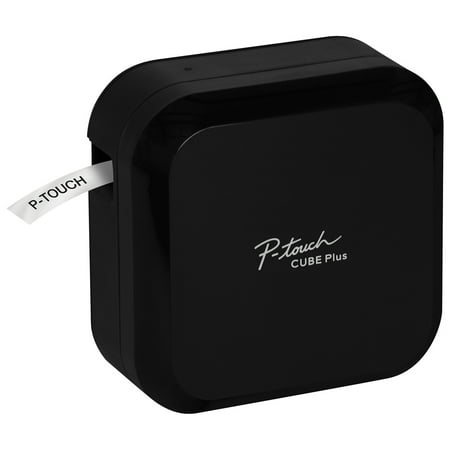
Brother P-touch CUBE Plus PT-P710BT Versatile Label Maker with Bluetooth® Wireless Technology
- Brand:
- Brother
- Model Number:
- PT-P710BT
- UPC:
- 012502650591
- EAN:
- 0012502650591
- Walmart SKU:
- 788112701
| Price Type | Price | Date |
|---|---|---|
|
Highest Price
|
$153.70 | |
|
Lowest Price
|
$117.85 | |
|
Most Recent Price
|
$153.70 |
Price history data is not available for this product at the moment.
Current Trend: No Walmart.com pricing data available for analysis.
Customer Insights: Rated 4.1/5 from 164 reviews.
I BADLY needed a 1.5 inch label maker. I DIDN'T need one with a keyboard since I much prefer using a PC to print labels. This unit is QUICK, QUIET, and produces perfect label's every time👍👍
I LOVE this label printer. I bought a case for it and I take it everywhere with me. I label my garden plants with the waterproof labels. HIGHLY RECOMMEND. Best labeler ever! I wish it was a color label maker. I would definitely use that all the time too. Best purchase ever!
I like the label maker very much, but the labels are expensive and hard to find, and the auto-wake does not work so I have to remember to turn it on each time I use it if it has sat a short time.
I had a very old P-touch model that was finally starting to have issues (wouldn't always turn on.) I am very happy with the new one and I really like the updated software. I wish this model was able to accept the old TZ cassettes tho. I had a number of them I had hoped to use up and they aren't cheap! I did some research and all I could find was that the newer TZe cassettes were more environmentally conscience. I found however that the newer cassettes have additional holes and this newer device has additional coinciding pins and as such does NOT accept the old type cassettes. This was a major disappointment to have to throw away all those expensive old cassettes.
Where has this been all of my office life!? I have become a bit of an office supply junkie and happened upon this gem because someone was getting rid of the tape. I purchased this and i don't see an end to my madness thanks to this labelmaking beast.
The printer and associated software are good. Everything works well and the software is easy to navigate. What this needs is a setting to permanently reduce the amount of label stock that is pre-fed before printing. You can change it to a minimal amout of waste but you have to do that each time you want to print. This needs a setting change that the user does not have to address each time.
Excellent Hardware held back from full potential by software. The automatic cutting is wonderful - especially once you find the setting to not cut the last label until you're done printing to save waste. Unfortunately the design software is cumbersome to use for repetitive tasks and too complicated and slow for the most basic labeling. Additionally, that you have to manually connect via the OS Bluetooth settings every time you power on the device (instead of automatically finding it like every other modern Bluetooth printer) makes the one off printing almost a waste of time. Brother, you can still fix this. App and firmware updates are clearly possible. Fix this. PS, this review interface is so bad it brings my whole browser to a crawl. Fix your software.
I purchased the product a few days ago and received it today. when i printed my first label, i noticed that it printed 1 inch of tape before it printed my label. i printed again thinking this was a mistake and maybe it was because of the first print and again it printed exactly 1 inch square before my label. Again thinking this was a mistake an search everywhere in the settings in both apps, (PT Design&Print, and iPrint&label) and did not find an option to reduce or eliminate this waste of tape. I then contacted support and was told this was by design. WHAT, Brother designed this product to waste 1 inch of tape for every label you print???? Support then directed me to the troubleshooting section of the manual where it actually states this is how the product is designed, and the workaround it so do continuous print and manually cut, however the device still prints 1 inch of blank space before each label and you have to manually cut off the extra blank space. this is obviously a planned in order to sell more of their expensive cartridges. I almost didn't purchase this device because of how expensive these cartridges are. Now knowing that Brother is deliberately wasting the tape really puts a sour spin on things. I will be returning this device and will post on other social media outlets to ensure the consumer is aware before purchasing this device.
I purchased the product afew days ago and received it today. when i printed my first label, i noticed that it printed 1 inch of tape before it printed my label. i printed again thinking this was a mistake and maybe it was because of the first print and again it printed exactly 1 inch square before my label. Again thinking this was a mistake an search everywhere in the settings in both apps, (PT Design&Print, and iPrint&label) and did not find an option to reduce or eliminate this waste of tape. I then contacted support and was told this was by design. WHAT, Brother designed this product to waste 1 inch of tape for every label you print???? Support then directed me to the troubleshooting section of the manual where it actually states this is how the product is designed, and the workaround it so do continuous print and manually cut, however the device still prints 1 inch of blank space before each label and you have to manually cut off the extra blank space. this is obviously a planned in order to sell more of their expensive cartridges. I almost didn't purchase this device because of how expensive these cartridges are. Now knowing that Brother is deliberately wasting the tape really puts a sour spin on things. I will be returning this device and will post on other social media outlets to ensure the consumer is aware before purchasing this device.
This is not a bluetooth printer! Your phone will work on BT; your computer needs USB, but the included cord will only work with a computer from 2005. Now I need to spend $$$ on some funky combo cable to connect to my laptop. That's why we use BT, guys at Brother. Moreover, you can create all kinds of layouts and font faces on the laptop app, but you cannot share them to your phone for printing. Just one font (ugly at that). Really, Brother, have you even heard of PDF or the cloud? Reminds me of sneaker-net days. I want my old Dymo back. At least it worked!
Detailed price history for the past 90 days
No Walmart.com pricing data available for analysis.
Third-Party Sellers prices have ranged from $141.25 (Jul 12) to $153.70 (Aug 30) over the past 90 days. Current price is close to the 90-day average of $143.51.
| Date | Price | Change | % Change |
|---|---|---|---|
| $153.70 | $+11.90 | +8.4% | |
| $141.80 | $+0.00 | +0.0% | |
| $141.80 | $+0.55 | +0.4% | |
| $141.25 | $+0.00 | +0.0% | |
| $141.25 | $+0.00 | +0.0% | |
| $141.25 | — | — |