
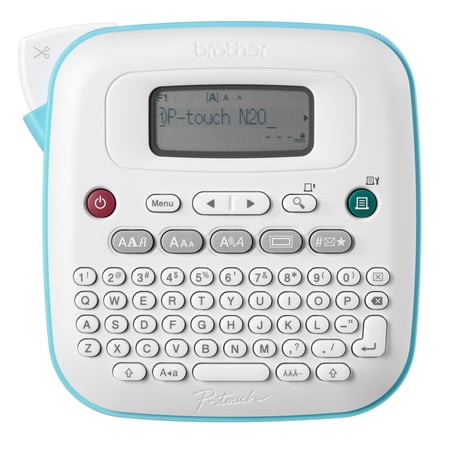
Brother P-touch Personal Desktop Label Maker PT-N20
- Brand:
- Brother
- Model Number:
- PTN20
- UPC:
- 012502673248
- EAN:
- 0012502673248
- ASIN:
- B0DFDRSHBJ
- Best Buy SKU:
- 6632072
- Walmart SKU:
- 14104269624
| Price Type | Price | Date |
|---|---|---|
|
Highest Price
|
$37.07 | |
|
Lowest Price
|
$28.30 | |
|
Most Recent Price
|
$31.99 |
Price history data is not available for this product at the moment.
Current Trend: No Walmart.com pricing data available for analysis.
Customer Insights: Rated 4.4/5 from 72 reviews.
I'm going to use this label maker on my many trays of Embroidery Machine Thread . This will help when looking for a color thread number
I tried this product for free in exchange for my honest opinion. What a fun surprise to be chosen to receive this label maker! I have thoroughly enjoyed testing it out. Our house has labels all over it now, getting it at the beginning of year was excellent, as it's the right time for organizing! The keyboard is highly responsive and easy to type on. The settings are easy to figure out and change. I love that there are different font options! It prints the label really quickly, so I can get back to organizing in a flash! I highly recommend this label maker, it is seriously so cute and so functional all at the same time!
I tried this product for free in exchange for my honest opinion. I received the Brother P-touch PT-N20 Personal Desktop and Handheld Label Maker courtesy of Shopper Army in exchange for my honest and unbiased review #gotitfree #freeproduct. The Brother P-touch PT-N20 Personal Desktop and Handheld Label Maker comes with 1 label tape which can print up to 2 lines. It uses 6xAAA batteries (not included) or AC adapter (not included). It contains 3 fonts and 7 font type styles, 15 frames, and 250 symbols. The Brother P-touch PT-N20 Personal Desktop and Handheld Label Maker feels so nice on the hands and the qwerty keyboard makes it so quick and easy to type on. The symbols and pictures that this label maker comes with is so cute. This is my first time having a label maker that can print pictures as well. I love that I can take this machine everywhere and personalize everything. I would definitely recommend this label maker to everyone especially to those that love to organize and label everything.
I tried this product for free in exchange for my honest opinion. I have been testing out the Brother P-touch PT-N20 Personal Desktop Label Maker over the last several days, and have fallen in love with this little machine! Firstly, I love that it's small enough that I can still use it as a handheld device if I want to, but its square design makes it perfect for my desktop. The Brother P-touch PT-N20 has a full QWERTY keyboard, which makes it so easy to enter any words or phrases you need to print. It also has a large 15-character display, that allows you to preview and edit your label before printing. I also love that it has several ways to customize your labels with 15 different borders/frames and 250 symbols that include holiday icons and emojis. It allows you to truly personalize your labels in a cute way. One feature that I especially like is the ability to save and store some of your labels, so you can quickly print them off whenever you need them. The unit also allows you to print multiples, so, you don't have to keep printing several labels manually. The cutter on the side has great precision, and cuts the label in a single click. Finally, I really appreciate that the Brother Btag label tapes come in 17 colour varieties, which really allows you to customize and organize everything in a colour coordinated fashion, if you'd like. The P-touch PT-N20 came with a blue ink and white tape, and I was also sent a black ink version. One thing that is a great bonus feature is at the bottom of the label maker, there is a clear window so you can see exactly which label tape is installed in the unit. So, if you're using different tapes, it is easy to identify which one you're currently using. I have really been enjoying labelling everything around the house as I try to get more organized this holiday season. I am truly grateful for the chance to try out there Brother P-touch PT-N20 Personal Desktop Label Maker, as it has made the task of organizing so much more fun!
I tried this product for free in exchange for my honest opinion. Brother P-touch N20 Personal Label Maker is a good companion for a mom like me who always loves to organize stuff and making sure my kids know their things. Inside includes the label maker and 1 label tape, I used 6 AAA batteries to power it up. It's very easy to install and follow the instructions. I love the color palette makes it fun looking and though big and bulk I actually like it, you can lay it in any surface when making label. It is also kid friendly so that's a big plus. Definitely thumbs up for this product.
I love my new Brother P-touch PT-N20 Personal Desktop and Handheld Label Maker! It's pretty easy to use once you figure it out. It has a lot of settings, you can change the font a few different ways. The screen is large enough so you can see what you're typing. I do wish it had better instructions though.
I tried this product for free in exchange for my honest opinion. When I first received the Brother P-Touch N20 personal desktop label maker, I was pleasantly surprised with how large it is. Easy to press the buttons and get them correctly the first time! Setting up this label maker was easy -peasy and very intuitive. The only negative is it takes 6 AAA batteries, which is a bit much. Luckily I had some on hand. Very easy to put the tape in and start labeling! It's really nice that you can change font size and add symbols. The tape comes out easily, cuts easily - just the push of a button - and the tape is perforated in the middle so it's very easy to take the back off. No frustrations! I definitely recommend this label maker to anyone for easily making labels that look sharp and professional.
I tried this product for free in exchange for my honest opinion. This label maker was easy to assemble and set-up. I found it very straightforward to use. I also like that there are cute emojis and other things you can include not just text. I had fun testing this product. I like that you can buy different print colours too. Once I printed it was easy to cut the label. This is a great tool for organizing.
I tried this product for free in exchange for my honest opinion. I like how personalised you can make the labels. You can choose the font, the style, the size, and add symbols and frames. It's easy to use, but it could come with clearer instructions of all the things you can do, because you kind of have to figure it out on your own. Now that I'm familiar with it, I use it for labelling many things. The only downside is that the adapter is not included so you have to use 6 AAA batteries.
I tried this product for free in exchange for my honest opinion. 1 439 / 5 000 I had the chance to test the Brother P-touch PT-N20 Personal Desktop and Handheld Label Maker and I really liked it. First of all, you have to put batteries in it (it is possible to plug it in but the adapter is not included, nor the batteries). I found that 6 batteries was a lot but luckily I had some. So once the back is open, you install the batteries and the ribbon cartridge and tou are good to start. Everything is explained on a paper in the packaging but it is really easy even without explanations. The ribbon sold with the p-touch is white with blue writing. Once everything is installed, just press the power button and familiarize yourself with the different options. It is possible to have the manual on the internet to better understand. Here are the functions that I liked: different type, style, format and height of texts, possibility of putting frames or inserting symbols such as emojis. I really had fun. We can also choose the margins and the length of the label. If we print the same one twice, the symbol ":" will print where we have to cut the label. In summary, the p-touch N20 is very easy to use and it allows you to do everything you want with all its options. I used it to identify wires with their device, work tools, school books and spice containers. It will be practical for anyone and any reason!
Detailed price history for the past 90 days
No Walmart.com pricing data available for analysis.
Third-Party Sellers prices have ranged from $28.30 (Aug 29) to $34.71 (Jul 22) over the past 90 days. Current price is close to the 90-day average of $32.01.
| Date | Price | Change | % Change |
|---|---|---|---|
| $31.99 | $+3.69 | +13.0% | |
| $28.30 | $-0.19 | -0.7% | |
| $28.49 | $+0.00 | +0.0% | |
| $28.49 | $+0.00 | +0.0% | |
| $28.49 | $-5.57 | -16.4% | |
| $34.06 | $+0.57 | +1.7% | |
| $33.49 | $-1.21 | -3.5% | |
| $34.70 | $+0.00 | +0.0% | |
| $34.70 | $-0.01 | +0.0% | |
| $34.71 | $+0.01 | +0.0% | |
| $34.70 | — | — |