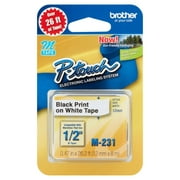
Brother P-touch PT-45M Personal Handheld Label Maker Prints 1 or 2 Lines of Text
- Brand:
- Brother
- Model Number:
- PT-45M
- UPC:
- 012502640141
- EAN:
- 0012502640141
- Walmart SKU:
- 44487918

Market direction turned downward with current $30.99 representing 0.0% under standard pricing.
| Price Type | Price | Date |
|---|---|---|
|
Highest Price
|
$30.99 | |
|
Lowest Price
|
$25.74 | |
|
Most Recent Price
|
$30.99 |
Tracking History: We have tracked Brother P-touch PT-45M Personal Handheld Label Maker Prints 1 or 2 Lines of Text since 2/5/2023. The most recent price update was on Aug 28, 2026.
Price Range: Over the past 90 days, the price has ranged from $25.74 (lowest on 2/5/2023) to $30.99 (highest on 10/6/2024). The average price during this period is $29.26.
Current Trend: Walmart.com prices have ranged from $30.99 (Aug 27) to $30.99 (Aug 27) over the past 90 days. Current price is close to the 90-day average of $30.99.
Customer Insights: Rated 4.2/5 from 378 reviews.
The appearance of this unit is deceiving. It is rather small and looks almost like a toy. However it prints really nice labels. I am truly impressed with what it generates. Of course, getting it out of the packaging was a feat unto itself. But then the ‘clam’ packaging is most often problematic. It requires four (4) AAA batteries which are not included. Once the batteries are inserted, the label maker turns on very easily by way of a normal on/off button conveniently placed at the upper right of the keyboard. I am one of those people who MUST read the instructions and User Guide before attempting to use an item. The User Guide accompanying this label maker is extremely detailed and not to be deciphered very quickly. The data is informative and useful but EXTREMELY DETAILED. You almost get lost following the ‘Guide’ for just doing the obvious and ordinary things. It was actually fun, once I got started actually producing a label. And the labels are good quality. I am anxious to experiment with a diverse variety of labels. The unit comes with two (2) cartridges of label material, which presents the opportunity to use your imagination. I am honestly looking forward to finding more reasons to use this.
I am a Spark Reviewer for Walmart and was given a free Brother PT 45M Label maker to review. The first thing I liked was it came with two label cartridges and a nice bag to keep it in. It does not come with batteries, so you will need 4 AAA batteries for it to work. The directions are very long and a little confusing as there are many styles of print and designs to choose from, as well as a lot of different symbols to decorate them with, so I suggest looking the directions over carefully so you don’t miss any of the cool options. I chose three different styles to show in my photo that show different size print, double lined print and a pretty bordered print. The cartridges I received are one of white tape and one of silver, but you can purchase the cartridges in several different colors including clear. The print on all the labels was of black ink and very clear lettering and once you get the hang of it the labels turn out very nice. I found it hard to believe that such a small handheld maker can give you so many choices to create your own labels for many different projects. The labels themselves have quite an adhesive backing so when peeling off you need to know where you are going to place them. They go on nice without any bubbles. The attached cutter makes it very easy to cut your labels off after they print. I think that people of all ages will enjoy this label maker and will find a lot of uses for it.
I like it a lot! I used this Ptouch Brother PT45 Labeler to type and print out labels for back up copies of my 5 e-books. I had originally hand written on the folders, but the printed adhesive labels look much more professional. It was easy to operate. Fits in the hand very well. Enough so that you can hold and type as with today's texting habits with large phones and tablets. The very first label I applied was crooked, so I simply lifted, corrected and reapplied. No waste, no fuss. The only qualm I did have was tediously trying to separate the plastic strip. It took a while because there was no starter tab, nor did I expect one since the tape is on a spindle that runs until cut, so the backing is fully intact with each label. There are many font options, i.e., italics, bold, underline and even the use of symbols and second line printing. Cuts clean and easy. I would say this is a quick and easy way to identify anything you would usually hand write to do so.
The Brother PT-45 labeler uses 4 AAA batteries. Battery life isn't great but the labeler works well and does a good job. It uses the type M tapes. It has a querty keyboard and the functions are fairly intuitive. The unit is small and easy to store and comes with a carrying case and two label samples. The screen showing what is being printed is small and not that easy to read for "mature" eyes. Three label types that the user has made can be saved into memory. The keyboard buttons are small but manageable. The PT-45 can print two lines of text. The labeler has a lot more functions than I think I would ever need but they are available just in case the need arises. This is a small, portable and handy label maker.
I've been wanting one of these for a while now, so I was happy to have the opportunity to try one and review it. This is a nice little label maker that was fairly simple to use. There were only a couple times I needed to read the directions. It was more difficult for me to open the package than it was to use the label maker. I did need the directions for making the images. This is a battery operated machine, does not come with power cord and batteries not included. You will need 4 AAA. Comes with a full page of easy to understand directions for operation and using all the features. Also comes with a nylon type material, drawstring, storage bag. Hand held, light weight, but not "cheap" lightweight. You can type words, add designs, make all kinds of cute labels. This comes with two sample label tapes- white and silver. Uses "M" series tapes, 9mm and 12mm. Refills for this label maker are in the $9 to $10 range, with the exception of silver which runs much higher in price. The label maker is capable of 9 Type Styles, 10 Framing options and 210 Symbols. Also, 6 Deco Mode Patterns for extra-stylish labels. Type your label up to two lines, push the print button, peel the backing off, and stick it on...that's all there is to it. I would recommend this label to maker. its a nice quality machine and very affordable price.
The Ptouch Brother PT45 Labeler is a nice little labeler. It came as a surprise to me because of its small size. However don't let that fool you. It has many capabilities for producing that label. It has many fonts from which to choose. It also has eight unique designs: i e large and plain, one line only or two lines, one line facing up and the second line facing down, etc. I enjoyed making labels so well, that my whole apartment is pretty well labeled. It came with two tapes. One is black on white. The other is black on silver. Many colors are available. Most have black on something, but they also have a blue on white. The tapes can be ordered directly from their site or from an office product store. The product also came with a user's guide in both English and Spanish. I am enjoying my labeler and would recommend it for any household. The only problem I had with it is that I had to supply the needed batteries. I had only used ones so they didn't last as long as wanted. I think the product package should include batteries.
I have wanted a manual labeler for some time, but I was happy to have the chance to try this one out when it became available for review. I really like this printing labeler a lot more than I had thought I would. This labeler requires 4 AAA batteries which are not included, but it does come with 2 sample tapes. It does go through batteries pretty quickly. I had to replace the first set of batteries after I had printed no more than a dozen labels. The instructions were too much for me to read before use, so I have been using only the basic settings on the labeler. It has been very easy to use even without having read all of the instructions, and my needs currently only require the basic settings. My only challenge has been separating the label from the backing. I usually have to fold it some to get it loose, but the creases so far have not shown once the label is in place. The labeler comes with a great drawstring bag to hold the labeler, instructions, and additional tapes. It is fairly light weight, but appears to be well made. I would definitely recommend this labeler.
First lets start with the pros to this unit. It is small and easy to use. The Instructions are clear and very easy to follow. The cartridges load easily. It comes with two print cartridges. It took me less them 5 minutes to get up and printing. You can print one or two lines with it. What I love and my old label maker did not have this. It prints vertical labels. I love this. It also has 8 Deco patterns that are fun. You can design your label with a choice of 210 symbols. You can also frame your label, and it has 9 different type styles. It takes 4 AAA batteries to run the unit and it does not come with a wall adapter. You can get all different colors of tape cartridges to use with this unit. Which makes it fun to make labels and it is very easy to frame the label and to add all sorts of symbols to your labels. If you make a mistake while you are typing your label it is very easy to back it up and erase the wrong letters or just start over. It also has a memory. Now there was on Con with this unit. I put the AAA batteries in and they were Alkaline like they tell you to use and I turned the unit on and scanned thru it then printed 2 labels and the label maker said the batteries were low. So, i changed then thinking I had bad batteries. I ran 2 more labels and it went dead on me. I changed them again using Alkaline batteries like it said and once again a low battery notice came on. I went thru 16 batteries in less then 30 minutes and only printed 8 labels. It is now dead again. I don't want to give up on this unit so I am going to go and buy some high quality alkaline camera batteries and try these. I hate to give up on this label maker quite yet as it does so many things. As soon as I get to the store and try these I will update my review and see if I can get it to work longer. If I still have problems I am going to also call the company and see if they know anything about this or know any tricks.
This is just one of those cool toys that you can think of so many uses for, but you know you want to just play with it! This one has an incredible amount of customization you can do with it. Symbols, little pictures (emojis for the smartphone users), font changing, two lines on the same label, it can do it all. Battery and cartridge replacement is super easy. Pop the back off, and everything snaps in and out. Incredibly easy to use, and what I personally think is the coolest feature is that it automatically centers your text for you, so you're not having to add spaces at the beginning, or using scissors to trim the label so it's centered. But. The cartridges for this are not cheap. So if you want to go label-crazy, you better be prepared to spend some money. One thing I would like is a backlight on the screen to make it easier to read, and it should have at least the option of a power cable (usb or wall outlet) so you could plug it in instead of running off of batteries. Speaking of batteries, I don't know what the issue is, but mine is ornery. 4 brand-new Duracell AAA batteries, print one label, immediately says "Low Battery" and stops functioning. Turn it off, turn it back on, works for one label, "Low Battery". Take the batteries out, replace with 4 brand-new Duracells, same thing. EVERY TIME you use it, it says "Low Battery." I hope it's just an issue with this one unit, but still, that is frustrating to have to constantly turn it off and back on to use it for consecutive labels. This is probably the first time I have ever checked off that I could not recommend a product. For all the neat things this can do, the replacement cartridge price and the fact that it can't print two labels in a row without turning it off and back on gets no recommendation from me.
This item worked nicely the first time it was used. After a month the battery died. Even after replacing the battery it says low battery and shuts off after its on for a minute. Also, the part that cuts the labels to size broke and now I have to use scissors to cut the labels. It did not last as I'd expected at all.
Detailed price history for the past 90 days
Walmart.com prices have ranged from $30.99 (Aug 27) to $30.99 (Aug 27) over the past 90 days. Current price is close to the 90-day average of $30.99.
| Date | Price | Change | % Change |
|---|---|---|---|
| $30.99 | $+0.00 | +0.0% | |
| $30.99 | $+0.00 | +0.0% | |
| $30.99 | $+0.00 | +0.0% | |
| $30.99 | $+0.00 | +0.0% | |
| $30.99 | $+0.00 | +0.0% | |
| $30.99 | $+0.00 | +0.0% | |
| $30.99 | $+0.00 | +0.0% | |
| $30.99 | — | — |