
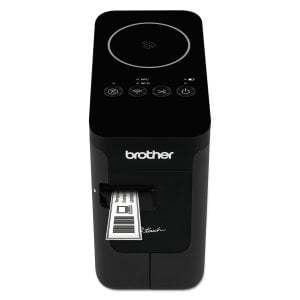
Brother P-Touch PT-P750W Compact Label Maker with Wireless Enabled Printing
- Brand:
- Brother
- Model Number:
- PTP750W
- UPC:
- 012502637226
- EAN:
- 0012502637226
- ASIN:
- B00JHME7W4
- Walmart SKU:
- 38295597
| Price Type | Price | Date |
|---|---|---|
|
Highest Price
|
$154.99 | |
|
Lowest Price
|
$129.98 | |
|
Most Recent Price
|
$154.99 |
| Price Type | Price | Date |
|---|---|---|
|
Highest Price
|
$154.99 | |
|
Lowest Price
|
$129.99 | |
|
Most Recent Price
|
$154.99 |
Tracking History: We have tracked Brother P-Touch PT-P750W Compact Label Maker with Wireless Enabled Printing since 2/17/2025. The most recent price update was on Nov 26, 2025.
Price Range: Over the past 90 days, the price has ranged from $129.99 (lowest on 2/17/2025) to $154.99 (highest on 11/26/2025). The average price during this period is $142.49.
Current Trend: No Walmart.com pricing data available for analysis.
Customer Insights: Rated 3.8/5 from 75 reviews.
Perfect label printer for me, up and running in less than 30 minutes thanks to automatically recognised operating system downloads for macOS Catalina 10.15.6 on Brother support site. Software is easy to use on both IOS and MAC and the genuine tapes are perfect for my needs
Go this when an competitors one died after 7 months. Very happy so far. Plenty of choice of label types and very handy to be able to print off a quick label using my iPhone when needed Only complaint is why does there have to be such waste at the beginning of a label print?
Ive been waiting for a printer that has these features for ages, great size, easy to use, and the software is easy to use. It will take all the Tz tape sizes and the cutting and peeling prep is brilliant. Ive not used the wireless function yet but i imagine it works as well as everything else.
This label printer has a variety of connectivity options, so there should be one to suit most use scenarios. It can connect to a PC via USB or wirelessly through WiFi Direct or through a WiFi network. There are mobile apps for iOS and Android, and also a development kit. Compared to other label printers, the ability to save the last printed label would be a nice addition. A Windows Phone app is also currently not available.
I am a genealogist with lots of artefacts and documents to label. I had had a 12mm brother labeller for some time and wanted a more sophisticated label for my large number of leather-look gold-tooled binders. The 12mm was ok but looked a bit like sticky-tape and often left little 'space' around words to assist in readability. 12mm, of course, still has its place but this machine does up to 24mm. The new 24 mm with premium gold tape is superior for my purposes and, not necessarily visible from image attached, is easier to read from a distance as well as looking professionally made. Once the program was on the system it was easy to create a label and typing is so much easier with my computer's keyboard than with the portable mini non-qwerty keyboards. I can save label templates to create a house-style to reuse which is great for me as I am a bit obsessive on order and continuity. I can ensure the label template is a fixed size so if the text changes the label always fills the space just right. Also it prints just the right amount of label with less waste than my portable so saves on expensive tape. It is mains so doesn't need batteries (although you can use them if you want) but this is a big saving as the hand-held used lost of batteries. The software feels a bit clunky, particularly around colour choice and selections, but is functional and I would not want them to exchange functionality for pretty. The half-cut device is bonus I didn't appreciate until I used it, I spend less time with my nails trying to separate the backing from the sticky-label. When using transparent tape this reduces the likelihood of my fingerprints showing on the corners! A small disappointment was that I did want a simple coach-line frame (a rectangle with scalloped corners, as shown in some Brother advertising) but this was not actually on the list of frames available. So, the facility to download free additional designs would be cool. Overall, extremely happy with the Brother PTP750W that now sits happily within wi-fi reach of my set-up.
Excellent Label Printer. I use the android app which has loads of options and produces excellent result. As of yet I have been unable to get NFC to connect from my Galaxy Note 4. Wifi takes a bit of patience to get working, but it does work. Very pleased with the printer.
Bought this product for labelling numerous items and it works really well and I specifically wanted one that I could move about the house and use WiFi, bonus that you can put batteries in it too. Print quality is very good too so I would recommend the printer if you need lots of labels!
I grow hundreds of pots of bulbs from seed and I keep a list of them on my computer as an Excel spreadsheet.. Now with a little formatting I can print them directly without having to re-type them. I knew the label quality is perfect for plant labels. The printing does not fade even out of doors and the adhesive seems everlasting. The label on my dustbin has been there for 11 years and shows no deterioration. I have not used it wirelessly yet and I find it easier to use the formatting in Excel. The tapes are relatively expensive but the printer makes efficient use when printing a batch. The white printing on black option is especially good for the garden since they are much less conspicuous.
Got this to provide robust garden labels that last. Very pleased so far and like the range of flexible options available re labels, including choice of strong adhesive ones.
I ordered the Brother PT-P750W Label Maker and I am very impressed with the label quality and the P-touch Editor 5.4 software it is easy to use but the only thing is the software has to be downloaded and you have to enter the serial number every time you want to install the software this is very inconvenient and frustrating. I ordered the Brother PT-P750W to replace my Brother E55ow after it fell on the floor and broke and the P-touch Editor for the Brother E550w was much easier to install
Detailed price history for the past 90 days
No Walmart.com pricing data available for analysis.
Third-Party Sellers prices have ranged from $149.89 (Mar 20) to $154.99 (Jun 8) over the past 90 days. Current price is close to the 90-day average of $154.35.
| Date | Price | Change | % Change |
|---|---|---|---|
| $154.99 | $+0.00 | +0.0% | |
| $154.99 | $+0.01 | +0.0% | |
| $154.98 | $+0.00 | +0.0% | |
| $154.98 | $-0.01 | +0.0% | |
| $154.99 | $+0.01 | +0.0% | |
| $154.98 | $+0.00 | +0.0% | |
| $154.98 | $+5.09 | +3.4% | |
| $149.89 | — | — |