
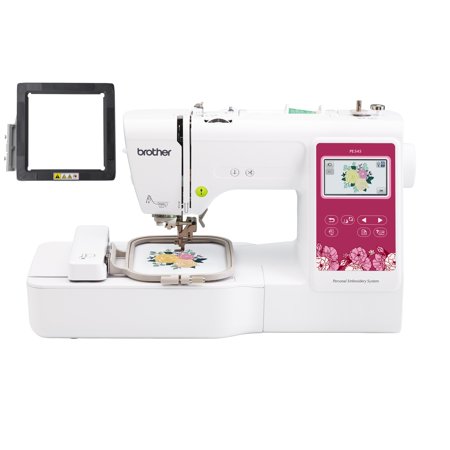
Brother PE545 Embroidery Machine with Wireless LAN, 4" x 4" Hoop Area, 3.7" Touchscreen, SAMFM100 4" x 4" Magnetic Hoop
- Brand:
- Brother
- Model Number:
- PE545
- UPC:
- 642135624296
- EAN:
- 0642135624296
- Walmart SKU:
- 14879452340
At $549.98, pricing shows 0.0% discount compared to typical $0.00 levels.
| Price Type | Price | Date |
|---|---|---|
|
Highest Price
|
$655.98 | |
|
Lowest Price
|
$559.95 | |
|
Most Recent Price
|
$585.98 |
| Price Type | Price | Date |
|---|---|---|
|
Highest Price
|
$549.98 | |
|
Lowest Price
|
$549.98 | |
|
Most Recent Price
|
$549.98 |
Tracking History: We have tracked Brother PE545 Embroidery Machine with Wireless LAN, 4" x 4" Hoop Area, 3.7" Touchscreen, SAMFM100 4" x 4" Magnetic Hoop since 1/22/2025. The most recent price update was on Mar 12, 2025.
Price Range: Over the past 90 days, the price has ranged from $549.98 (lowest on 1/22/2025) to $549.98 (highest on 1/22/2025). The average price during this period is $549.98.
Current Trend: No Walmart.com pricing data available for analysis.
Customer Insights: Rated 4.22/5 from 45 reviews.
i'm a commercial embroidery digitizer. my parents are elderly so i'm starting to have to spend days/weeks at their house. i also like to travel and do home exchanges with my wife. i wanted a machine that could handle some basic sewouts if i had to work while travelling. this is a no nonsense machine; all it does is embroidery. you plunk the design onto a jump drive, pop it in the machine, and press start, just like my tajima single head. suits my purpose perfectly.
I found the PE545 difficult to use. One it seems that there is only one size that you can use on the machine and that is the 4x4. I had issues getting it to connect to my network until I sent a message to the online chat person. She was great and was able to get me to the point I was connected and able to transfer my image through Artspira. The program PE - Design 11 is complicated I still have yet to get a good image or create a design to be able to transfer. The Brother Design Database Templet isn't really any help. I'm not sure why you wouldn't get the full access of these programs if you purchased a machine. You would think that it would come free with the product. Maybe it's just me but I've not had much luck with the PE545. I have several Brother Machines, and this one is the only one that I seem to not be able to figure out.
[This review was collected as part of a promotion.] The brother PE545 embroidery machine , is wireless LAN enabled it comes with white accessory pouch ,spool caps, packed needles,scissors, user guide ,seam ripper,bobbins. The embroidery machine has135 design , great for those who is creative . I can make my own designs and I am so happy for making something my own. The automatic needle threaded is also a nice feature , it saves lot of time . The machine is meant for embroidery, but does do a little bit of sewing. I like the fact that the machine is quiet when used and it doesn't vibrate . LCD screen is touch and easy to navigate. It comes with a built in tutorial that guides users. I like the drag and drop feature to create a design. The artspira app is user friendly and helps to create new designs and patterns. I created a monogram for my husband and few embroidery for my daughter. Overall , keeps me motivated to try new designs and gives immense satisfaction when I finish it and people compliment .
Great device for beginners - I already had a sewing machine, so I didn't want a combo. I had to learn a bit about the device and am a very nominal sewer. I am amazed at how well it threads a needle and when it stops if your bobbin runs out it picks right back up where it left off. The artspira software and design paperwork that comes in the package is absolutely no help - not worth the $$. I am a cricut user and this is nowhere near that software. Follow the manual and look for youtubes, qr code if you get in trouble. There is a brother app you can use to work with loading items to your machine wirelessly. I love how it loads and am still learning but it is fantastic so far. I was able to go to etsy and get some designs / fonts to make some projects. I am a bit confused as to why it shuts down every time I try to attach the hoop, but I will figure it out.
I had to become a member to create my own designs to store in the app. So I after designing the images I wanted to keep. And working on other projects I let the embroidery machine sit for a week and a half. Now I'm completely locked out my account having to create a new account just to loose my designs all because I discontinued the monthly subscription...
Nice machine. Easy to use. The videos on tge use were just what i needed. I would recommend it to any beginner.
[This review was collected as part of a promotion.] This embroidery machine is so easy to use. The machine is labeled with numbers and pictures to show how to thread machine. If anything goes wrong with the embroidery process (ex. Needle becomes unthreaded) than the machine will automatically stop and tell you. The color touch screen is so simple to use. You can resize image on the screen and move it where you want it and change the colors. I love that the machine tells you how many stitches total are in your project and how many stitches you have completed. It also tells you total time to complete each step plus how much time has lapsed. This machine also has a USB port to upload your designs. This machine is so fun and user friendly!
This is the worst crafting item I have ever worked with. I have complete Ted one project and thrown away so many others. Don't waste your money.
Works well enough. I had one needle break so far on a project and I'm not sure why it was shaking. Often the outline stitch does not align with the fill pattern, like it is off a millimeter or so
[This review was collected as part of a promotion.] I love making my own crafts and learning new skills! I admit I was a bit intimidated by the setup and learning required to start down this embroidery path but I'm really glad I did it! There is A LOT to learn about this machine but the basic startup is pretty easy as long as you read and follow the directions. This is my first attempt at embroidering and I feel like I'll keep with it and get much better. My goal is to make my own design but I think I need to master the many options for designs that already come with the machine. If you're just starting out, I recommend to have some patience and check out specific YouTube videos for this machine.
Detailed price history for the past 90 days
No Walmart.com pricing data available for analysis.
Third-Party Sellers prices have ranged from $559.95 (Oct 16) to $655.98 (Nov 11) over the past 90 days. Current price is close to the 90-day average of $622.26.
| Date | Price | Change | % Change |
|---|---|---|---|
| $585.98 | $-70.00 | -10.7% | |
| $655.98 | $+0.00 | +0.0% | |
| $655.98 | $+96.03 | +17.1% | |
| $559.95 | $-26.03 | -4.4% | |
| $585.98 | $-70.00 | -10.7% | |
| $655.98 | $+0.00 | +0.0% | |
| $655.98 | — | — |