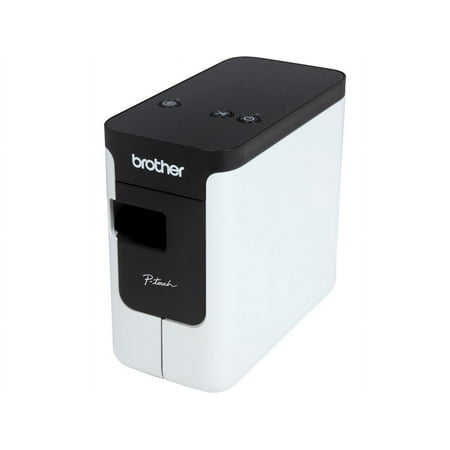
Brother PT-P700 PC-Connectable Label Maker for PC and Mac
- Brand:
- Brother
- Model Number:
- PT-P700
- UPC:
- 012502635888
- EAN:
- 0012502635888
- ASIN:
- B00DSYEB28
- Walmart SKU:
- 31157791
Current pricing at $94.99 reflects recent market activity, running 0.0% below the 90-day average.
| Price Type | Price | Date |
|---|---|---|
|
Highest Price
|
$95.93 | |
|
Lowest Price
|
$79.98 | |
|
Most Recent Price
|
$94.99 |
| Price Type | Price | Date |
|---|---|---|
|
Highest Price
|
$94.99 | |
|
Lowest Price
|
$94.99 | |
|
Most Recent Price
|
$94.99 |
Tracking History: We have tracked Brother PT-P700 PC-Connectable Label Maker for PC and Mac since 11/16/2025. The most recent price update was on May 30, 2026.
Price Range: Over the past 90 days, the price has ranged from $94.99 (lowest on 11/16/2025) to $94.99 (highest on 11/16/2025). The average price during this period is $94.99.
Current Trend: No Walmart.com pricing data available for analysis.
Customer Insights: Rated 4.1/5 from 171 reviews.
Having used the other type of Brother Label printers before (self contained keyboard models), I was always bothered by the fact that they were not very user friendly due to the many functions available for each keys, which were not easy to find or remember when the Label had not been used for a while. This PT-P700 Label Printer is a game changer. You use your personal computer keyboard with all the functions similar to Microsoft Word so, very familiar and easy to remember. Love it.
I bought this to replace and older edition and It is so versatile. Good choice.
I have used an aged P-touch portable (PT-1750) that used TZ tapes and was hoping to use up my old stock of labels but the TZ and the TZe are not compatible; you can use the TZe tapes in older devices but not TZ in the PTP700. As for the machine itself, is does an excellent job. I use the Windows P-touch Editor 5.1.100 software and it prints a much smoother text than the old one, uses the Windows TrueType fonts installed on your PC and allows small graphics to be imported (Black & White)
I bought the PT-P700 to replace an existing label printer as I was looking for additional functionality. I've found the P700 to offer a lot of flexibility in its easy incorporation of graphics, and ability to print on different materials - such as shrink wrap. There are a lot of neat touches in the P-Touch Editor software too - and they work very nicely together. Loading new tapes is very straightforward. Setup too was reasonably simple. The only thing that threw me initially was the need to turn off the in-built software to allow my Mac to control the device.
I purchased the Brother PT-P700 to use exclusively as a label maker for my file folders and the keep track of my oil changes that I've done in my trucks. I've had a really nice experience over the last 6 years. I've labeled reminders for oil changes, and folders for so many files. I am so glad I made the purchase and would not trade it for anything! It's dependable and the software keeps tracks of what you'd like to save for future needs!
All told, a fine little machine. Just what I wanted. Easily operated from my PC, with a small footprint on the desk. But what do I do with my old supply of tapes? I have a much-loved and long-lived hand-held P-Touch, and I find that none of the tapes I already have will work in the new machine. It would seem that, whilst current tapes will work in my old machine, my new machine takes only much more recent tapes. And, yes, my old tapes are Brother OEM tapes! Seems I can't throw away my old machine just yet!
This is a good printer if you want to fully customise your labels with logos, layout and graphics. It's also excellent for printing lots of labels with mail merge. The software for Mac is a bit clunky, for example if you insert an image it sets it to 0x0 and doesn't maintain the aspect ratio by default. It's generally not as polished as something like Pages but it's serviceable. (Think MS Word 2003). In principle you can print to it from any software as it's just a printer but when I had a quick go I couldn't get the paper size right. The range of tapes is good and unlike the main competitor you don't have to have an 'industrial' machine for the more industrial tapes. The printing is clear but a little bit low res, I think it probably has roughly the same number of pixels across as my handheld printer but they're spread over 24mm rather than 9mm making graphics and small text look a bit blocky. You do lose quite a bit bit of tape (about 10mm is cut off and discarded) each time you print an individual label which is a bit of a waste but if you mail merge it doesn't do that for each one so printing 20 or 30 labels at a time it's not a big problem. I bought this on a cashback which made it exceptional value for money for a USB printer that will print industrial tapes. I just wish the DPI was a bit higher.
I bought a PT700 and used iton Win7. Everything worked fine. Installed the software and away I went. However, I thought it might be nice to use it on my WIN10/11 machine so I downloaded the software from the Brother site. It took about 30minutes fro it to install which wouldn't be so bad, but then when I opened the printer software all my previously saved labels had been wiped. Why would anyone do this - No warning no backup attempt just labels gone. I'm not a happy bunny and it stinks
Just bought this specially to work with both my MAC (2019 Macbook Pro), and Windows. After wasting an fruitless hour got onto support who confirmed that it does not work with "does not have support for different USB ports for new Mac computer", my MAC. He asked me if I was connecting it to a USB2.0 port, which no MAC has had for about 5 years at least. So effectively does not work with Macbook Pros, Macbook Airs, or presumably any other current model. Would be nice if the website stated that before wasting my time and money.....
The product itself is absolutely fine, it's the Technical Support of the company that is absolutely disgraceful. Those people or hopelessly incapable of diagnosing an issue. It wasn't until my call was escalated to a higher level support individual who within a minute or two figured out the problem and resolved the issue. But for weeks prior to that the other incompetent idiots at Brother technical support we're abject failures.
Detailed price history for the past 90 days
No Walmart.com pricing data available for analysis.
Third-Party Sellers prices have ranged from $94.98 (Aug 19) to $94.99 (Sep 7) over the past 90 days. Current price is close to the 90-day average of $94.99.
| Date | Price | Change | % Change |
|---|---|---|---|
| $94.99 | $+0.00 | +0.0% | |
| $94.99 | $+0.00 | +0.0% | |
| $94.99 | $+0.00 | +0.0% | |
| $94.99 | $+0.00 | +0.0% | |
| $94.99 | $+0.00 | +0.0% | |
| $94.99 | $+0.01 | +0.0% | |
| $94.98 | $+0.00 | +0.0% | |
| $94.98 | $-0.01 | +0.0% | |
| $94.99 | $+0.00 | +0.0% | |
| $94.99 | $+0.00 | +0.0% | |
| $94.99 | $+0.01 | +0.0% | |
| $94.98 | $-0.01 | +0.0% | |
| $94.99 | $+0.01 | +0.0% | |
| $94.98 | $+0.00 | +0.0% | |
| $94.98 | $-0.01 | +0.0% | |
| $94.99 | $+0.00 | +0.0% | |
| $94.99 | $+0.01 | +0.0% | |
| $94.98 | $-0.01 | +0.0% | |
| $94.99 | $+0.00 | +0.0% | |
| $94.99 | $+0.00 | +0.0% | |
| $94.99 | $+0.01 | +0.0% | |
| $94.98 | $-0.01 | +0.0% | |
| $94.99 | — | — |