
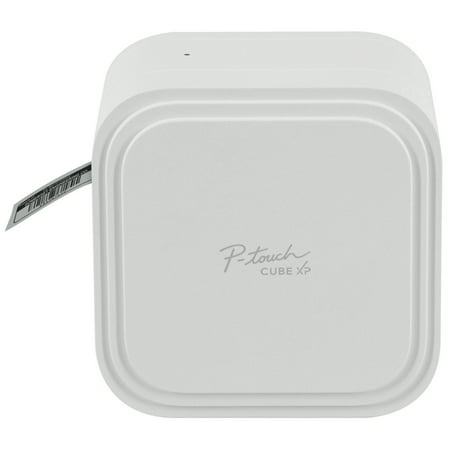
Brother PT-P910BT P-Touch CUBE XP Label Maker with Bluetooth® Wireless Technology PT-P910BT
- Brand:
- Brother
- Model Number:
- PT-P910BT
- UPC:
- 012502659846
- EAN:
- 0012502659846
- ASIN:
- B08C62LX27
- Best Buy SKU:
- 6657573
- Walmart SKU:
- 371460902
| Price Type | Price | Date |
|---|---|---|
|
Highest Price
|
$439.90 | |
|
Lowest Price
|
$349.98 | |
|
Most Recent Price
|
$420.49 |
| Price Type | Price | Date |
|---|---|---|
|
Highest Price
|
$299.99 | |
|
Lowest Price
|
$299.99 | |
|
Most Recent Price
|
$299.99 |
Tracking History: We have tracked Brother PT-P910BT P-Touch CUBE XP Label Maker with Bluetooth® Wireless Technology PT-P910BT since 3/9/2025. The most recent price update was on Mar 10, 2025.
Price Range: Over the past 90 days, the price has ranged from $299.99 (lowest on 3/9/2025) to $299.99 (highest on 3/9/2025). The average price during this period is $299.99.
Current Trend: No Walmart.com pricing data available for analysis.
Customer Insights: Rated 4.11/5 from 19 reviews.
Purchased this unique label maker a few weeks ago. Primarily to make 1.5” labels. I have 2 other conventional Brother label makers for regular size labels. I've read some critical reviews about this PT-P910BT labelmaker. It is excellent‼️The app for it is a little awkward, however it does require a little effort at first! The finished labels it creates are PERFECT‼️ In fact all 3 of these label makers do an outstanding job. I couldn't be more pleased.
THIS THING ROCKS!
I received this product for free from Brother in exchange for my honest opinion/review of the product. Coming into sampling this unit, I was a bit skeptical. How could something so small print and easy do what I was needing it to. Well, after setting up (which was pretty simple and self explanatory) and then printing my first label, I definitely changed my mind about it. Again, the set up of the unit, loading the tapes and the basic getting ready to print items, are explained perfectly. Then the finished product after all the things you can do with it, are awesome. It`s a must try if you are looking for a sturdy, great printer. It does it all and then some! [This review was collected as part of a promotion.]
I received this product for free from Brother in exchange for my honest opinion/review of the product. I received this product in exchange for my unbiased opinion. Easily prints clear labels for file folders and storage bins. I love that photos (2) can be attached so you can see items in storage. It includes many fonts and clip art. Easy and clear Bluetooth set up instructions. Inserting the battery and cartridges were also clearly illustrated. [This review was collected as part of a promotion.]
I received this product for free from Brother in exchange for my honest opinion/review of the product. The device is a nice size and not too big. I was confused on which app to use as the instructions tell you to download two different ones. It`s also a little complicated to figure out which setting and on which app to have the label cut automatically for you once you`re done printing it. I wasted a lot of label because I had to cut manually and it was uneven. If you love doing things through apps on your phone, this is definitely a product for you. [This review was collected as part of a promotion.]
I received this product for free from Brother in exchange for my honest opinion/review of the product. I haven`t had a label maker in years. This thing is amazing. I started by making all these great fancy labels for spice jars and ended up printing photo stickers. Amazing. Easy to use along with the app. I`m still learning the app. I don`t know if it`s been around a while or if it`s new but I think I need to learn more about navigating it to its fullest potential. That`s not to say it`s not effective that`s just where you get your usage direction. It comes with set up instructions but you have to depend on the app. The P-Touch is really just a printer. An amazing label printer that surprised me by the quick printing and quality of the graphics. [This review was collected as part of a promotion.]
I received this product for free from Brother in exchange for my honest opinion/review of the product. I enjoy organizing and labeling things in my home, so this label maker was a great addition to my toolkit. It is very sleek, compact, and portable. Set up was straightforward, although i got a little confused about how to add the label tape cartridge. It did not come with the adapter for the charger, which would have been helpful. However, I had one I was able to use. The label maker was fully charged within an hour or so. It is so convenient to be able to do everything from my smartphone. The apps connected to the label maker with ease via Bluetooth. I was able to design a new label for my mail box and print within a few minutes. However, it would be nice if the apps were combined into one to make everything one seamless process. Overall I am very satisfied with the label maker and am looking forward to using it for all of my future labeling projects. [This review was collected as part of a promotion.]
I received this product for free from Brother in exchange for my honest opinion/review of the product. Excited to start using P-touch Cube. My current labeler is hand held and only prints one line. Unboxing I quickly found instructions. Took only a few minutes to read and set up. Instructions did not specify how long I had to charge the unit and some of the drawinga were printed so faintly it was hard to figure them out. I let it charge 2 hrs. The cube is larger than I thought it would be and does not have any handles or indentions to make it easy to grab onto when moving. I almost dropped it once. Ergonomically it needs improvement.Once charged I proceeded to download the app to my android phone. Easy. I them followed the instructions on how to create and print a label. 1st few attempts did not work so I uninstalled app and then reinstalled. Trouble was getting the bluetooth to work. I decided to make labels for my tax files. I used 1 1/4 inch tape and I noticed that when I changed the size of the font it would frequently reset itself back to the default size. I had to keep resetting it. A little annoying. I liked being able to print multiple lines on my labels. Also your last label stays in the printer so you have to create an extra one to get your last label. It also prints borders around labels and has an additional app that includes graphics if desired. Overall I liked being able to create labels from my phone and wirelessly print them. The cube has some quirks but the quality of the labels and convenience make up for it. I would give it a must Buy. [This review was collected as part of a promotion.]
I received this product for free from Brother in exchange for my honest opinion/review of the product. I recieved this product in exchange for my unbiased opinion. First impression of this label maker, there is a learning curve before you can really maximize its potential. It is not the easiest to plug and use. There is a manual, but the manual isnt printed as "normal" manuals. No, this is one of the manuals that starts as a booklet, then opens up into a poster when you want to flip to the next page. So you have to flip front to back several times before you get all the information. Realize the label maker needs to be charged for several hours before use, but there is no charging adapter provided, only usb cord. The manual recommends using a specific usb adapter that is not provided, so we have to figure out how to give it the safest multiple-hour charge, so it can be used. The next learning curve is figuring out how to connect it to your device. The options are made for Windows, Mac, & mobile devices. However, I had a Chromebook and could not download the links. Even though my Chromebook has google play, it took me about 30 mins to realize the label maker was not connecting to my laptop, and the app I had downloaded was an older version. Yes, there seems to be multiple versions of the label maker app in the play store, so be sure to pick the right one. So i just said forget the laptop im just using my phone, and Presto! it connects. Another question I have while using the label maker is How come I need to use "Location Services" with this app?? Normally my gps is off while at home, and I am normally still able to coonect through bluetooth with all my devices. This device, however, not only requires bluetooth connection, but also require gps to be on and location activated. Is All of that absolutely neccessary to print a label? No way.So after going through all that, we finally get to the part we`ve been trying to get to for the past 17 hours... printing a label!! The aspect I liked after going through this is how simple the process could be. Simply pressing a button on my phone, and having a label print. There is still a learning curve here also as there are numerous layout and the ability to upload photos and logos etc. Much trial and error involved. Some images I printed were too small for the printer. Sometimes I wanted the label to print bigger, other times I wanted the machine to print more in the center. Also I realize some colors work better for certain labels. While other colors work better for other labels. There is more of a learning curve here before I can fully know with confidence that I am getting the exact label shown on the app`s preview. With that being said, you could turn this on as a complete novice, choose a template on the app, and have a "formatted" label within seconds. Adds professional touch to labels with very little effort. Overall I can see the benefit of using this label maker, especially for a small business.Furthermore, the label maker it seems to auto-shutoff if left idle for a short period of time (10-15 mins). However the auto-shutoff is more a "sleep mode" because there is still a blinking light. I am not a fan of this feature, because it requires turning back on the device and reconnecting my device if i still want to use it OR turning back on the label maker to try to turn it all the way off. Storage may be a concern as well. The label maker itself is a decent size, not THAT big. But if I wanted to order a variety of colors for the printing material (there seems to be 7+ colors), each printing cartridge has to be stored, and seems sort of delicate/sensitive. The paper cartridges could easily stack up and turn into a pile of tripping material, or get lost in a crevice.Overall:I see the potential. It has to be used several times over before we fully understand how to maximize the dozens of templates/themes. It creates an ease for making a decent label within minutes. The main drawback for me is the gps location needed to use the device, missing adapter, and the auto-shut off feature [This review was collected as part of a promotion.]
i choose this printer for work, and it was a let down because there is no support behind it, and some bugs could be easily resolve. first one: PRINTING ISSUE the print is not vertically center, there is more space above text than below...why? I can fill the whole tape with ink, so why can't I center my words? (Again vertically, since we can horizontally) Second: Limitation of number of images I can print in one go There is absolutely no reason for that, i can't put more than 2 image per print? this is not 1990, I have a phone that could power all of Nasa when then ship the entire Apollo program, and yet you tell me I can't use more than 2 images… this is madness third one: no QR code or BAR CODE maker, In 2022 you still haven't implemented a way to make those code? i have to use another app, save it as an image, then use that image...and again i am limited with 2 images…this is nerve-racking. fourth : there is no folder on my phone where my designs are saved, so when i had to do a factory setting on my phone, even with data being backup i lost everything. five : still no touch screen to place the element where i want them to be Again, it is 2022, you got a good product but you app was made for windows 3.1, it is like someone took “office words” and decided that the image feature where when you move it it mess everything should be the foundation of this app. six: multiple cuts, You should have an option when we make more than 5 label to have a cut between our label if we want to, why wasn't this implemented, i have to use a scissor every time between labels. seven: you decided to remove the volontary cut feature from the app, where i could choose by clicking twice on the power button to cut my tape
Detailed price history for the past 90 days
No Walmart.com pricing data available for analysis.
Third-Party Sellers prices have ranged from $420.49 (Aug 30) to $439.90 (Jun 30) over the past 90 days. Current price is close to the 90-day average of $426.23.
| Date | Price | Change | % Change |
|---|---|---|---|
| $420.49 | $-15.01 | -3.4% | |
| $435.50 | $+15.01 | +3.6% | |
| $420.49 | $+0.00 | +0.0% | |
| $420.49 | $-19.41 | -4.4% | |
| $439.90 | $+19.41 | +4.6% | |
| $420.49 | — | — |