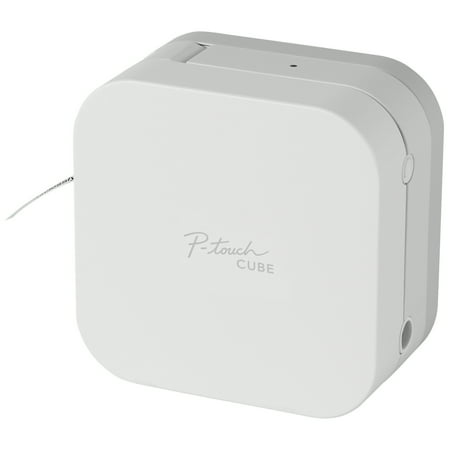
Brother PTP300BT P-Touch Cube Smartphone Label Maker, Bluetooth Wireless Technology - White
- Brand:
- Brother
- Model Number:
- PTP300BT
- UPC:
- 012502643975
- EAN:
- 0012502643975
- ASIN:
- B071RSC7ZH
- Walmart SKU:
- 416614312
The two weeks at $54.99 represents stable pricing, running 11.7% below the 90-day average of $62.25.
| Price Type | Price | Date |
|---|---|---|
|
Highest Price
|
$69.99 | |
|
Lowest Price
|
$54.99 | |
|
Most Recent Price
|
$54.99 |
Tracking History: We have tracked Brother PTP300BT P-Touch Cube Smartphone Label Maker, Bluetooth Wireless Technology - White since 9/15/2025. The most recent price update was on Nov 4, 2026.
Price Range: Over the past 90 days, the price has ranged from $54.99 (lowest on 5/1/2026) to $69.99 (highest on 11/3/2025). The average price during this period is $66.10.
Current Trend: Walmart.com prices have ranged from $54.99 (Nov 4) to $69.99 (Aug 30) over the past 90 days. Current price is 11.7% below the 90-day average of $62.25.
Customer Insights: Rated 4.1/5 from 191 reviews.
I've been using the PTOUCHCUBE for a few days now and I absolutely love it. It's compact, easy to set up and use and the app is brilliant. You can create so many different labels using the templates or have fun creating your own. I've been using it for gifts, labelling for storage and label the kids things for school. I'm definitely in labelling heaven.
Easy to set up and use, compose with your phone and print wirelessly by Bluetooth. Use the iPrint%26Label app for no-nonsense office/shipping/admin/IT labels and/or the P-touch Design%26Print 2 app for artsy-fartsy crafting/gifting/retail/fun labels.
I've had this printer for over 2 years now it has never let me down. I recently bought some ribbons (red & blue with gold lettering) for use at Christmas to wrap around special presents it looks wonderful. I also use it on garden labels which were just as clear at the end of th growing season. An all round great and very useful printer.
Purchased to use with plant labels and what a professional job it does. Easy to use with the designated app which provides a multitude of fonts and clip art with the added bonus of being able to import your own photographic images. Tape colour can be changed by simply pushing in a different cassette. I have also used this for my tools and equipment, kitchen and hobby storage and my grandkids school items. Well done Brother for producing yet another excellent bit of kit at a bargain price.
[This review was collected as part of a promotion.] I was disappointed that this did not come with a mains power lead. You have to buy this as an accessory. The unit is compact so can be easily moved. The App seems quite good but takes some getting used to and practice to get what you are expecting. The labels seem good that were supplied. Good range of different tape labels can be purchased to do different jobs. Might prove quite expensive if you are using the gadget a lot. Unit seems very versatile so would definitely recommend.
[This review was collected as part of a promotion.] I so wanted to give the PT Cube a glowing review but I have to be honest. I'll start with the positive, it's neat, lightweight, portable and has a wealth of uses. Not so positive, set up was challenging, possibly due to having to set it up on an older phone as my usual one is in the repair shop. Finding and downloading the app was simple enough but getting the phone to communicate with the cube was somewhat difficult (maybe once I get my phone back I'll be updating this review) but once set up it worked well, that was until it lost connection and stopped communicating so I had to start again! As it didn't come with a power adapter and rechargeable battery it requires AAA batteries which it goes through quite quickly, obviously this can work out quite costly depending on how much you're using it, considering I'd be using it at craft fairs and boot sales I personally would be carting a box of batteries with me. Finally the tape, I can't find anywhere other than Brother to purchase replacement at the moment, hopefully this is because I'm looking in the wrong places or because it's new, again this could become costly. Overall, it is a neat little printer and I would recommend it to someone who needed one for light use but not for someone like myself who would be doing a lot of printing on site. Perhaps Brother could look into the possibility of a built in or replaceable rechargeable battery so it can be charged off a generator, power pack or directly from the mains which would make it more user friendly.
[This review was collected as part of a promotion.] This is a very easy to use lable printer, the app can be downloaded free to a mobile phone which I liked. There is no need to use cables. I like the variety of labels that can be printed, I have used this mainly for nameing my sons clothing he wears to school and labeling food items like spices and jars. Im foverever looking for things to lable. The size of the lable printer I really good for its use and I like the way it looks. The only downside I could find was it does not come with adapter and you have to use batteries. I believe an adapter can be purchased separately.
[This review was collected as part of a promotion.] The label maker was easy to use, the app certainly inspired me. It was easy to locate the app in the Google Play Store and set up my label printer. It works via Bluetooth and so it almost set itself up. There was no fiddling around. The same with the ribbon cartridge, it is very easy to install. The printer is very compact and neat. It looks stylish if you leave it out but it also packs away in a drawer as it is self contained. I have recently had a new kitchen installed with a large pantry area. I have enjoyed getting myself organised and labelling the jars, containers and storage boxes. My only negative is as it didn't come with a power adapter or any rechargeable batteries it requires AAA batteries which it goes through quite quickly.
After solving a technical problem with cutting labels in half. (Customer services were very helpful). I discovered my particular PTouchCube would not print complex labels, without stopping with an error message to indicate the batteries were low, even after inserting several sets of brand new batteries. Returned this product and purchased a Brother QL-700 Label Printer. Similar price, older technology, but a much better machine.
I bought this printer to use with my Apple iMac (M1 Apple Silicon) . I tried downloading the P-Touch Editor from the App Store but discovered that the printer is only compatible with MacOS 13 and above. My Mac runs Monterey and I have no intention of upgrading the OS just to use the P-touch. Furthermore, I understand from Brother help that there are no apps available for pre MacOS 13 Macs. Disappointing result from Brother and I now own a printer that is not fit for my purposes.
Detailed price history for the past 90 days
Walmart.com prices have ranged from $54.99 (Nov 4) to $69.99 (Aug 30) over the past 90 days. Current price is 11.7% below the 90-day average of $62.25.
| Date | Price | Change | % Change |
|---|---|---|---|
| $54.99 | $+0.00 | +0.0% | |
| $54.99 | $+0.00 | +0.0% | |
| $54.99 | $+0.00 | +0.0% | |
| $54.99 | $+0.00 | +0.0% | |
| $54.99 | $+0.00 | +0.0% | |
| $54.99 | $+0.00 | +0.0% | |
| $54.99 | $+0.00 | +0.0% | |
| $54.99 | $+0.00 | +0.0% | |
| $54.99 | $+0.00 | +0.0% | |
| $54.99 | $+0.00 | +0.0% | |
| $54.99 | $+0.00 | +0.0% | |
| $54.99 | $+0.00 | +0.0% | |
| $54.99 | $+0.00 | +0.0% | |
| $54.99 | $+0.00 | +0.0% | |
| $54.99 | $+0.00 | +0.0% | |
| $54.99 | $-15.00 | -21.4% | |
| $69.99 | $+0.00 | +0.0% | |
| $69.99 | $+0.00 | +0.0% | |
| $69.99 | $+0.00 | +0.0% | |
| $69.99 | $+0.00 | +0.0% | |
| $69.99 | $+0.00 | +0.0% | |
| $69.99 | $+0.00 | +0.0% | |
| $69.99 | $+0.00 | +0.0% | |
| $69.99 | $+0.00 | +0.0% | |
| $69.99 | $+0.00 | +0.0% | |
| $69.99 | $+0.00 | +0.0% | |
| $69.99 | $+0.00 | +0.0% | |
| $69.99 | $+0.00 | +0.0% | |
| $69.99 | $+0.00 | +0.0% | |
| $69.99 | $+0.00 | +0.0% | |
| $69.99 | — | — |