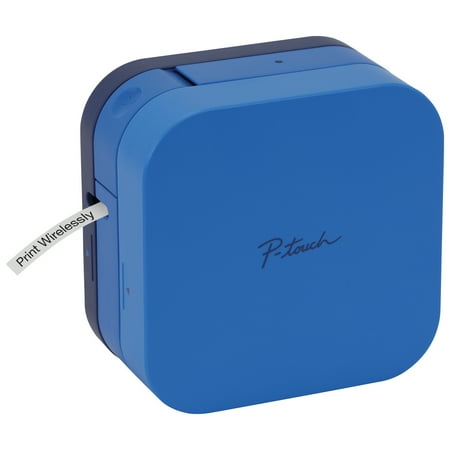
Brother PTP300BTBU P-Touch Cube Smartphone Label Maker, Bluetooth Wireless Technology - Blue
- Brand:
- Brother
- Model Number:
- PTP300BTBU
- UPC:
- 012502646303
- EAN:
- 0012502646303
- Walmart SKU:
- 957734631
Market direction turned downward with current $69.99 representing 0.0% under standard pricing.
| Price Type | Price | Date |
|---|---|---|
|
Highest Price
|
$81.78 | |
|
Lowest Price
|
$79.98 | |
|
Most Recent Price
|
$79.98 |
| Price Type | Price | Date |
|---|---|---|
|
Highest Price
|
$69.99 | |
|
Lowest Price
|
$69.99 | |
|
Most Recent Price
|
$69.99 |
Tracking History: We have tracked Brother PTP300BTBU P-Touch Cube Smartphone Label Maker, Bluetooth Wireless Technology - Blue since 11/20/2025. The most recent price update was on Jun 9, 2026.
Price Range: Over the past 90 days, the price has ranged from $69.99 (lowest on 11/20/2025) to $69.99 (highest on 11/20/2025). The average price during this period is $69.99.
Current Trend: Walmart.com prices have ranged from $69.99 (Jun 9) to $69.99 (Jun 9) over the past 90 days. Current price is close to the 90-day average of $69.99.
Customer Insights: Rated 4.2/5 from 185 reviews.
I've been using the PTOUCHCUBE for a few days now and I absolutely love it. It's compact, easy to set up and use and the app is brilliant. You can create so many different labels using the templates or have fun creating your own. I've been using it for gifts, labelling for storage and label the kids things for school. I'm definitely in labelling heaven.
I've had this printer for over 2 years now it has never let me down. I recently bought some ribbons (red & blue with gold lettering) for use at Christmas to wrap around special presents it looks wonderful. I also use it on garden labels which were just as clear at the end of th growing season. An all round great and very useful printer.
[This review was collected as part of a promotion.] Was easy use with endless possibilities to use the cube The cartilage as easy to fit you can't go wrong The label printer once you work it out to over over a peel slide is easy I have use the cube all over the house from sorting the kitchen boxes and labelling them saw it is easier to find things first times to using it in the bedroom to label rabies boxes
I bought this cube label printer only a few weeks ago but I am already very impressed as it is easy to use and you can add small icon on the label such as a plug or Computer to save typing long label. Bought to label my smart home hub as lots of plugs and network leads and need to ID them.
[This review was collected as part of a promotion.] I am a homeschooling mum of four and as someone who loves to tidy and organise, I was eager to receive my P-touch cube label and ribbon printer. I've previously owned a competitors handheld label maker but admittedly it wasn't the best and so I was intrigued to see what Brother had to offer. Upon opening and unboxing, I was first wowed by its unconventional ‘cube' like design. On the box it states that it's operated via an app so there's an absence of any kind of keypad or buttons, other than the power on/off button. It's sleek design makes it very eye catching and inconspicuous at the same time. One cannot tell just by looking at it that it's a printer, let alone one for labels and I like that, it can sit with the rest of our computer tech without looking odd. The app itself was very easily to download off the QR code that was included, and within seconds we were able to start printing. The device itself didn't come with a charging wire but it does take AAA batteries and it does have a charing port, I think any standard 9v charger would do the job but it's for this reason I've knocked off a point, who wants to run out of battery in the middle of organising?! that would frustrate me so much. I'm currently homeschooling my elder three and do we have many folders, books, stationary etc and it all needs labelling to prevent fights! This tiny but might printer made light work of it all. It offers a massive choice of different fonts, you can use different types and widths of tapes depending on what you need. The only thing I really didn't like was the amount if label that gets wasted on a single print, in my opinion there's no need to have so much excess on either side that you will have to trim off yourself. It makes having a cutter in the machine a bit pointless. Overall I would say it's a very good label maker, it has a couple of snags but is way better and more innovative than my previous label maker. It's a thumbs up from me and my kids!
[This review was collected as part of a promotion.] This is a very easy to use lable printer, the app can be downloaded free to a mobile phone which I liked. There is no need to use cables. I like the variety of labels that can be printed, I have used this mainly for nameing my sons clothing he wears to school and labeling food items like spices and jars. Im foverever looking for things to lable. The size of the lable printer I really good for its use and I like the way it looks. The only downside I could find was it does not come with adapter and you have to use batteries. I believe an adapter can be purchased separately.
[This review was collected as part of a promotion.] The label maker was easy to use, the app certainly inspired me. It was easy to locate the app in the Google Play Store and set up my label printer. It works via Bluetooth and so it almost set itself up. There was no fiddling around. The same with the ribbon cartridge, it is very easy to install. The printer is very compact and neat. It looks stylish if you leave it out but it also packs away in a drawer as it is self contained. I have recently had a new kitchen installed with a large pantry area. I have enjoyed getting myself organised and labelling the jars, containers and storage boxes. My only negative is as it didn't come with a power adapter or any rechargeable batteries it requires AAA batteries which it goes through quite quickly.
[This review was collected as part of a promotion.] I was disappointed that this did not come with a mains power lead. You have to buy this as an accessory. The unit is compact so can be easily moved. The App seems quite good but takes some getting used to and practice to get what you are expecting. The labels seem good that were supplied. Good range of different tape labels can be purchased to do different jobs. Might prove quite expensive if you are using the gadget a lot. Unit seems very versatile so would definitely recommend.
After solving a technical problem with cutting labels in half. (Customer services were very helpful). I discovered my particular PTouchCube would not print complex labels, without stopping with an error message to indicate the batteries were low, even after inserting several sets of brand new batteries. Returned this product and purchased a Brother QL-700 Label Printer. Similar price, older technology, but a much better machine.
I bought this printer to use with my Apple iMac (M1 Apple Silicon) . I tried downloading the P-Touch Editor from the App Store but discovered that the printer is only compatible with MacOS 13 and above. My Mac runs Monterey and I have no intention of upgrading the OS just to use the P-touch. Furthermore, I understand from Brother help that there are no apps available for pre MacOS 13 Macs. Disappointing result from Brother and I now own a printer that is not fit for my purposes.
Detailed price history for the past 90 days
Walmart.com prices have ranged from $69.99 (Jun 9) to $69.99 (Jun 9) over the past 90 days. Current price is close to the 90-day average of $69.99.
| Date | Price | Change | % Change |
|---|---|---|---|
| $69.99 | $+0.00 | +0.0% | |
| $69.99 | $+0.00 | +0.0% | |
| $69.99 | $+0.00 | +0.0% | |
| $69.99 | $+0.00 | +0.0% | |
| $69.99 | $+0.00 | +0.0% | |
| $69.99 | — | — |