
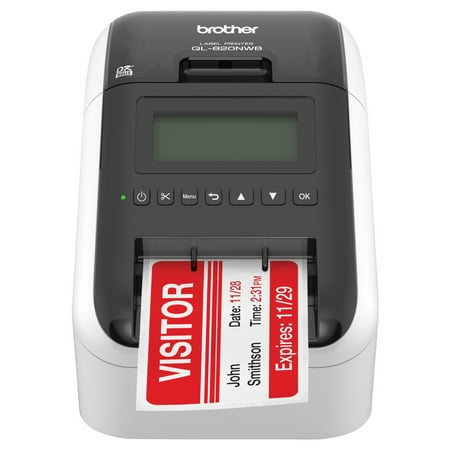
Brother QL-820NWB Professional Ultra Flexible Label Printer with Wireless Networking
- Brand:
- Brother
- Model Number:
- QL820NWB
- UPC:
- 012502646341
- EAN:
- 0012502646341
- ASIN:
- B01MTYE0X6
- Best Buy SKU:
- 5796910
- Walmart SKU:
- 55541552
| Price Type | Price | Date |
|---|---|---|
|
Highest Price
|
$275.99 | |
|
Lowest Price
|
$209.99 | |
|
Most Recent Price
|
$239.99 |
Price history data is not available for this product at the moment.
Current Trend: No Walmart.com pricing data available for analysis.
Customer Insights: Rated 4.0/5 from 52 reviews.
It is fast and extremely reliable. The text is crystal clear on the labels. Labels are a bit expensive but worth it. The but. I am a Linux user and the label software, P-touch Editor, are only for Windows and Mac. Mac is close to Linux, could you pleas make it avaible for Linux?
This is great little printer will all it's connectivity features. I have it connected to the home WiFi but do sometimes use it with USB and Bluetooth. I print from my Windows and Apple devices. It's great to be able to print a label at will, especially in my workshop etc. I like the paper and film labels but I mainly use the continuous ones rather than the die cut ones. This is because it's easy to switch between portrait and landscape modes from within the app so for smaller labels I just set it to portrait and then the cut length to say 13mm. It would be nice to see some different colour film labels though. The printer app for the iPad and iPhone is good too but I could like to be to see my saved labels created from within the app on my iPad and iPhone.
Ver pleased with it. It replaces a Dymo one and is very much better
Not sure what JCK1 is referring to with "difficult to understand and apply" but everything works as expected and hoped for. I use it for tracking IT inventory and asset tracking as well as other things that need labels. Attached our Excel spreadsheet and works like a charm. You can filter in the P-Touch software and design the labels exactly how you want. The fact it's networked (we use Ethernet) but Bluetooth and AirPrint also work flawlessly. Would definitely recommend and support this good product.
This is the second printer we have ordered and installed, it works great and is fully configurable - Brillant
Faultless, never stopped using it - well recommended first class printer. Looking forward to the introduction of more colours to print
printers ok, Software needs work. All software developers should read 'Commodore Amiga Style Guide' for the 90's to show them how to write user friendly software instead of making it really difficult to use so they can run training courses.
I bought this to replace a dying Dymo 450 Turbo labeler (USB) that is shared. The fact that it is almost the same price and has BT\WiFi & LAN Ethernet was a bonus! Unfortunately, the labels are totally different and do not work with our system properly even tho they both support P-Touch which at the time I thought was a standard labeling system (label format). Brother actually uses their own formats which our system does not work with (truncates the label verbage) I am sure that it is a great printer for general Win\Mac use, but be careful when buying this product to use with a non-standard system, as you are limited to a short choice of label formats! I selected that I would recommend this product to others .... BUT only for regular OS use, UNLESS you have access to 3rd party (external) label setups which we don't.... (also the reason I gave it 3 stars). I wish Brother could help me out with my issue, as this is a waste of a NEW labeler we will never use again!!
Great when it works. Has issues with any other app besides Brother app which isn't compatible for our needs. Regularly has issues with iPad and misprints labels. When asking support, I have to buy their labels and only use their app to get help. I would go another route.
The printer is very good, but unfortunately wireless printing is very unreliable and tedious from a mobile device (or at least from an iPhone). The mobile app is really poorly designed, and that is a major drawback since I've specifically bought this WiFi printer for wireless printing! It is disappointing to see that Brother decided to abandon its customers, by not listening to their feedback and concerns - as the app has not been significantly improved at all for over 2 years! (A quick check on AppStore for Brother iPrint & Label will illustrate my point - as the reviews are poor.) My advice would be - DO NOT BUY this printer if you're planning to print from an iPhone! This is because of poor software implementation and complete disregard to customer feedback! (If I didn't already invest in lots of extra label rolls, I would have sold this printer and bought one with adequate support from any other manufacturer.)
Detailed price history for the past 90 days
No Walmart.com pricing data available for analysis.
Third-Party Sellers prices have ranged from $224.50 (Aug 3) to $270.22 (Aug 19) over the past 90 days. Current price is close to the 90-day average of $246.77.
| Date | Price | Change | % Change |
|---|---|---|---|
| $239.99 | $-0.01 | +0.0% | |
| $240.00 | $-30.22 | -11.2% | |
| $270.22 | $+24.05 | +9.8% | |
| $246.17 | $+0.00 | +0.0% | |
| $246.17 | $-0.02 | +0.0% | |
| $246.19 | $+0.07 | +0.0% | |
| $246.12 | $-0.05 | +0.0% | |
| $246.17 | $+21.67 | +9.7% | |
| $224.50 | $-20.40 | -8.3% | |
| $244.90 | $-1.30 | -0.5% | |
| $246.20 | $-20.73 | -7.8% | |
| $266.93 | $+21.98 | +9.0% | |
| $244.95 | $-1.32 | -0.5% | |
| $246.27 | — | — |