
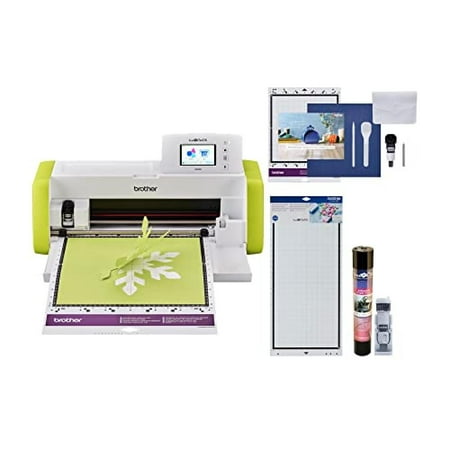
Brother ScanNCut DX SDX85 Electronic Cutting Machine with Built-in Scanner - Lime Green
- Brand:
- Brother
- Model Number:
- SDX85
- UPC:
- 012502660361
- EAN:
- 0012502660361
- Walmart SKU:
- 389843914
Market rate of $339.99 positions buyers 0.0% under the established average.
| Price Type | Price | Date |
|---|---|---|
|
Highest Price
|
$438.74 | |
|
Lowest Price
|
$300.00 | |
|
Most Recent Price
|
$438.74 |
| Price Type | Price | Date |
|---|---|---|
|
Highest Price
|
$349.00 | |
|
Lowest Price
|
$299.99 | |
|
Most Recent Price
|
$339.99 |
Tracking History: We have tracked Brother ScanNCut DX SDX85 Electronic Cutting Machine with Built-in Scanner - Lime Green since 6/11/2024. The most recent price update was on Apr 28, 2025.
Price Range: Over the past 90 days, the price has ranged from $299.99 (lowest on 4/16/2025) to $349.00 (highest on 6/11/2024). The average price during this period is $344.54.
Current Trend: No Walmart.com pricing data available for analysis.
Customer Insights: Rated 4.3/5 from 186 reviews.
WHERE HAVE U BEEN IN MY GRAFTING LIFE!!! With now have strength issues, this an upgrade from my lil 6" die cutter. With just a touch of a button like BAMBOOM!! I JUST MADE 10 PAIR OF EARRINGS!
[This review was collected as part of a promotion.] Before I got this machine, I hadn't ever previously owned a cutting machine. I had wanted one for quite awhile, since I like crafts and especially papercrafting, but I was a little intimidated by cutting machines and figured I was getting by well enough with a cutting mat and knife. When I received this Brother ScanNCut machine, I indeed felt a bit intimidated by it at first since it seemed like it had a lot of features that I wasn't sure I'd be able to grasp well enough to use the machine properly. It came with a manual that walks you through your first project, and I was surprised at how easy it was to make my first cute box, it only required a few simple steps. At this point most of my apprehension melted away and I couldn't stop thinking of the possibilities for using this machine! My favorite feature is probably the fact that it can connect to Wifi and receive patterns sent from your computer. It wasn't very hard to set up, and the Canvas Workspace online program lets you make your designs on the computer and then instantly send them to be cut on the machine. It is really all so much easier than I expected. There are lots of options to get exactly what you want, but it's simple enough to just scan or upload an image and have it automatically accurately cut by the machine in a matter of minutes. I'd say this machine has enough awesome features that it's good for a cutting machine veteran looking to upgrade, but it's simple enough to use that a beginner like me can grasp it in a matter of minutes. Plus, it's saving me time that I would otherwise be spending laboring with a cutting knife in hand!
[This review was collected as part of a promotion.] Setting up and getting started was easy, the machine does the work for you. I used to admire my friends for all of the projects they had on display, now my wife and I can do the same. There are downloaded images to use at the touch of a button and the machine adapts to the type and thickness of material being cut. Using the software is easy and adaptive. This tool also comes in very handy for my kids and their class projects. I would definitely recommend this product to anyone who has interest in this type of hobby or need.
[This review was collected as part of a promotion.] This is such a neat printer/cutter. The initial set up is pretty easy to do. We had a little trouble at first getting our wireless internet set up, but we eventually got it. We were just looking in the wrong place. It comes with a mat, spatula, and a stylus pen for the display. I will be honest, we had some trouble getting it to cut the pattern. It is super easy to set up what pattern you want. It just takes a few steps. I had to run the mat through the printer and pattern several times before it actually cut. I'm not sure if it was because the blade was new or what. I presumed it would have cut first thing. I put it on different settings and it just wasn't cutting the card stock. After several attempts it finally did cut. I pulled the paper up and used the spatula to lift my pattern off. What is super cool with this Brother is that you can actually scan your own designs and use your computer to print/cut out whatever you like. It will cut vinyl, some fabrics, cardstock, etc. I'm definitely going to get some materials and make some Christmas crafts with this. The possibilities are endless with this cutter. This is a crater's dream come true. I was intimidated at first, but now I can't wait to make designs for tshirts, decals, and everything in between.
I like the product but when i ran into a problem with the machine witch isn't the problem in itself. The Problem is trying to get through to Walmart to return this for a replacement. The roller Bar doesn't work all the time and won't feed the mat in every time. So walmart needs to get back to people when they say there going to email you and they don't.
The machine does what it says. I purchased it to cut out wallet patterns as that seems to be something that truly interests me. The only downfall i can see is the blade gets blunt very quickly. I don't think i make that many wallets for it to get blunt so fast, but I've replaced them like 10 different times since my purchase. I do cut faux leather & cork.
I didn't like this at all. I thought it was going to be easy to use. I found it difficult to understand. My package also had some missing parts. It may be good for someone else, but it just wasn't for me.
I'm using it for card making. On the bad side is you don't include a manual. Now how silly is that I would think at the cost of the machine you would.
A User Manual would be extremely helpful. I already own an older model of Scan n Cut, so I'm not inexperienced. Still, the new model is different and I can not get it to cut what I need. I'm sure the answers to my questions are out there and I will find them when I have the time and patience to search for them. It would just be so much easier if the instructions were easily available.
I absolutely HATE this machine! I wish I had not spent my money on it. It is difficult to use, difficult to connect to the internet, difficult to understand. When it works it makes a nice cut, but those times are far and few between. My daughter and I are both disappointed in it. I let her take it home to figure out and she hates it as much as I do. Brother and wireless do not work well together. Again- I HATE THIS MACHINE (and my brother embroidery machine). I will NEVER buy another Brother product.
Detailed price history for the past 90 days
No Walmart.com pricing data available for analysis.
Third-Party Sellers prices have ranged from $332.64 (Sep 5) to $438.74 (Sep 13) over the past 90 days. Current price is 25.2% above the 90-day average of $350.32.
| Date | Price | Change | % Change |
|---|---|---|---|
| $438.74 | $+0.00 | +0.0% | |
| $438.74 | $+106.10 | +31.9% | |
| $332.64 | $+0.00 | +0.0% | |
| $332.64 | $+0.00 | +0.0% | |
| $332.64 | $+0.00 | +0.0% | |
| $332.64 | $+0.00 | +0.0% | |
| $332.64 | $+0.00 | +0.0% | |
| $332.64 | $+0.00 | +0.0% | |
| $332.64 | $+0.00 | +0.0% | |
| $332.64 | $+0.00 | +0.0% | |
| $332.64 | $+0.00 | +0.0% | |
| $332.64 | — | — |