
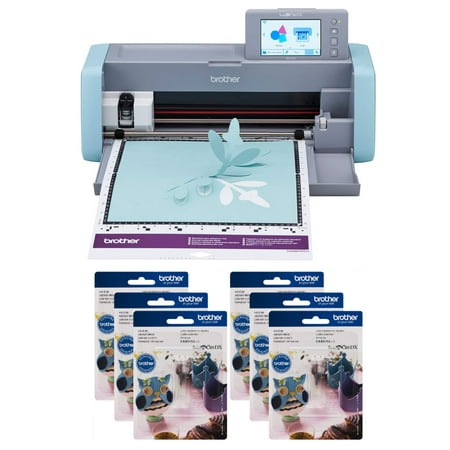
Brother ScanNCut SDX125e DIY Cutting Machine with Scanner and 6 CADXBLD1 Replacement Blades
- Brand:
- Brother
- Model Number:
- SDX125E
- UPC:
- 688099529383
- EAN:
- 0688099529383
- Walmart SKU:
- 150934057
| Price Type | Price | Date |
|---|---|---|
|
Highest Price
|
$549.00 | |
|
Lowest Price
|
$469.98 | |
|
Most Recent Price
|
$495.95 |
Price history data is not available for this product at the moment.
Current Trend: No Walmart.com pricing data available for analysis.
Customer Insights: Rated 4.3/5 from 192 reviews.
I bought this machine mainly for cutting my stamped images, my printed ephemera pages, and my traced die cut images. It works really well for everything I hoped it would. I'm still learning and I'm sure there will be many more projects I haven't thought of.
This was the best price on this bundle that I have seen. I wanted this machine for over a year and I have been price watching. When this bundle became available I couldn't pass it up.
[This review was collected as part of a promotion.] When I first got this I thought I would never figure this thing out, but oh my goodness it practically does everything itself! You can use it with internet or without. You can use ut on your favorite hobby, or I could see someone with a craft type business really using this a lot! For quilting, my next hobby, it will be perfect! It has patterns on it specifically for quilting. Other patterns? Oh yes, over 600 patterns plus you can even draw it up, and use your own! It reads the thickness it needs to cut, no measuring involved on your end. It cuts everything I tried easily. Leather, paper, foam, felt. It has a little drawer to keep all your tools in so they are handy. It is a dream come true. I love it!
I purchased this machine to help reduce my "fussy" cutting on craft projects due to arthritis and time. I have only had the machine a brief time so I have not had time to experience all the great things this machine can do. It does a wonderful job of scanning items and then cutting them out. The few projects I made turned out wonderfully and I am looking forward to learning to do more things with the machine. I love the fact that it connects with my other electronics via blue tooth.
Hobby cardmaker here. I spent time trying to determine which of the many similar machines would best fit my needs; cutting images from cardstock. Fellow cardmakers had raved about this machine. I watched many and made comparisons to similar machines. I gifted it to myself for Christmas. One of the major complaints people made was that the mats needed to be constantly replaced. When I ordered the machine I purchased it as a bundle with 6 mats and 6 blades. I am very glad that I did this as I think I have avoided a huge amount of frustration regarding the mats. As I mentioned, I watched many videos that are available, I especially like The Papered Chef, and was able to follow the setup and begin putting my machine to use quickly. Without the help of videos my experience would have been different and frustration as the instructions provided were not clear to me. Luckily my machine has worked as expected and I have been very pleased with the fact that I can easily cut stamped images from cardstock and DSP; this has upped my card making enjoyment as not all stamp sets have coordinating dies. There is a huge learning curve to use the machine but available videos make it easier. I would purchase it again and recommend to others
Opened the box, took everything out & made the blue box. Easy as pie. I'm a greeting card maker & it works so well for me & is very quiet, unlike the CM650W I had before. No more fussing with settings. I tell it what I want to do & it says what adjustments to make & off we go.
The Scan n Cut comes with a simple project to start, and it is a good introduction. The project worked fine. But there should be a link or a booklet with instructions to learn the machine. It only comes with one mat and does not explain what mats you need for fabric, or thinner paper, or how to use some of the other functions: embossing and foil. I've tried registering for the software program that it says to scan to open but it does not send me the verifying code so I can't sign up for the program. I will continue to use the machine but will have to learn on my own.
[This review was collected as part of a promotion.] I was amazed by the amount of features this Brother Scan n' Cut has, and I love that there are preloaded designs on the machine itself unlike other paper cutting machines I have used. There is a large selection of preloaded designs, and they can be resized to fit your needs for your project. It is a bit difficult to get the hang of using the small computer screen but after a few attempts and rereading the instructions I understood how to operate. My major issue with this machine is the provided cutting mat, it comes with the high tacky mat and I would've preferred a mat with less stickiness to it. I tried using the provided piece of paper in the box, and had no issues. However, when I used card stock it stuck to the mat so I boiled some water and steamed the mat to remove the paper residue. I learned from that point to always test the paper first in the corner before laying down the entire sheet. I found that shiny scrapbook paper works best with this particular mat since it is highly sticky, I'm hoping after more use it will lose some of its tackiness so I can use other papers. I am also unsure of how long a mat will last, because it seems somewhat thin and not very durable for numerous projects. Also, since the mat is highly sticky it makes it rather tedious to remove intricate pieces from a project once it's done cutting, I am going to stick to more simple designs until the mat loses some tackiness to avoid ripping projects with intricate details. All in all, I am impressed by all this machine can do and look forward to continue learning more about how to use it and make lots of projects.
First, I love the machine, but the 3 stars is based on the overall system which includes the mats that you use. They don't last long, they are not self healing, and very difficult to find replacements and they are expensive. You can only use the mats that are for this particular machine, otherwise it won't load. I use it primarily for direct cutting of embellishments for journals. The amount of time saved when fussy cutting is substantial. However, the machine reads solid lines, so if your graphic has no distinct border or outline it will cut into the graphic.
I have tried every combination to cut stickers. it is a joke! it will NOT cut using a kiss cut. It cuts through the image even thou I tell it to cut a white border it still cuts thru my images. I would not waste my money on this machine again! BUY A CRICUT!!!!!
Detailed price history for the past 90 days
No Walmart.com pricing data available for analysis.
Third-Party Sellers prices have ranged from $495.95 (Jul 12) to $549.00 (Apr 30) over the past 90 days. Current price is close to the 90-day average of $499.74.
| Date | Price | Change | % Change |
|---|---|---|---|
| $495.95 | $+0.00 | +0.0% | |
| $495.95 | $+0.00 | +0.0% | |
| $495.95 | $+0.00 | +0.0% | |
| $495.95 | $+0.00 | +0.0% | |
| $495.95 | $+0.00 | +0.0% | |
| $495.95 | $+0.00 | +0.0% | |
| $495.95 | $+0.00 | +0.0% | |
| $495.95 | $+0.00 | +0.0% | |
| $495.95 | $+0.00 | +0.0% | |
| $495.95 | $+0.00 | +0.0% | |
| $495.95 | $+0.00 | +0.0% | |
| $495.95 | $-53.05 | -9.7% | |
| $549.00 | $+53.05 | +10.7% | |
| $495.95 | — | — |