
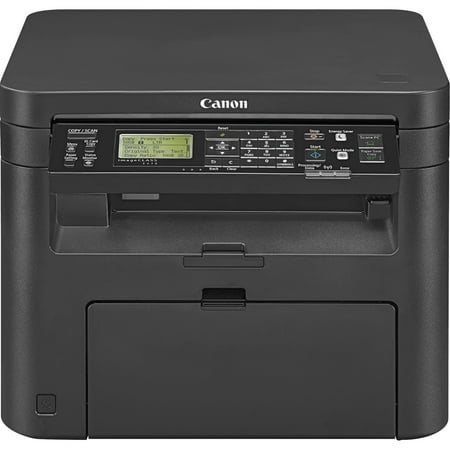
Canon, CNMICD570, imageClass D570 3-in-1 Laser Printer, 1 Each
- Brand:
- Canon
- Model Number:
- D570
- UPC:
- 013803275117
- EAN:
- 0013803275117
- ASIN:
- B06XY4B179
- Best Buy SKU:
- 5848300
- Walmart SKU:
- 459398671
| Price Type | Price | Date |
|---|---|---|
|
Highest Price
|
$394.00 | |
|
Lowest Price
|
$158.68 | |
|
Most Recent Price
|
$389.95 |
Price history data is not available for this product at the moment.
Current Trend: No Walmart.com pricing data available for analysis.
Customer Insights: Rated 3.43/5 from 28 reviews.
The manual/documentation is poor so get plan to spend some time going through the setup process. I've now installed the drivers for this printer 3 times on 3 different Windows laptops and it takes only a few minutes start to finish, but knowing what to do was the trick. Here are the main things to know: Go to the canon website (link below or google it) and download both the driver package ("drivers" tab on canon website) and the "MF Scan utility" ("software" tab on canon website). There is a CD included in the box but that is useless for computers that don't have a CD. If configuring wireless printing, configure wifi settings on the printer first. Install driver software next, it will ask if you're doing wifi or USB cable setup. (Don't connect your computer to printer using USB cable before installing driver software on your computer). Once the drivers are installed and you have the print functions working, you'll need the "MF Scan utility" to make the "scan from printer" capability work. The printer has a lot of capabilities and works well (administration web page for example) but it's very poorly documented. https://www.usa.canon.com/internet/portal/us/home/support/details/printers/black-and-white-laser/imageclass-d570/imageclass-d570
Purchased for use as home copying machine for enlarging small print. It set up easily. Enlargement steps are in one percent per step so it is easy for me to get the right size.
This is a great little printer B&W laser printer for the home office. Easy to setup and effortless, to use.
Great printer, scanner, copier that connects easy, and handles duplex printing with ease. Nice (smaller) footprint. Easy controls and easy to use.
This copier will last for quite some time
Set up went well. Very quick printing, even from Eco mode. Quality on labels was a little “dusty”. That is the only reason for the 4 star. Loving it!
Glad I bought it, but sometimes it's hard to turn off 2 sided
This was going to be the perfect printer, front paper outload, size perfect. The printer would not pick up paper in the tray. Useless. Sams took it back with no problem.
Included starter cartridge had 10% toner left after printing just 1 page, despite advertised 1,700 page capacity. Starter cartridges are not covered under warranty and I was told by Canon customer service I would need to buy a new cartridge to replace the defective starter cartridge. This would be an additional expense and not reimbursed. I've had many Canon printers and cameras over the years with no issues. Quite disappointed this time.
This printer required a firmware update to get out of a frozen and panel locked DOWNLOAD MODE, which froze and required a restart, which failed to update the firmware, which finally woke the printer enough to apply wireless settings, which finally allowed the firmware to be updated through the printer. I have set up hundreds of printers on many OSes. This one, brand new and out of the box, was 2nd worst to set up. I don't think most people would have the patience or the wherewithal to get past the 2 hour process of setting it up. Now that it's working, it seems to print, though I've only run a couple sheets. Scan and copy seem to work too. I remain very cautiously optimistic about its long term use. Canon, I own your cameras and scanners, and they work great. This printer setup is unacceptable, and needs work.
Detailed price history for the past 90 days
No Walmart.com pricing data available for analysis.
Third-Party Sellers prices have ranged from $349.00 (Apr 20) to $394.00 (Apr 26) over the past 90 days. Current price is close to the 90-day average of $382.57.
| Date | Price | Change | % Change |
|---|---|---|---|
| $389.95 | $+0.00 | +0.0% | |
| $389.95 | $+0.00 | +0.0% | |
| $389.95 | $-4.05 | -1.0% | |
| $394.00 | $+45.00 | +12.9% | |
| $349.00 | — | — |