
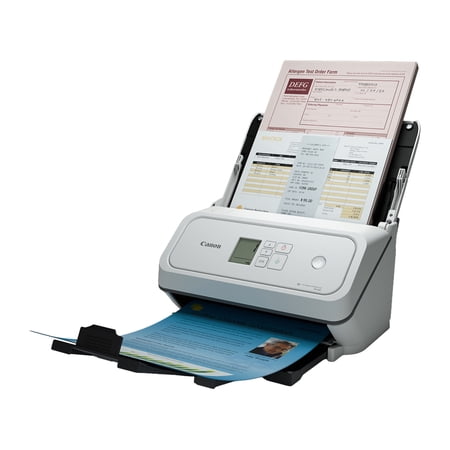
Canon imageFORMULA R40II Office Document Scanner
- Brand:
- Canon
- Model Number:
- 7292C002
- UPC:
- 013803388121
- EAN:
- 0013803388121
- Walmart SKU:
- 20525472549
| Price Type | Price | Date |
|---|---|---|
|
Highest Price
|
$356.00 | |
|
Lowest Price
|
$309.73 | |
|
Most Recent Price
|
$309.73 |
Price history data is not available for this product at the moment.
Current Trend: No Walmart.com pricing data available for analysis.
Customer Insights: Rated 4.66/5 from 29 reviews.
This scanner is small but mighty. I am extremely pleased with it - it's fast and accurate. The most pages I've put into it at once so far is 15; I was skeptical it could handle feeding them in the correct order but it did great. The only downside is the software for it has closed unexpectedly on me several times (I use a Mac), but I'm hopeful that will get fixed with an update. Very pleased with my scanner.
Great machine, performs wonderfully! Easy to start up, install and use
Love this scanner. Super easy to setup, just take out the box and plug in. Scanner is small and won't take up a lot of room. What I love the most about this scanner is it can scan multiple items of different sizing. Working in the transportation industry I have a lot of paperwork that needs scanned this scanner has helped me so much thru speed and scanning multiple sized items.
I was excited to receive this scanner in return for my honest review. The scanner was more compact and lightweight than what i was initially expecting. The setup was fairly easy, it took me about 10 minutes to get started using the scanner after the software was installed on my laptop. The whole setup process was pretty straightforward. As for the scanner's performance, this is probably the fasted and most visually detailed piece of office equipment I've ever used. The speed in which it scans, and the details that it captures is incredible, it makes my original scanner look like a dinosaur haha. I have been using my printers 1 page at a time scanner and it takes forever. I've used both the single sided scan, and the duplex scan and the duplex scan is just as fast and detailed as the single sided scan. I like how it folds up on my desk as to not take up too much room. As of right now, I don't have any critiques or negative things to write about this Canon Scanner. It's the fasted piece of office equipment I've used if I'm being honest. If you're in the market for a compact, efficient scanner than I highly recommend giving this one a chance!
I received a free sample of this scanner in exchange for writing a review, and overall I've been very impressed with it. The setup process was quick and straightforward. It only took a few minutes to get everything connected and ready to use. The instructions were easy to follow, and I had no trouble installing the software on my computer. The scanner quality was excellent for my needs. Documents came through clear and sharp, and the scanning speed was faster than I expected. I also tried various sized photos and they scanned beautifully as well. Even with the varied sizes, it handled everything without hesitation. One feature I especially appreciated was the duplex (2-sided) scanning. It saved a lot of time because I didn't have to manually flip pages over to scan the back side. The software automatically detected a two sided document without my input. Overall, this scanner was easy to use, reliable, and worked very well for everyday scanning needs. I would definitely recommend it to anyone looking for a dependable home or small office scanner.
The setup process was very easy and straight forward. The only thing i didn't like is that there was a lot packaging material, including tape on parts of the scanner. removing all that was a bit annoying, but the scanner was in perfect condition. The scanning speed and quality is great. I use it in my home office, and love that i can can two sided. It's much faster and better quality my older scanner i have been using.
I received this product for giving an HONEST review on this product. This Canon Scanner was super Easy to set up . It took about 5-6 minutes. It doesn't take up a lot of space on my desk it worked correctly and it I remember correctly, it worked without any glitches or problems. I didn't receive or didn't welcome any problems during usage or putting it together.
I was provided with the reviewed scanner as remuneration for the testing and review. \The download site's automatic OS detection was incorrect. It reported MacOS Catalina, when I currently run Tahoe, which is significantly newer (this seems out scope for this review, but matters later on. Tahoe is selectable from the menu, but should have been the default choice. The step-by-step use instructions in the installer are great. The first time I installed the OnTouch app, it wouldn't work, throwing an app error about not being able to use the driver. I tried a opuple of tricks. and eventually asked Gemini for an answer,I learned that there are two versions of the installer, an older DMG, and a newer PKG. One installer, the older one, apparently corrupts the application on install if you're using a newer OS. I used the PKG installer and the app ran normally. The Canon support site should have mentioned this and pointed me to the proper software. Other than that, the one-touch app is simple to set up and easy to operate. Hardware is similarly easy, with only a couple of mior pain points. The amount of stabilization tape in this thing is astounding, and I have trouble gripping the pull tabs to remove it. Then, fitting the top of the feed tray into the printer was quite difficult, even after consulting the directions twice. The USB-C cable is appreciated, and was easy to connect. Direct connection worked well, connecting through my Anker USB hub...did not. At first wouldn't work with the hub unpowered. After I connected a power cable to the hub, the computer was able to see the scanner. After removing power from the hub once again, the computer remained able to see the scanner, and it works normally. When I put in my first batch of documents, I noticed that there's no indicator on the feed tray as to which direction the documents should be fed. By luck, I chose the correct orientation, and it worked, but an indicator on the feed tray would be nice. Scans, both black and white and color, are simply great — crisp, sharp, and easy to read. The scanner will very occasionally slip a page and blur the scan, but this is true of any machine, and it doesn't seem to happen often. Unsurprisingly, the best scans come from flat documents with relatively pristine edges. The scanner also handled trifold documents easily. Card scans are similarly easy, and of comparable quality. Just make sure orient the card properly, or it won't scan. I was able to fit 60 pages of single-sided 8.5x11 20# bond i the hopper, and scan them in about a minute. A similar quantity of double-sided docs were simlarly fast, which make the job easier to complete. Be sure to extend the output tray, or the scanned pages will get out of order, as the pages will not sit consistently on output. I also scanned a sheaf of 24# without incident. I don't have any 40# around at the moment, but I doubt it would cause any problems. I appreciate that the scan can be initiated either from OnTouch or from the scanner. As well, I like that the rollers are easily replaced when they wear out All in all, a capable addition to my offfice that will simplify the process of digitizing a significant quantity of stored documents.
The setup process was amazingly easy and quick. I used this for uploading important documents onto my at home use computer. I did use the 2 sided scanning a few times. It worked really well. I liked this scanned a lot. I would recommend to anyone. I also love how portable and lightweight this scanner is. I can pack it into a small basket box thing i bought for it. Once I start traveling again, it'll be so easy to pack it up and go.
I was given a free Canon R40II scanner, in order to perform my honest review of the product. The product was slim and compact, in compassion to other scanners that i have used before, with few buttons on the front face. There was not a lot of complicated buttons for me to try and figure out what they are or mean. The set-up process was quite simple and not complicated at all. The scan quality and speed were superior to current all in one scanner, printer etc. The ability to do duplex scanning was a feature I particularly liked compared to my traditional flatbed scanner. I found though that in the set up and using the duplex scanning feature, I had missed seeing the two little guide paper holders on the flap of the scanner. Hence, at first my original scans were distorted and paper crumpled. I think if they were made in a different color, such as gray, white or a lime green to make it more visible (since they are folded in) would be helpful.
Detailed price history for the past 90 days
No Walmart.com pricing data available for analysis.
Third-Party Sellers prices have ranged from $309.73 (Sep 5) to $356.00 (Aug 9) over the past 90 days. Current price is close to the 90-day average of $321.32.
| Date | Price | Change | % Change |
|---|---|---|---|
| $309.73 | $-46.27 | -13.0% | |
| $356.00 | $+46.23 | +14.9% | |
| $309.77 | $+0.00 | +0.0% | |
| $309.77 | — | — |