
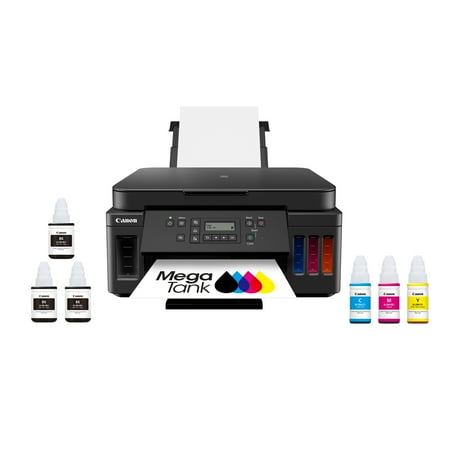
Canon MegaTank PIXMA G6020 All-In-One, Wireless Color Inkjet Printer for Home Office Use
- Brand:
- Canon
- Model Number:
- 3113C002
- UPC:
- 013803317824
- EAN:
- 0013803317824
- ASIN:
- B07SQZNSQY
- Best Buy SKU:
- 6356231
- Walmart SKU:
- 473729371
Market direction turned downward 4 days ago with current $249.99 representing 1.1% over standard pricing.
| Price Type | Price | Date |
|---|---|---|
|
Highest Price
|
$278.39 | |
|
Lowest Price
|
$199.00 | |
|
Most Recent Price
|
$249.00 |
| Price Type | Price | Date |
|---|---|---|
|
Highest Price
|
$299.00 | |
|
Lowest Price
|
$189.99 | |
|
Most Recent Price
|
$249.99 |
Tracking History: We have tracked Canon MegaTank PIXMA G6020 All-In-One, Wireless Color Inkjet Printer for Home Office Use since 4/16/2024. The most recent price update was on Aug 28, 2026.
Price Range: Over the past 90 days, the price has ranged from $189.99 (lowest on 11/11/2024) to $299.00 (highest on 8/1/2024). The average price during this period is $238.83.
Current Trend: Walmart.com prices have ranged from $199.99 (Jul 23) to $299.00 (Aug 13) over the past 90 days. Current price is close to the 90-day average of $247.24.
Customer Insights: Rated 3.7/5 from 283 reviews.
I purchased this Canon PIXMA G6020 MegaTank printer knowing exactly what I was getting. I have owned the very same printer for over 3 years,. It has, and still does, perform perfectly. This printer isn't replacing the other one. I needed this new printer because it seemed like everyone in our home needs to print things when someone else needs to too. This new printer will solve that problem. It will also provide the great results we've become accustomed to. It produces great prints of photos, and documents, without costing a small fortune in ink. We've consistently printed over 5000 sheets before needing to purchase more ink, and the cost of that ink is extremely inexpensive compared to the ink cartridge printers we've owned in the past. It's also very simple to add new ink to the tanks. The bottles won't release the ink until they are placed on the refill ports on the printer, and it only takes a few seconds for the ink to transfer from the bottles to the tanks. I'll list some Pro's and Con's below. Pro's: 1- Extremely low cost prints. 2- Easy to setup and operate. 3- Included software CD includes helpful editing applications. 4- Wireless capability 5- Prints from a paper cartridge, and has a rear feed option for thicker cardstock. 6- Prints great photos. 7- Scans great photos. 8- Prints documents %26 photos quickly. 9- Printer heads are replaceable, and easy to remove/install. (Haven't needed to, but the instructions are simple). 10- Doesn't take up a lot of space. 11- Canon tech support is a phone call away, and free during the warranty period. 12- The built-in display folds out to make it more visible, and folds in to keep it out of the way when the printer isn't being used. Con's: 1- It wasn't free.
I can't imagine having a printer that does NOT print double sided. I don't consider me taking the paper and putting it back in the tray to print the other side 'double sided' printing. THIS printer prints both sides without you having to touch the paper at all. Not only that, but this printer WILL connect easily to a Google Chromebook!! I can print right from my Chromebook without having to use my actual PC. It has large tanks so I don't have to worry about replacing cartridges. It has a front AND back loading tray and the front tray will hold 250 sheets, which is 1/2 of a ream. I can't love this printer enough!
Setting it up was not too hard but them I'm not a whiz either. I got mostly for printing pictures and that was the first printing I did after "test sheets". The photo came out very good so I believe I got what I wanted. I will set up my other computers to print from it.
Another great printer from Canon. Easy to setup, operate, and own. I can easily print using the front or rear loader from all my devices. I love the large ink tanks. The colors and pictures are beautiful. I am a 99% print or copy person. I rarely need more than the large buttons on the control panel. It would be nice if the control screen had a backlight I could turn on when I need it. The control panel itself and the features are easy to understand and use.
I have had this printer for over a year, and it is connected to my Wi-Fi. At first, it worked smoothly. I thoroughly enjoy the tanks that refill with ink bottles. I moved my printer to a different room in my house and began having connection issues. I thought maybe it was due to a poor Wi-Fi connection. I moved my router closer, but I still had issues. I then checked for updated drivers and found the Wi-Fi Assist tool on the HP website. I followed the software's instructions exactly, and now my printer is printing fast and smoothly again. I haven't had any issues since. I have been a true Canon fan for decades, and this printer shows its true solidity.
The MegaTank's refillable ink tanks are a big money-saver compared to traditional cartridges. However, compared with modern “smart” printers, this model doesn't include features like automatic duplexing (double-sided printing), high-resolution photo modes, advanced wireless printing with easy mobile-to-printer integration, or a touchscreen control panel. If you expect a premium, feature-rich printer experience, you might be disappointed. So I returned
The ink tank idea appeals to me, filling was very easy. After limited use, some copies are too light and there is no adjustment for it when used with a Mac. Two aspects frustrate me - a lot - the display is not backlit, requires a flashlight, and the printer turns itself off (power saving-great idea!) but needs to be turned on manually for new print job which requires walking to the machine.
We exchanged this Canon printer for an older version that had ink cartridges. This printer is more computerized and therefore more complicated. The bottles of ink my prove beneficial, but it is too soon to tell. I have been frustrated at factory settings (2 sided printing) and even with the online manual cannot figure out how to turn it off. I think these kind of automatic settings could have been discussed in initial setup guides.
Setup of the printer itself was pretty simple, but connecting to my computer has been frustrating and difficult. Canon will only help me resolve my setup issues if I pay them $65 for a support contract. Debating whether to keep or return.
Has to be ink flushed every time to print So it uses up all the ink on the tanks. Teriw design. Needs to keep it from drying out or do something so you don't need to ink flush every time. Defective unit.
Detailed price history for the past 90 days
Walmart.com prices have ranged from $199.99 (Jul 23) to $299.00 (Aug 13) over the past 90 days. Current price is close to the 90-day average of $247.24.
| Date | Price | Change | % Change |
|---|---|---|---|
| $249.99 | $+0.00 | +0.0% | |
| $249.99 | $+0.00 | +0.0% | |
| $249.99 | $-49.01 | -16.4% | |
| $299.00 | $+69.01 | +30.0% | |
| $229.99 | $+30.00 | +15.0% | |
| $199.99 | $+0.00 | +0.0% | |
| $199.99 | $-99.01 | -33.1% | |
| $299.00 | — | — |
Third-Party Sellers prices have ranged from $229.99 (Aug 3) to $252.99 (Jun 26) over the past 90 days. Current price is close to the 90-day average of $246.66.
| Date | Price | Change | % Change |
|---|---|---|---|
| $249.00 | $+0.00 | +0.0% | |
| $249.00 | $+19.01 | +8.3% | |
| $229.99 | $-23.00 | -9.1% | |
| $252.99 | $+3.00 | +1.2% | |
| $249.99 | $+0.99 | +0.4% | |
| $249.00 | — | — |