
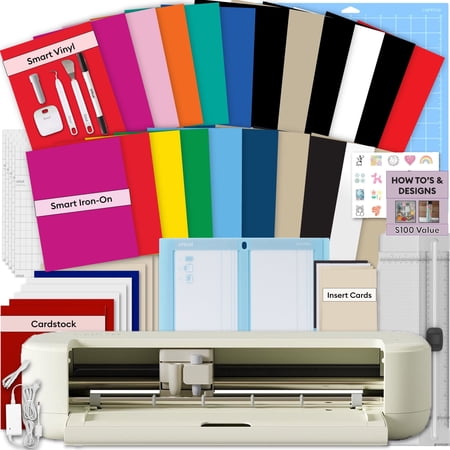
Cricut Explore 5 Cutting Machine Essentials Bundle + Extra Smart Vinyl & Heat Transfer Vinyl Sheets
- Brand:
- Cricut
- Model Number:
- z20-12404-G9
- UPC:
- 810109116393
- EAN:
- 0810109116393
- Walmart SKU:
- 19632019213
| Price Type | Price | Date |
|---|---|---|
|
Highest Price
|
$299.99 | |
|
Lowest Price
|
$220.20 | |
|
Most Recent Price
|
$299.99 |
Price history data is not available for this product at the moment.
Current Trend: No Walmart.com pricing data available for analysis.
Customer Insights: Rated 4.6/5 from 84 reviews.
Compact, lightweight and fast. I wasn't prepared for how much my productivity would improve with this machine, but this was a good problem to have. Connectivity was simple, so getting the first cut in took way less time than I expected. This was a great buy and I'd highly recommended it
I purchased the Explore 5 to replace an Explore 2. More versatility, faster, simple to use (I think would be a great machine for a beginner) and really well priced of the lot. I started in 2008 with the little cutter, mainly scrapbooking and cards, progressed to decor (banners for parties, etc) and it was finicky sticking things on with glue. I also learned to do stencils for etching glasses and also for using fabric paint, a LOT of fun personalizing things. I am loving the pen abilities of this machine, the size (compact!) and how neatly it cuts, and as I get to know more materials and tools/abilities in Design Space, (high honestly overwhelmed me at first) I am having sooo much fun and I haven't even scratched the surface of what one can make with this great little machine!
(This review was collected as part of a promotion.) My first Cricut machine was a Cricut Explore Air 2. So this was my basis of comparison for the Explore 5 machine, and the bar was already set pretty high! I love that the Explore 5 loads and goes with the touch of just one button, which increases the cutting speed if you love making projects with lots of materials or mats. The scoring tool, is in the same clamp as the blade, which guarantees perfect precision for all score lines. This is extremely important for a paper crafter like myself. The pens and the foiling tool worked beautifully. I created projects with very intricate cuts and the Explore 5 handled them without any issues. It's a fantastic machine and I love that it takes up less room in my craft space than the comparable machines.
[This review was collected as part of a promotion.] Wow, the Explore 5 is such a great cutting machine. It features load and go, which makes it super fast! The speed that it scans print then cut just blew me away. The new style scoring is amazing and I no longer have to double my score lines. I love that it doesn't have a lid and is sleeker in looks, but it will need a dust cover in my house. I have made numerous projects on it and have tested so many materials, all with flying colors. The material bundle it comes with is pretty generous and I was able to complete quite a few projects with just the included materials. The new 2 Card card mat is just perfect and such a great addition to the machine. The fact that it comes with mats, tools, scoring, pen, and materials is perfect. You can start crafting right out of the box. The updated bluetooth has really helped connection issues and I was able to connect easily each time I selected the machine.
I bought this after just buying the joy extra to do larger project. Never using a maker or explore before i didnt bother about the issue with changing the blades/scorer etc as i was used to it from the joy. Fast speed and good cut. Much louder than the joy xtra but that was expected being a much bigger machine. My only dissappointment was the first time i used the pen i realised i could not leave the blade in like the other machines as the clamps are not independent like on previous machines but one solid mechanism. This means if you dont take the blade out that it also cuts the writing out about an inch to the right of the writing so be warned if you want to leave the blade in while you write then this is not the machine for you, if however you are happy to only use one clamp at a time then its a brilliant option. If i had known about this issue i would definitley have bought the explore 4 instead but after buying 2 machines in a month i wont be buying a 3rd lol. Overall i am more than happy with the machine and it only lost a star due to the clamp issue
[This review was collected as part of a promotion.] I was given the opportunity to test the E5. I love how quickly it cuts. The print then scan occurs very quickly compared to the Maker 4. The new scoring tool is really compact and amazing. I think it scores better than the Maker and Maker 4 (stylus and scoring wheel.) The scoring lines is very easy to fine. I like that the new pens that came out with the Joy work in the E5. It cuts, scores, foils (I use the foiling tool for debossing) quickly. There are some times when the cuts on cardstock aren't as sharp others, but I think that is a software issue in DS.
It's lighter and smaller and cuts lightening fast, I would just say read instructions carefully for the pen holder. It does move down which makes he one too long. It can be pushed up to work properly…so far I love it.
I don't understand why you had to change the size of the pens. I have so many of your pens that I use in my Maker. I use them a lot and this change is very frustrating to me.
I was really excited to get a new Cricut machine as my current ones are several years old. At first I was impressed with the speed of the new Cricut Explore, but unfortunately the issues started not long after I began using it. The main problem has been with Print Then Cut. It works one minute and then completely fails the next. I've wasted a lot of materials and printer ink trying to get it to work consistently. I've also spent time speaking with Cricut support via chat to troubleshoot the problem, but nothing has resolved it. To test whether it was my design or settings, I ran the exact same project on my older Cricut Maker, and it cut perfectly with no issues. This makes me believe the machine I received may be faulty. It's really disappointing because I had high hopes for upgrading my machine, but the inconsistency and wasted materials have been frustrating. Unfortunately I would like to return it.
I purchased this with high expectations, but it doesn't cut all the way through. I contacted support, and after spending nearly 3 hours troubleshooting and feeling like I was being blamed for the issue, they finally agreed to send a replacement cutter. I'm hoping that solves the problem, but I'm not very confident at this point. I have a feeling I'll end up spending another few hours with support if the replacement doesn't fix it.
Detailed price history for the past 90 days
No Walmart.com pricing data available for analysis.
Third-Party Sellers prices have ranged from $220.20 (Aug 16) to $299.99 (Sep 15) over the past 90 days. Current price is close to the 90-day average of $288.14.
| Date | Price | Change | % Change |
|---|---|---|---|
| $299.99 | $+0.00 | +0.0% | |
| $299.99 | $+0.00 | +0.0% | |
| $299.99 | $+79.79 | +36.2% | |
| $220.20 | $+0.00 | +0.0% | |
| $220.20 | $+0.00 | +0.0% | |
| $220.20 | $+0.00 | +0.0% | |
| $220.20 | $-79.79 | -26.6% | |
| $299.99 | $+0.00 | +0.0% | |
| $299.99 | $+0.00 | +0.0% | |
| $299.99 | $+0.00 | +0.0% | |
| $299.99 | $+0.00 | +0.0% | |
| $299.99 | $+0.00 | +0.0% | |
| $299.99 | $+0.00 | +0.0% | |
| $299.99 | $+0.00 | +0.0% | |
| $299.99 | $+0.00 | +0.0% | |
| $299.99 | $+0.00 | +0.0% | |
| $299.99 | $+0.00 | +0.0% | |
| $299.99 | $+0.00 | +0.0% | |
| $299.99 | $+0.00 | +0.0% | |
| $299.99 | $+0.00 | +0.0% | |
| $299.99 | $+0.00 | +0.0% | |
| $299.99 | $+0.00 | +0.0% | |
| $299.99 | $+0.00 | +0.0% | |
| $299.99 | $+0.00 | +0.0% | |
| $299.99 | $+0.00 | +0.0% | |
| $299.99 | $+0.00 | +0.0% | |
| $299.99 | $+0.00 | +0.0% | |
| $299.99 | $+0.00 | +0.0% | |
| $299.99 | $+0.00 | +0.0% | |
| $299.99 | $+30.00 | +11.1% | |
| $269.99 | $+0.00 | +0.0% | |
| $269.99 | — | — |