
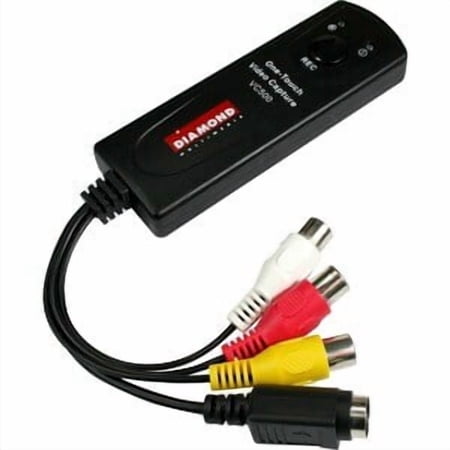
DIAMOND VC 500 VIDEO RECORDER ONE TOUCH VIDEO CAPTURE
- Brand:
- Diamond MultiMedia
- Model Number:
- VC500
- UPC:
- 757448005080
- EAN:
- 0757448005080
- Walmart SKU:
- 13215178
Current pricing at $34.99 reflects recent market activity, running 0.0% below the 90-day average.
| Price Type | Price | Date |
|---|---|---|
|
Highest Price
|
$39.99 | |
|
Lowest Price
|
$29.99 | |
|
Most Recent Price
|
$39.99 |
| Price Type | Price | Date |
|---|---|---|
|
Highest Price
|
$35.22 | |
|
Lowest Price
|
$33.99 | |
|
Most Recent Price
|
$34.99 |
Tracking History: We have tracked DIAMOND VC 500 VIDEO RECORDER ONE TOUCH VIDEO CAPTURE since 12/5/2022. The most recent price update was on Dec 10, 2024.
Price Range: Over the past 90 days, the price has ranged from $33.99 (lowest on 12/5/2022) to $35.22 (highest on 6/9/2024). The average price during this period is $34.76.
Current Trend: No Walmart.com pricing data available for analysis.
Customer Insights: Rated 3.2/5 from 145 reviews.
I needed a low cost way to save some old VHS cassettes for a friend whose player broke. I did a lot of searching before I found this device and it works as advertised. I already have video editing software installed so all I really needed was the analog to digital conversion.
I almost didn't buy the adapter due to some of the reviews, but I am glad I did! I used it to capture video from a Sony Digital 8 Cam. I am using Windows 8.1 and using CyberLink PowerDirect to capture and edit my old videos. I only installed the driver for the Diamond Multimedia and that's it. I did not even bother installing the provided software. I am very very happy now that I am able to transfer and edit all my old videos to digital!
I am using the unit to burn dvd's off my large collection of VHS tapes. I recently purchased the VC500 to replace a Roxio unit. The roxio unit gave me troubles from the beginning and I never received any satisfaction from the support group. I checked into reviews on the VC500, and so purchased it. I have been using it now for a coupla weeks and found it to be very satisfactory, with good renditions of picture and sound. I can't say too much for the program itself, but I am using another burning program so no problem.
I purchased this even though I read alot of bad responses. I actually purchased two. One from Kohl's which was more expensive and this one from Walmart. Just incase the reports were right about it not working. The VC500 works so much better than the more expensive one I purchased at Kohl's. It is very easy to use. Turn off your internet connection, sometimes it got in the way. Great product, great price.
Easy to set up and use. The unit has bright lights on it to tell you if it's on or not which is helpful. You literally press 1 button on the unit and it starts recording. The EZ Grabber software(made in 2011) though super basic, will work fine on Windows 7 and 8, but it won't work on Windows 10 as the video source selector dropdown menu won't populate. That's not a reason not to buy this, because you can use any Windows 10 compatible screen recording software like Camtasia or Screencast-O-Matic, which allow you to do your video editing in one place. Remember that this records exactly what you put into it, so if your tape/source is old, grainy or messed up in any way, that is what you're going to get as a final product. This unit works fine and like most digital devices, if something is wrong it's usually pilot error. The quality of the VHS player does make a big difference. Clean the heads before recording if you can and it will help a lot. I gave this a 5 star review because it worked fine for me and has virtually no learning curve. I would buy it again.
The video capture portion of this product works exactly as expected with very good results. What doesn't work is the "Dyyno Broadcaster." The instructions indicate that you have to go to a certain website to register your product or it won't work. When you attempt to go that site, it times out with "Page not found." I googled the internet and found that Dyyno went under. I'm not sure what this part of the software is supposed to do, but you can't use it. As for the instructions, they are horrible. There are obvious misspelling and steps that buried inside of other steps, where they should have been given their own line. It is obvious that nobody checked the documentation before releasing the software. The actual steps are horrible too. They don't match what I'm seeing on the screen and several times I had to guess what the next step might really be. Somebody needs to do their job!
The video capture hardware and capture software worked as expected. However, there was basically no documentation to support the use of the device and software. But, it was pretty simple and required very little technical knowledge. The video editing software, on the other hand, did not work and kept locking up. I ended up downloading some free video conversion and editing software from cnet.com that worked just fine, after capturing the original image.
The VC500 was installed in Windows 10 laptop but did not work. Tried it on a windows 1o desktop, no luck. Called tech support and after several fidgeting with tech support, I was told the unit was defective. Got another one, same problems. Returned both devices and bought a similar yet cheaper device made by SIIG at Fry's electronics. The SIIG device works right away. No fuzz.
I bought this device to convert my old home videos. I had no problems converting my compact-c video from the VHS player but I had problems converting my hi8 tapes. While capturing the video there where frequent glitches looking like diagonal lines almost like it was losing horizontal sync or something of that nature. The video plays perfectly when connecting the composite to a TV so I know there no problem with the original video or player. I tried different settings in the included PowerDirector 12 software but nothing would correct it. I opened a ticket with Diamond five days ago and the status shows open and I've received no response. I have to give Diamond one star based on the fact that it did not fulfill their claim that it would work with hi8 video and the lack of response to my problem from Diamond.
I was disappointed with this product and returned it for a refund. The installation was a nightmare and I could not wake up! I called the support line for assistance and all they could do was advise me that the installation DVD was defective [missing key components] and I should download the software from their site. Well I don't think so. If their quality control is so weak that the installation disks they send / package for consumers aren't reliable I don't think I want to award them with my patronage. Also, while I am on the subject, the installation instructions are some of the worst I have seen recently. Many of the steps did not even match up with the screens presented during the process. How stupid is that? I also set up a problem report / ticket on their system [ticket #9945983]. Have they contacted you? Well me neither. So much for after the sale support!
Detailed price history for the past 90 days
No Walmart.com pricing data available for analysis.
Third-Party Sellers prices have ranged from $34.99 (Jun 21) to $39.99 (Sep 13) over the past 90 days. Current price is close to the 90-day average of $38.99.
| Date | Price | Change | % Change |
|---|---|---|---|
| $39.99 | $+0.00 | +0.0% | |
| $39.99 | $+0.00 | +0.0% | |
| $39.99 | $+0.00 | +0.0% | |
| $39.99 | $+5.00 | +14.3% | |
| $34.99 | — | — |