
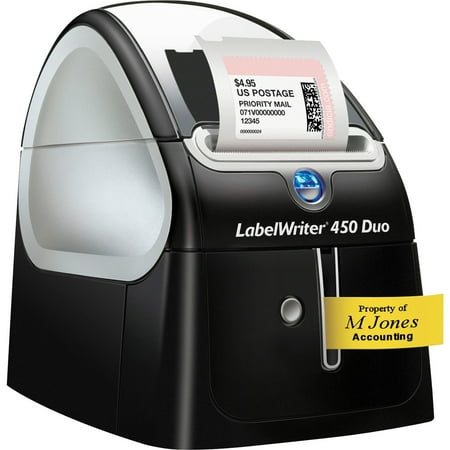
Dymo LabelWriter 450 Duo Direct Thermal Printer - Monochrome - Label Print - USB - Platinum
- Brand:
- Rubbermaid
- Model Number:
- 450 Duo
- UPC:
- 071701056603
- EAN:
- 0071701056603
- Walmart SKU:
- 23140201
Trending downward with a $0.00 move to reach $405.72. Current price runs 0.0% below the 90-day average.
| Price Type | Price | Date |
|---|---|---|
|
Highest Price
|
$409.77 | |
|
Lowest Price
|
$258.24 | |
|
Most Recent Price
|
$409.77 |
| Price Type | Price | Date |
|---|---|---|
|
Highest Price
|
$405.72 | |
|
Lowest Price
|
$237.79 | |
|
Most Recent Price
|
$405.72 |
Tracking History: We have tracked Dymo LabelWriter 450 Duo Direct Thermal Printer - Monochrome - Label Print - USB - Platinum since 3/4/2023. The most recent price update was on Sep 15, 2026.
Price Range: Over the past 90 days, the price has ranged from $237.79 (lowest on 8/25/2023) to $405.72 (highest on 1/24/2026). The average price during this period is $387.52.
Current Trend: Walmart.com prices have ranged from $405.72 (Sep 15) to $405.72 (Sep 15) over the past 90 days. Current price is close to the 90-day average of $405.72.
Customer Insights: Rated 2.3/5 from 80 reviews.
I've used this label writer before, and had a somewhat difficult time with the tape cartridge. But this one has been amazing for the short time I have used it. I have had no issues with the tape cartridge so far.
We use this Dymo Duo printer at all of our company locations inside and outside of the US. We are very happy with the printer and have never had any issues with the unit or supplies.
I admit we are not "heavy" users, but we have gone through 4 or 5 rolls of address labes and 2 of the tape rolls over the last 3 years and it has never failed to function as designed (except when I installed the roll upside down, oops) no problem, just installed correctly and everything was good again. Highly recommended!
I received this in my bzzkit from [@] , I am always apprehensive about hooking new things up to my computer as it always seems like I run into technical difficulties. Let me say, I installed the software, plugged it in, and was on my way. No problems. I didn't even need to read the manual to get started. So far I have had no problems with it, in fact I am really enjoying using it. I just wish I would have been able to get the bigger printer as I sell on both ebay and Amazon, and I always use the large labels with the barcodes on them. Having that printer would make my internet label printing so much more streamlined and quicker... All in all, I am very happy with this label printer...
This 450 Duo was an upgrade from a 320. I like the added Tape printing on the Duo, and it's faster with labels. The software seems more full featured on the Duo, with its more word processor-like look, but still seems a little "clunky" for a long-time Mac User. I had some trouble getting the former address databases to import and stick, so I did copy and paste most of them. Maybe that was a needless mistake on my part, but once in, they worked predictably. Loading Paper label rolls and Tape cartridges is really a snap on these units. I downloaded the very latest driver (8.3), after having loaded an earlier version, and the newest one looked a little better, but I'm not sure if there was much functional difference. Overall, as a Mac User, I've been quite happy with two DYMO units, including this new 450 DUO.
Hi, was dancing with installing, configuring etc without any luck on Windows11. Unfortunately I can not use any other machine on Windows10 and looks like with the latest windows 10 updates it's also failed. From other reviews I understood it's like not your problem but Windows11 issue. But are you really not able to do anything about this?
Very good & versatile, unfortunately the D1 tape stopped being recognised on PC, tried uninstalling software, another USB port, don't know what's wrong with it & because the connect software is now so horrible to use I'm looking to replace with a handheld label printer. I've seen on another post the OG software is still available, unfortunately i have 2 Dymo printers, 450 Duo & 4XL, the OG software is no longer compatible with the 4XL. Whoever came up with the connect interface needs a good talking to, not user friendly & a nightmare to navigate. Someone decided to try & fix something that wasn't broken, bring back the OG software that worked for all
It comes with labels but doesn't tell you the model number of those labels and the printer cannot determine which labels you have in there so it was annoying to try and tell it which labels are in there. Most people can't eyeball 1/2 inch differences. For as much as this costs it should be able to automatically tell what labels you've loaded. On top of that, it jammed immediately. I kept trying to print a label and since it was jammed it wouldn't work. Then, when I finally fixed the jam, it reprinted every single time I had previously tried to print so I ended up with 12 labels I didn't need with no way to cancel. Such a waste. The software is really bad and not intuitive. If you want to change the margins trying to drag and drop randomly will work and not work. There's no way to automatically make a font the maximum size for the height of the label you want to print, you have to keep trying to pull it larger. I write software for a living so seeing something like this is especially frustrating since these are all ux issues that should have been identified immediately. There's also no way I can see to adjust the kerning or spacing of letters which is really annoying and such an easy thing to include. There is a button on the front that flashes and I have no clue what it does. Oh, and there is no included manual, you have to go download it.
I upgraded my Dymo label printer although the one I had worked perfectly. I did so because I need the newest macOS. I expected that the newer model printer and print software would work. Imagine my dismay when I got the message that the software wouldn't work with the next upgrade. The message went on to suggest that I contact a company hired by Dymo to presumably develop software. (No info on how to contact them.) The most frustrating thing is that although I reached out to Dymo software support and registered this "showstopper" issue in an earlier review, no one from the company has cared enough to reach out and help me.
For some reason my DUO almost, all ways works with the label side, but I have to remove the printer and reset my computer for it to recognize the tape portion. In order to get the tape back, I unplug the USB, remove the printer in settings, then reset the computer. After boot finishes, I plug the USB in and then the Label V8 works with the tape but not the Connect software. Connect only shows the label printer. This is very frustrating as I don't want to go back to my Casio printers every time I want a tape print out.
Detailed price history for the past 90 days
Walmart.com prices have ranged from $405.72 (Sep 15) to $405.72 (Sep 15) over the past 90 days. Current price is close to the 90-day average of $405.72.
| Date | Price | Change | % Change |
|---|---|---|---|
| $405.72 | $+0.00 | +0.0% | |
| $405.72 | $+0.00 | +0.0% | |
| $405.72 | $+0.00 | +0.0% | |
| $405.72 | — | — |