
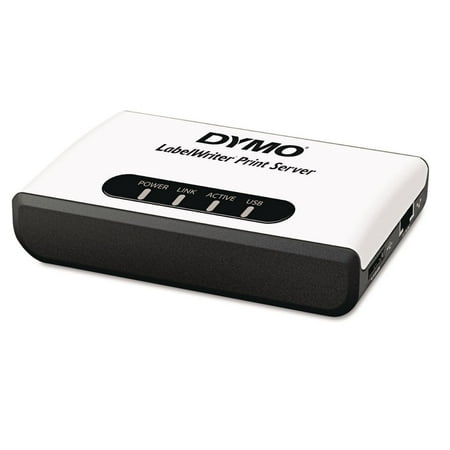
DYMO LabelWriter Print Server for DYMO Label Makers
- Brand:
- DYMO
- Model Number:
- 1750630
- UPC:
- 071701056283
- EAN:
- 0071701056283
- Best Buy SKU:
- 1416605
- Walmart SKU:
- 13214796
Market direction turned downward with current $184.99 representing 0.0% under standard pricing.
| Price Type | Price | Date |
|---|---|---|
|
Highest Price
|
$234.74 | |
|
Lowest Price
|
$149.99 | |
|
Most Recent Price
|
$228.63 |
| Price Type | Price | Date |
|---|---|---|
|
Highest Price
|
$212.01 | |
|
Lowest Price
|
$184.99 | |
|
Most Recent Price
|
$184.99 |
Tracking History: We have tracked DYMO LabelWriter Print Server for DYMO Label Makers since 1/31/2026. The most recent price update was on Sep 15, 2026.
Price Range: Over the past 90 days, the price has ranged from $184.99 (lowest on 8/27/2026) to $212.01 (highest on 1/31/2026). The average price during this period is $195.80.
Current Trend: Walmart.com prices have ranged from $184.99 (Sep 15) to $184.99 (Sep 15) over the past 90 days. Current price is close to the 90-day average of $184.99.
Customer Insights: Rated 3.0/5 from 18 reviews.
We've needed something like this in our office for some time as we all have laptops and may not always be able to connect to the Dymo to allow it to be used. This makes our lives much easier! Set up was simple with the directions provided.
The print server got updated so that it works in large networks with multiple subnets! When you are setting a static IP you can now configure a default gateway as well. The firmware update for this is available on the support page if you happen to have an older unit. http://sites.dymo.com/Support/Pages/ProductDetails.aspx?ProductID=1750630%28DYMO%29
Sharing our Labelwriter Twin Turbo from a computer was always problematic when any changes to the sharing computer occurred. Also, the sharing computer always had to be powered on for the printer to be used by anyone else in the office. Setup and configuration of this LabelWriter Print Server was quick, easy and painless. I would highly recommend this for any office sharing a Labelwriter.
We have been using 2 of these little Dymo LabelWriter Print Server with Dymo Label Printer 450 for years. They work just fine with Windows 10. I recently noticed that there is a difference in the firm version between them. I would like to get them both to the newest possible firmware. I wanted to request support using the support form but the Dymo Label Writer Print Server is no available as product for selection. Please provide a link to the newest firmware.
Just a note about setting the default gateway -- it can't be set from the application that installs from the CD but it can be set from the web interface.
The software for this is nowhere to be found. Found the labelwriter print server control center on a 3rd party site which saved my day. Please document this properly & update for use with windows 11.
Once you get the print server on your network & connect your DYMO LabelWriter, it should be smooth sailing. It should go without saying, but be sure to have the DYMO Label Software (or DYMO Connect for Desktop) already installed on any machine(s) you'll be using the DYMO printer with. I did want to point out a few things though. When you unbox the device, you'll find the MAC address listed on the bottom sticker. I would highly suggest creating a static IP for the print server via your router's management page (192.168.1.1 in my case), BEFORE connecting it to your network via Ethernet. Per the DYMO Print Server User Guide, by default, the static IP address for the print server is 192.168.1.100. Since that was already taken by another IP reservation on my network, I assigned 192.168.1.3 to my DYMO print server. Once that was done, I connected the print server to my LabelWriter & to my router, and plugged in the A/C adapter. Less than a minute later, all of the status lights had activity & I was able to navigate to 192.168.1.3 to access the DYMO LabelWriter Print Server web configuration page. I really didn't need to change any options here though, since setting the IP address is basically the bulk of the setup; I did modify the server Description field. Do yourself a favor and search Google for “Dymo Print Server User Guide” — the first result is what you're looking for — a PDF version of the setup guide. Avoid installing the Control Center software, as the same configuration can be done using the print server web UI (as outlined above). The only thing I used the guide for was to install the DYMO printer on my Windows machine(s), since the process was not as straightforward compared to Mac. Once on the network, the DYMO printer automatically shows up when you click on the + button on the Mac's Printers & Scanners window — I just changed the Name & Location fields when adding it, for clarity. However, on Windows, the DYMO will not be automatically detected, and must be added manually, by following the steps listed under the “Adding a Printer in Windows Vista” section of the DYMO Print Server User Guide; the Vista instructions still work in Windows 10. This is where having a static IP comes in handy — you'll be guaranteed that the DYMO Print Server will always have the same IP address, even after its DHCP lease expires. This ensures that your computers will always be able to “see” the printer on the network after it's been added. My server's been up & running since day 1 with no issues; works with both my Mac & Windows machines. Docking 1 star, given the not-so-clear setup process, and the outrageous price. I'm mostly bummed about Windows not automatically detecting the print server during the install step, unlike Mac. But overall, it's a set-it-and-forget-it kind of device. TL;DR — Install the DYMO Label Software (or DYMO Connect for Desktop) on any machine(s) you'll be using the DYMO printer with. Locate the MAC address of the DYMO LabelWriter Print Server (found on the bottom sticker of the device), and set a static IP address for the server on your network (doing this via your router, NOT the DYMO server itself, is preferable). Connect the DYMO LabelWriter Print Server to your DYMO printer via USB, to your router/modem via Ethernet, and connect the A/C adapter. Navigate to the DYMO LabelWriter Print Server web configuration page, using the IP address you just reserved — if it loads, it means it's been set up correctly — you do not necessarily need to change any options here. By default, the Administrator is “admin” as is the Password; unless you're on an Enterprise/office network, I wouldn't suggest changing this. Follow the instructions in the Dymo Print Server User Guide to add/install the printer on your computer(s) — refer to “Adding a Printer in Windows Vista” if you're using Windows 7 or 10.
I'm an IT Administrator professionally and we are tasked with supporting multiple offices with these little boxes. What originally was like a wonder drug has become a headache. We have a few of these devices that must be rebooted every few days or they simply stop printing. The manual specifies how to update the firmware but the link to download new firmware has been removed. Perhaps most importantly this device was labeled as compatible with all LabelWriter printers but the description was edited at a later time with a little caveat that it doesn't support the 550 model printer (which is positioned as the newest mainstream printer). As a strange aside, the OUI for the MAC address is "MagickJack". 2 stars only because I do have multiple that work without issue.
Why on gods green earth do you advertise this as a wireless print server. How dare you mislead the general public into buying something that its not capable of doing. I never write reviews when I buy things, but your product and its lack of ability to do what you advertise it to do is the ONLY REASON why I am writing this. Outrageous!!!!
bought the print server and used this for my 450, this one broke so i bought a 550. Nowhere in the documentation it says the 5 series are not supported. So now i have a 550 and a print server that are not working. When will this work? Also downloading the print server firmware link is down it seems.
Detailed price history for the past 90 days
Walmart.com prices have ranged from $184.99 (Sep 15) to $184.99 (Sep 15) over the past 90 days. Current price is close to the 90-day average of $184.99.
| Date | Price | Change | % Change |
|---|---|---|---|
| $184.99 | $+0.00 | +0.0% | |
| $184.99 | $+0.00 | +0.0% | |
| $184.99 | — | — |
Third-Party Sellers prices have ranged from $228.63 (Jul 25) to $234.74 (Jul 6) over the past 90 days. Current price is close to the 90-day average of $230.40.
| Date | Price | Change | % Change |
|---|---|---|---|
| $228.63 | $-0.64 | -0.3% | |
| $229.27 | $-5.47 | -2.3% | |
| $234.74 | $+4.81 | +2.1% | |
| $229.93 | $+0.00 | +0.0% | |
| $229.93 | $+0.01 | +0.0% | |
| $229.92 | — | — |