
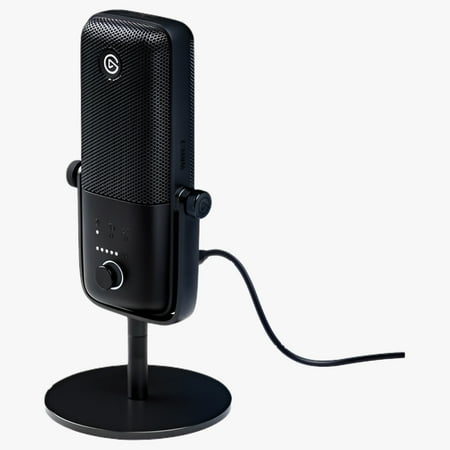
Elgato Wave:3 Premium Microphone & Digital Mixing Solution
- Brand:
- Elgato
- Model Number:
- 10MAB9901
- UPC:
- 840006618072
- EAN:
- 0840006618072
- ASIN:
- B088HHWC47
- Best Buy SKU:
- 6416421
- Walmart SKU:
- 804201974
| Price Type | Price | Date |
|---|---|---|
|
Highest Price
|
$194.54 | |
|
Lowest Price
|
$115.50 | |
|
Most Recent Price
|
$149.99 |
Price history data is not available for this product at the moment.
Current Trend: No Walmart.com pricing data available for analysis.
Customer Insights: Rated 4.6/5 from 85 reviews.
Before I got my wave 3, I was using a cheap little xlr microphone that was good for what I needed, but I was having a hard time easily managing my audio during my streams, and my voice wouldn't get picked up unless the microphone was right up against my mouth. Enter the Wave:3 microphone. First impressions were overall VERY positive. It was easy to set up, and the software is intuitive. Super easy stream deck integration means that it's now a BREEZE to manage my audio live on stream! Gain is super easy to adjust using the included knob on the front, but I'll be honest, I don't usually use the other two functions on it that often. The 3.5mm head phone jack on the back is great for monitoring audio live so that you can know just how your stream is going to sound before you pipe it out to your stream! I also want to talk about how sturdy this thing is! The stand that I have my microphone on isn't the most sturdy stand on earth, and so if you hit it too hard in just the wrong way, it comes crashing to the floor. It's hit the ground more times than I'm willing to admit, and it still works perfectly! Some things to keep in mind is that the microphone can be super sensitive to sound, so make sure that gain is only up as high as it needs to be. I use RTX Voice with it and run the mic into OBS as its own audio source and then have the Stream Output going to it's own audio source in OBS. That helps eliminate the sound of crying babies and clacking keyboards really well. Otherwise you can hear things like the tv in the living room that is probably a good 20 feet down the hall from me. However, if RTX Voice isn't and option for you, you can always apply things like a noise gate to your audio in OBS and get a similar result which is an expected part of setting up any kind of mic/audio set up.
I've been looking for a mic with really great sound quality but have had trouble with finding a mic that sounds good. Here comes Elgato with the Wave:3 which has the quality I've been looking for. I finally don't have to cringe at mic quality anymore.
The audio quality alone outshines every other USB market out there, but to take it a step higher, it even rivals the likes of XLR mics. That is just audio, though, and the audio quality is shared with the Wave 1. The real killer app here is the software. The Wave Link software has eliminated by urgency to buy a mixer, because it does all it for me digitally. It makes my audio so much easier to manage on and off stream because I can route any and all audio on my computer to any of the 6 available channels. This has opened the door for me to easily introduce soundbites and voice changers without having to continue changing mic inputs. It also has made controlling different sources of audio levels way easier by having different outputs for what you hear and what your stream hears. So far I've had a great experience, but have ran into some issues that have slowly faded away. The issues include crackling mic audio, audio not routing to a channel, needing to unplug and plug the mic back in for sounds. Little things like that. Other than that, this is the mic I recommend to everyone now.
[This review was collected as part of a promotion.] It's easy to get started looking at Audio Interfaces and XLR microphones in order to take your content creation's sound to the next level, before very quicky realising that you're probably going to need a second job to get the cash. The process also feels like you need a degree in order to get things working correctly. The Wave series definitely takes all the work out of that, and saves you a great deal of money, a little desk space, and makes you sound great, too! Out of the box, the Wave:3 is really lightweight, but feels pretty premium, and I love it's smaller form factor compared to a lot of competitor mics on the market. It comes with a very weighty stand if you don't have an arm to put it on, which does eliminate any vibration that may go through the surface you put it on. Setting it up was an absolute cakewalk, and the mic itself sounds incredibly clean and crisp; The gain only needs to go up a small way so you can be heard without picking up everything in the room. But what's really special to me is the bundled Wave Software, that, once set up correctly, really takes the hassle out of managing and montoring your sound channels, and saves you the space you would need on your workstation for a bulky audio mixer. The sliders in the software can be synced so that what you hear and what the stream hears is the same, and you can even go as far as adding commands on your Streamdeck in order to raise, lower and crossfade audio channels at your leisure, which makes your stream feel so much more professional! For the price point, the Wave 3 has a lot to offer, and you'd be extremely hard-pressed to find a product that gives you the level of quality paired with the features that comes bundled with it. As far as Content Creation goes, this is defnitely the gold standard.
I have just got my Wave:3 in and it is pretty stellar already. The capactive mute and the ability to easily change volume on the fly right in front of me is AMAZING! The quality is also great to boot. I am glad I switched to something easier, and in my opinion, better than my AT2035.
I've been using this mic for a few months now after switching from a competitor, and I am thoroughly impressed with what Elgato has done, not only with the microphone itself, but also with the Wave Link software. Setup was a breeze- download the software, plug in the mic, and start setting up audio channels. The mic looks fantastic, and I don't mind having it in-frame during streams and video calls. The materials feel premium and solid, definitely not going to fall apart any time soon. Wave Link has greatly improved my stream quality, but I even use the mixer features when I'm offline and multitasking during my day. I would give it way more stars if I could.
Bought the Elgato Wave 3 in replacement of my Blue Yeti and I did not look back! I had a big issue with background noise as I have a fan and dehumidifier, and the Wave Link software completely wiped out background noise. The Wave Link software is incredible, the fact that it comes with a built in mixer is insane! I can mute, and edit input levels with my stream deck or with just a click of a mouse. Another must own product for any Streamer or Creator!
We purchased this for my husband a few months back and it has been issue after issue. There is this horrible underwater sound and his voice cuts out constantly. We've spoke with Elgato support and did everything they asked, nothing changed. My audiotechnica works flawlessly and I have been wanting a Wave:3 but now... I'm not so sure. Elgato support is very slow to respond and the product is very poor quality. All we want is a replacement or some sort of action from the support team. I hope no one else has this much trouble.
So far I really like this mic and it just missing one or two things to move it to a 5 star rating. I love the fact that I can simplify my stream audio with a mix through the wave link software interface. Once the software adds VSTs so that I can do Noise Gates and Suppressors it'll be automatically bumped to a 5 Star rating. I'm still working out a few kinks with using it with my stream deck, but I'm enjoying it.
I bought this a week ago and couldn't be happier with both the Wave:3 and the Wave Link software. No more complicated software and hardware setups to achieve separate audio mixes for content creation. Simple and easy to use interface. Mic has great build quality and the buttons/dials on the Wave:3 feel solid and are perfectly placed. The soft touch mute button is a refreshing change. They thought of everything.
Detailed price history for the past 90 days
No Walmart.com pricing data available for analysis.
Third-Party Sellers prices have ranged from $115.50 (Nov 11) to $149.99 (Nov 18) over the past 90 days. Current price is 16.0% above the 90-day average of $129.30.
| Date | Price | Change | % Change |
|---|---|---|---|
| $149.99 | $+34.49 | +29.9% | |
| $115.50 | $+0.00 | +0.0% | |
| $115.50 | $+0.00 | +0.0% | |
| $115.50 | $-34.49 | -23.0% | |
| $149.99 | — | — |