
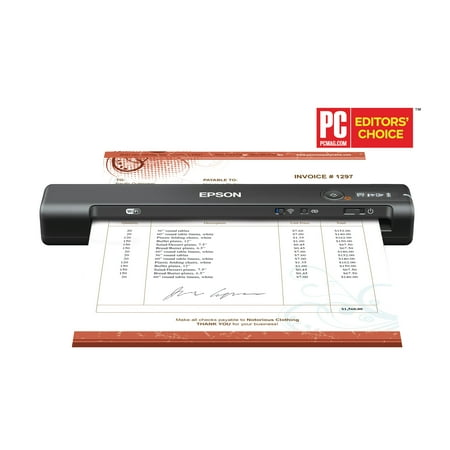
Epson WorkForce ES-60W Wireless Portable Document Scanner
- Brand:
- Epson
- Model Number:
- ES-60W
- UPC:
- 010343945074
- EAN:
- 0010343945074
- ASIN:
- B07KRXXWYY
- Best Buy SKU:
- 6319727
- Walmart SKU:
- 649211340
Market direction turned upward last week with current $179.99 representing 2.2% under standard pricing.
| Price Type | Price | Date |
|---|---|---|
|
Highest Price
|
$184.99 | |
|
Lowest Price
|
$139.98 | |
|
Most Recent Price
|
$179.99 |
| Price Type | Price | Date |
|---|---|---|
|
Highest Price
|
$199.99 | |
|
Lowest Price
|
$129.99 | |
|
Most Recent Price
|
$179.99 |
Tracking History: We have tracked Epson WorkForce ES-60W Wireless Portable Document Scanner since 12/5/2022. The most recent price update was on Sep 24, 2026.
Price Range: Over the past 90 days, the price has ranged from $129.99 (lowest on 2/19/2025) to $199.99 (highest on 11/8/2025). The average price during this period is $173.94.
Current Trend: Walmart.com prices have ranged from $169.99 (Aug 25) to $199.99 (Aug 6) over the past 90 days. Current price is close to the 90-day average of $184.11.
Customer Insights: Rated 4.2/5 from 340 reviews.
My current printer/scanner can only read up to 8-1/2" x 11" documents on its scanner. Had legal papers to scan, but trying to stitch together the scans proved less than stellar. I can feed documents up to 6' long through this continuous feed scanner. Can even read cards (credit, license, social security, etc) through this scanner, and the scan quits as soon as the end of the card or sheet passes through, unlike my printer/scanner that has to scan the entire platen. Output is sharp. Included software runs in the background to facilitate automatic scanning. Has a battery and wifi connect to let you use it on-the-go, like take it to scan documents while away from home to your smartphone (use their phone app). Sometimes have preferred using this pass-the-paper-over-the-scan-head scanner instead of my pass-the-scan-head-across-the-platen printer/scanner. If my printer/scanner ever breaks, I'll just get a printer, and use this scanner. Bought a travel case for it. Fits inside a drawer for storage.
I never realized the benefit of a portable scanner until I bought this. And, the wireless capability is a plus! OCR works great. I wish it had an auto-feed option, but I understand this is a light duty scanner and the design limitations for it's size. It did take some time for me to setup wireless connectivity, but a couple of restarts later, I was able to establish connectivity. Great addition for a paper free home setup (to scan receipts, etc.,) or a small business.
I have a scanner on my printer but needed one that would take longer sheets, and this is perfect, thank you.
It has a built-in battery that can be charged through a USB. As per the instructions, I fully charged the scanner using the USB cable and then installed EpsonScanSmart app on my laptop (Windows) as well as on my android phone. I tried connecting the scanner to my laptop using USB cable. EpsonScanSmart app automatically detected the scanner and it was super easy to scan the document receipt, photos in just few secs and the scanned document was very clear. I felt little challenging while trying to set-up the scanner on my android phone using Wi-Fi but after multiple tries, it worked and it was quick
Epson 60-W is portable and light-weight scanner. Easy to carry anywhere for official or personal purpose. It has a built-in battery that can be charged through a USB. As per the instructions, I fully charged the scanner using the USB cable and then installed EpsonScanSmart app on my laptop (Windows) as well as on my android phone. I tried connecting the scanner to my laptop using USB cable. EpsonScanSmart app automatically detected the scanner and it was super easy to scan the document receipt, photos in just few secs and the scanned document was very clear. I felt little challenging while trying to set-up the scanner on my android phone using Wi-Fi but after multiple tries, it worked and it was quick & easy to scan. This is a review for the Epson WorkForce ES-60W Wireless Portable Document Scanner that I received free of charge to do a beta test and review.
When I took the scanner out of the box I immediately found the instructions and charging cord. The instructions were very easy to follow. The scanner had to be charged before I could use it but it didn't take long to charge at all. I think I might have charged it for about 15-20 minutes. After I charged it I went to the website and downloaded the software. Once the software download was done the scanner was ready to use. Scanning my document was super easy and didn't take long at all. I love that the scanner is wireless so I don't have to worry about needing the cord to scan documents. I also love that it is compact and I can put it in my purse for on the go use. The scanner works great and I would definitely recommend it to anyone who needs to scan on the go. This is a review for the Epson WorkForce ES-60W Wireless Portable Document Scanner that I received free of charge to do a beta test and review.
Upon unpacking the portable scanner, the first thing I noticed is that it is extremely light weight! I was able to unwrap it, open it, and connect it to my laptop in just a few short minutes. The scanner is sleek, easy to carry and very much compact for my desk. I scan worksheets and paperwork every few days for my daughters schooling as well as for work purposes. I have gone through many scanners but what sets this one apart is the slim design. It is easily storable and a classic black color. The button and screen at the top of the device is slightly raised and clearly visible. As it was connecting and charging I could clearly see the icons blink. The first laptop I utilized my scanner with was a Lenovo laptop. The website provided in the instructions was very explicit and stated a driver must be added to get the scanner to connect both wirelessly and hardwired through the cable/laptop. I had a bit of trouble adding the last set up portion of the driver. I’m not entirely sure what the issue was, but after giving it a few minutes, I was able to complete it! Still, after my minor issue, the scanner connected and I then scanned some samples! I am surprised that the paper feed went in quite easily and that the image came through quickly. This efficiency is the key to my productiveness and I am thoroughly grateful for a device that has such ease of use! Overall, wonderful product and a new staple for my work desk. This is a review for the Epson WorkForce ES-60W Wireless Portable Document Scanner that I received free of charge to do a beta test and review.
“This is a review for the Epson WorkForce ES-60W Wireless Portable Document Scanner that I received free of charge to do a beta test and review.” I followed the directions as followed and I installed the software. It stated that it was installed but there had seemed to be an issue with it connecting to the Wi-Fi. So I went into the Printers and Scanners section of my Settings and it was able to read it there.When placing a document through to be scanned, you have to place it on the left side of the portable scanner in order for it to give you the best results that your looking for. So I placed my document on the left side of it and it went straight through the scanner and I was able to read everything that was on that document. It was very clear, it looked like the company sent it to me in an e-mail, that is how clear it was . I liked the fact that when the document feeds through the scanner that it moves quickly. Which saves you time in your daily tasks. It is light weight and not heavy at all which is a good thing. It was also easy to access the Wi-fi button as well as the power button.How you know that the power is on is by the thin white light that lights up. You have to make sure that you charge it fully first before using it. You will know that it's fully charged when the batter light turns off completely. I liked this product a lot and am so happy to have one it will make it easier for business purposes It's energy efficient as well. I highly recommend this product. It's energy efficient as well.
It said that it's compatible with iPhone and iPad, but when I received the scanner it said right on it not compatible with iPhone or iPad.
Setup is incredibly complicated, not enough detail on the Getting Started sheet. When scanning, it just scans a solid black sheet. Can't even properly setup the thing. This isn't rocket science, this should be ridiculously easy to setup without needing to contact support for assistance. No troubleshooting section even lists this as an issue.
Detailed price history for the past 90 days
Walmart.com prices have ranged from $169.99 (Aug 25) to $199.99 (Aug 6) over the past 90 days. Current price is close to the 90-day average of $184.11.
| Date | Price | Change | % Change |
|---|---|---|---|
| $179.99 | $+0.00 | +0.0% | |
| $179.99 | $+0.00 | +0.0% | |
| $179.99 | $+10.00 | +5.9% | |
| $169.99 | $+0.00 | +0.0% | |
| $169.99 | $+0.00 | +0.0% | |
| $169.99 | $+0.00 | +0.0% | |
| $169.99 | $-30.00 | -15.0% | |
| $199.99 | $+0.00 | +0.0% | |
| $199.99 | $+0.00 | +0.0% | |
| $199.99 | $+0.00 | +0.0% | |
| $199.99 | $+30.00 | +17.6% | |
| $169.99 | $+0.00 | +0.0% | |
| $169.99 | $+0.00 | +0.0% | |
| $169.99 | $-30.00 | -15.0% | |
| $199.99 | $+0.00 | +0.0% | |
| $199.99 | $+0.00 | +0.0% | |
| $199.99 | — | — |
Third-Party Sellers prices have ranged from $179.99 (Sep 19) to $179.99 (Sep 19) over the past 90 days. Current price is close to the 90-day average of $179.99.
| Date | Price | Change | % Change |
|---|---|---|---|
| $179.99 | — | — |