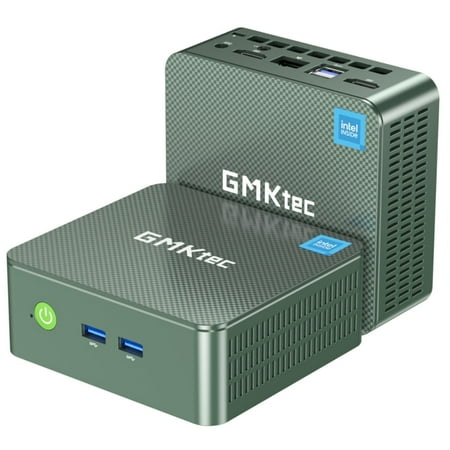
GMKtec Mini PC Intel N150 (up to 3.6GHz), 8GB RAM 256GB SSD, Windows 11 Pro Desktop Computer, Dual HDMI, 4 x USB3.2, WiFi 6/BT5.2, NucBox G3 Plus
- Brand:
- GMKTec
- Model Number:
- Nucbox G3 Plus
- UPC:
- 785034519222
- EAN:
- 0785034519222
- Walmart SKU:
- 5155975089
| Price Type | Price | Date |
|---|---|---|
|
Highest Price
|
$179.99 | |
|
Lowest Price
|
$123.89 | |
|
Most Recent Price
|
$179.99 |
Price history data is not available for this product at the moment.
Current Trend: No Walmart.com pricing data available for analysis.
Customer Insights: Rated 4.3/5 from 229 reviews.
I set mine up to dual-boot into either Windows 11 or Linux Mint and it runs both OS's flawlessly. Never played with a mini-PC before, impressive performance considering its small size. This model probably not going to run games very well, other models having high-end CPU and GPU specs would be a better choice for gaming. I experienced an audio issue (speakers made a popping noise every 6 seconds) but a change in a BIOS setting fixed the issue. Very satisfied and I look to purchase another unit for another purpose, backing up a desktop system.
I bought one of these computers about 6 months ago and didn't expect it to be as good as the reviews that it got. I was very pleased with it and decided to replace our 2 other desktops with 2 more. The 1TB drive and 16 GB Ram was exactly what I wanted. The N150 processor exceeded my expectations as I was replacing 2 computers with Core I7 processors and these computers are not a downgrade from the windows 10 computers that they replaced. We are in our winter home in Texas and in May will return to our summer home in NY and I will get another one for there.
This is a great mini-computer. My version has 16 GB of memory and a 1 TB SSD. It is powerful enough for light office work (e.g. writing documents, surfing the web, checking email.) I shrunk the Windows 11 partition down to 250 GB, then installed Ubuntu MATE 24.04 on the rest of the disk. I had no problems running programs under either Windows or Ubuntu. Ubuntu recognized all the hardware and performed flawlessly.
I am totally blown away by the capabilities of this little box. I'm used to buying used laptops and installing Linux on them. This is the first new PC box I've purchased in years. Not only does it fit neatly on my desk but it more than replaces my old laptop. It's fast, silent, and inexpensive. This unit cost a little less than the used ThinkPad I bought five years ago. If you live off grid, it's also crazy thrifty on power consumption. I run this box, an LG UHD LED monitor and my sound bar on just 37 watts, like a light bulb. The only problems I've had stem from Microsoft, not the computer itself. This unit came with Win 11 and I intended to dual boot both operating systems. But the arrogance of MSFT, it kept overwriting my Linux boot loader. I fixed it by blowing away the Windows partition and making it exclusively Linux. Problem solved.
Windows 11 would no longer load on my wife's big computer. The GMKtec mini PC was a great alternative that requires much less space and was very easy to set up with Windows 11 preinstalled. I did add a small cooling fan that I placed under the wall-mounted GMKtec. There are no problems with storage and memory that have good capacity.
So compact and feels quite solid and well made. Started up fine with the pre-installed Windows 11 Pro. Runs a bit warm, wouldn't say hot. I sit an old computer case fan on top of it, that keeps it cool. Not sure how it would do running games, but for my uses (browsing, email, texting, watching YouTube videos) works fantastic. Understand, it does NOT include a keyboard or mouse, you must supply those. Most of us have spares lying around. Definately recommend it !
This basic mini pc is for anyone wishing to do everyday tasks using its preinstalled Windows 11 Pro edition, 1 terabyte storage, and 16K RAM. It is enough to perform multitasking. If you are looking for a gaming computer, this one is not a good choice. If you use Google Chrome browser as I do, you will notice up to 50% of total RAM could be used at any instant for this browser memory hog. And when you go online with Google Chrome and play graphics-intensive games, you will see degradation of response time. But as a basic Windows 11 Pro mini desktop PC it could be among your top considerations given its pricepoint and capabilities.
If you buy this NucBoxG3_Plus, first do not hookup to the internet until you at least finish setup. skip internet sign in, only set your sign in user and password. If it forces you for e-mail or account info, skip or reboot to get past it. Now it took me a week to get this thing work normal. You should instead once setup go to reset windows from the internet; this may save a lot of time. If after this you're not getting sound in things like YouTube, go to sound settings and removed usb input. This is not good for any type of gaming.
What should have been a straight forward setup turned into a nightmare. The scant instructions were less than helpful. I violent activate windows and was forced into a restart. Now I cannot proceed past the Bios/ Boot pages. I am totally disappointed with this experience.
I bought this small desktop PC from Walmart. The price looked OK at the time. But I can NOT get any color to display on the PC. I am hoping that someone will read this review and find a way to have someone reply. Is this a faulty PC or why can I not find a way to turn on the color?
Detailed price history for the past 90 days
No Walmart.com pricing data available for analysis.
Third-Party Sellers prices have ranged from $179.99 (Jul 15) to $179.99 (Jul 15) over the past 90 days. Current price is close to the 90-day average of $179.99.
| Date | Price | Change | % Change |
|---|---|---|---|
| $179.99 | $+0.00 | +0.0% | |
| $179.99 | $+0.00 | +0.0% | |
| $179.99 | $+0.00 | +0.0% | |
| $179.99 | $+0.00 | +0.0% | |
| $179.99 | $+0.00 | +0.0% | |
| $179.99 | $+0.00 | +0.0% | |
| $179.99 | $+0.00 | +0.0% | |
| $179.99 | $+0.00 | +0.0% | |
| $179.99 | — | — |