HP 14" Ryzen 3 4GB/1TB Laptop-Silver (Google Classroom Compatible) price history and forecast - HP 14-dk1025wm
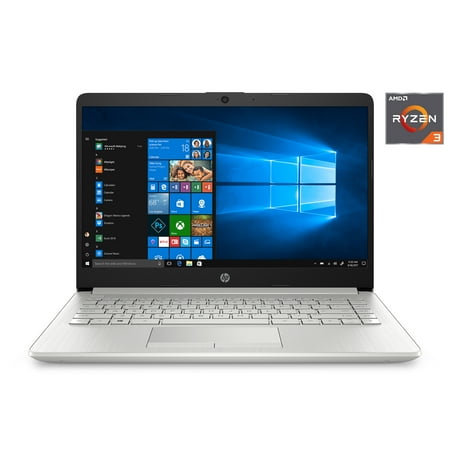
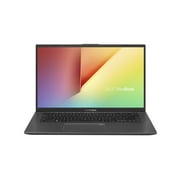
HP 14" Ryzen 3 4GB/1TB Laptop-Silver (Google Classroom Compatible)

HP 14" Ryzen 3 4GB/1TB Laptop-Silver (Google Classroom Compatible)

Brand:
HP
Model Number:
14-dk1025wm
UPC:
194850318597
EAN:
0194850318597
Walmart SKU:
580075820

Third-Party Seller Summary

Third-Party Seller Price History Summary
Price Type Price Date
Highest Price
$339.00
Lowest Price
$324.00
Most Recent Price
$328.88
Average Price
$332.69
First Tracked
Last Update

Walmart.com Summary

No price history available for Walmart.com

Price Analysis

Price history data is not available for this product at the moment.

Current Trend: No Walmart.com pricing data available for analysis.

Customer Insights: Rated 3.5/5 from 741 reviews.

Customer Reviews

741 reviews

Customer Reviews

3.5
Based on 741 reviews
5
341
4
106
3
49
2
51
1
194
Filter Reviews:
Sort By:
Showing 10 of 741 reviews

Fast, powerful laptop!

JayBee May 27, 2020

This is a fantastic laptop! It is fast, powerful, and compact. It is also lightweight and very easy to set up. The graphics are amazing, and it has the ability to keep up with all of my multitasking needs. It charges incredibly quickly, and I can work on it for a long time before I have to charge it again. It also has incredible sound from such a compact laptop. I am very inpressed with not only the quality of sound, but the sound level itself. I am amazed with how much power is packed into this laptop. Overall, I am very impressed with this laptop and I highly recommend it.

Was this review helpful?

HP Delivers Again!

MimiReviews June 2, 2020

I have been an HP fan since the mid-90's and with good reason - HP always delivers when it comes to quality, performance, innovation, and affordable pricing. This HP Laptop 14 is another example of HP excellence. First, let me just say that I absolutely love it's slim, sleek, and ultra-modern design. Very stylish and chic! Definitely something I wouldn't mind showing off to my co-workers at the office. Lightweight and portable, the HP Laptop 14 also manages to deliver a powerful performance thanks to a super fast AMD Ryzen processor and responsive touchpad. Colors are bright and vivid on the 14-inch diagonal HD display, which makes watching movies and playing games a blast. Feel like video chatting with family or friends? No problem! The HP TrueVision HD Camera with integrated digital microphone and stereo speakers has got you covered, even in low lighting. In fact, the camera is so good in low light conditions that my mom was able to spot my toddler trying to climb out of her crib when she was supposed to be napping during one of our video chats. Needless to say, my little escape artist daughter wasn't too thrilled about being caught on tape and ratted out by grandma, but it certainly saved her from potential disaster. The HP Laptop 14 comes with Windows 10 Home in S mode installed, which is supposed to be a safer and more secure version of Windows 10. I haven't had that much experience with S mode yet, but I really like what I see so far. It definitely loads faster than regular Windows and seems to have fewer bugs. Battery life is great, lasting approximately 7-8 hours before needing to recharge again. Oh, and this thing charges fast! Only took about 30 minutes to go from 15% to 90% again. It boots up pretty fast too, which is a nice bonus and may have something to do with the more streamlined operating system. All in all, I'm extremely happy with my new laptop and plan to continue my love affair with HP for many years to come. HP delivers yet again!

Was this review helpful?

Love it!

fikisha August 17, 2020

For $300 I love it. I ordered the first one on May for my sons birthday. After a few months of usage he enjoyed the speed as it was faster than the computer he previously had. He had no complaints about the laptop. As the new school year approached I ordered 5 more for my other two elearner and 3 nephews. It does its job. They use it for school, surfing the net, and light gaming. No complaints. Good for its price as far as memory, speed, and overall quality.

Was this review helpful?

Light weight laptop

Jeff May 16, 2020

I got the laptop as a spare for my office work and when my wife used it, I never got it back. I have not used a RYZEN 3 chip, until I got this laptop. She loves the laptop it is much lighter than her old Black Friday special and a whole lot faster. The finish of the material is a nice looking silver color, the material looks almost like aluminum, but is a fairly solid plastic. The initial setup was straight forward and simple, you can do it all by voice or type in your answers. There were a lot of updates to be installed, and after some software installation, we were on the road. I did uninstall some bloatware and change a few settings. After a lot of work on the laptop, I did notice the fan ramping up to a high speed, but it was still pretty quite, normal running speed is very quite. The display is nice, the colors seem vibrant and non bled through any of the games or pictures. There are 2 USB 3.0 ports, a USB-C port, HDMI and a SD card slot. For general home use and light gaming, she has been very happy with the laptop.

Was this review helpful?

Great beginner laptop

Onyx2016 May 12, 2020

This is a really good beginner laptop or for someone that just needs to occasionally get online to pay bills, possibly do some work, or stream tv. It would be really great for a student! There is 3 people in my household that use this computer: myself, my boyfriend, and my 7 year old daughter. It work great for all 3 of us. It starts up quickly and easily and gets you going in a matter of just a couple minutes. It is quick to get online and the graphics are excellent. The camera and microphone are awesome and work great! It's you standard basic computer in general but like I said if all you need to do is stream tv, do homework, pay bills, or do minor work things, this is a perfect little computer for all those needs.

Was this review helpful?

It is a speedy little one.

Kin May 11, 2020

This is a perfect item for a school kid - to bring to school and back to home for study. Well, it may also be enlisted for internet game use!!! The item weighs just over 4 pounds. Screen is measured as 14 inch and the size of the computer is measured 9 x 12.5" and diagonal is 15 in. It is easy to place in the school backpack. I first fully charged it. The item came with Windows 10 S. It took me about 20 minutes to complete the setup. And I swiftly installed the Windows updates and that took me another 60 mins to complete. That said, the battery has 77% remaining. Good battery. I tried to learn the Windows 10 S and good things are - the windows defender would help act like an antivirus program, so that saved me a license from my Norton account. Also, all programs have to be installed from the Windows store for security reasons. That could be a pain if one wants to install a third party program if the Store did not have it. But by then one can simply switch out to regular Windows 10 and the problem solved The computer has basically all pheripheral ports one needs, except the CD drive. The booting time is fast and that would definitely help keep my kid in focus.

Was this review helpful?

Happy camper

Rosara April 22, 2021

It was a easy set up . Sleek look and very light. Screen is clear. So that will come in handy when I am ready to travel. Came with a disposable case . I did buy a real one . However was glad I could keep it safe till then . It did arrive on time. It came with s mode . It was easy to remove so I can download my files . Over all I love it.

Was this review helpful?

Linux users: Read this

Bender August 24, 2020

If you are buying this for Linux, you will need the "rtl8821ce" wireless driver to get WiFi to work. The BIOS is easy to access by holding Escape key after powering the device on. Holding ESC also lets you choose to boot from a USB. The BIOS lets you disable secure boot and enable legacy support if needed. I'd recommend updating the BIOS if an update is available before you wipe Windows completely. So: 1) Boot up Windows and create their stupid account they want you to create if you don't have one already 2) Update BIOS 3) Fiddle in BIOS to disable secure boot and enable legacy mode (if you need to). openSUSE, Fedora, and all the Ubuntus should work with secure boot just fine. 4) Plug in an ethernet cord because you won't have WiFi during your Linux install, then boot your USB After Linux is installed, you will have to get the aforementioned driver for WiFi. I found working solutions for multiple distros -- just check out unofficial repositories via your search engine of choice. Arch based distros seem to work on this hardware the best. Some distros I tried, the touchpad would randomly not work on a fresh boot or restart. There are other workarounds for reloading the module, but it's easier to pick a distro that just works. There's definitely better hardware to use for Linux, but if you like this price point, you can get it working. I believe the Ryzen 3 is better than the HP Intel i3 that is similar, but I guess you pay a premium for Intel because that laptop was more expensive when I purchased this one. HP should work harder to not tie people to Windows and allow full Linux compatibility in their hardware. I believe Lenovo, especially their Thinkpads, are highly regarded for Linux compatibility. tl/dr: If you are somewhat experienced with Linux and you want to save some money or don't have options, you can run it on this. If you are brand new to Linux, you might have better luck elsewhere. You'll have to do some extra work for WiFi to work.

Was this review helpful?

Great if you only use it for basic stuff

AmazingPhil August 14, 2020

I want to start off by saying that if you plan on keeping this laptop in "S" mode, and don't plan on doing much more than basic stuff with it, then this laptop will accomplish what you need to do, especially if you are using it for your child's schoolwork. I bought this for my significant other because for the most part she only uses it for Facebook, email, and online shopping. However, she was used to Firebox browser, and I use Macrium Reflect to back up our computers so it was necessary to take it out of "S" mode in order to install these programs because they are not in the Windows Store. I am giving this laptop a 4 star rating because although she loves everything about it (size, appearance, color, battery life etc...) The computer started freezing up after installing Firefox requiring powering off and back on to recover. I started monitoring it in task manager and discovered that it was running using up to 90% of ram, which meant that when she would open a video on Facebook, it would crash the computer. I discovered that running it on Edge would work because it uses less memory, but we were still at about 80% not a whole lot of wiggle room! I needed to add some ram because there is an extra slot on the motherboard for it. Too bad it is basically inacessable to a normal user. I on the other hand have no fear of opening a computer case, and was able to add 4 gb of ddr4 ram for a total of 8 gb. The computer then assigns 2 gb of it to video, and after system used ram you get about 5 gb to work with. Now we have plenty of memory, and we can run whatever we want. No more crashing or freezing! The other issue was that occasionally when scrolling, the screen would go black for a moment, and then return . It turns out that there is a setting in the Radeon Graphics App called Vari-Bright that is enabled by default unless you turn it off, which is what I did, and boom! no more flickering screen. So far, the only issue she has now is with facebook itself, and the scrolling problem with the newsfeed, but that is an issue with facebook itself and not the computer. I will try to update this review as time goes by if anything else pops up.

Was this review helpful?

Terrible

Christi September 28, 2020

Don't buy this laptop. My sister and I both purchased this when school started and we've had nothing but trouble with it. Tried resetting it to factory settings a couple weeks ago and still it moves SO slow. All we were trying to use it for is online homeschooling but it just sits and spins when trying to open websites or open an app. Meanwhile, our other 2 laptops that are both more than 5 years old have no problems. Now I'm having trouble returning it - didn't realize there was a 30 day return policy!

Was this review helpful?

Price History

Historical price data graph for HP 14" Ryzen 3 4GB/1TB Laptop-Silver (Google Classroom Compatible)

Recent Price Changes

Detailed price history for the past 90 days

Walmart.com Pricing

0 records

No Walmart.com pricing data available for analysis.

No Walmart price history available in the past 90 days

Third-Party Seller Pricing

15 records

Third-Party Sellers prices have ranged from $324.00 (May 6) to $328.88 (Jun 10) over the past 90 days. Current price is close to the 90-day average of $326.28.

Third-party seller price history for HP 14" Ryzen 3 4GB/1TB Laptop-Silver (Google Classroom Compatible) showing recent price changes
Date Price Change % Change
$328.88 $+0.00 +0.0%
$328.88 $+0.00 +0.0%
$328.88 $+0.00 +0.0%
$328.88 $+0.00 +0.0%
$328.88 $+0.00 +0.0%
$328.88 $+0.00 +0.0%
$328.88 $+4.88 +1.5%
$324.00 $+0.00 +0.0%
$324.00 $+0.00 +0.0%
$324.00 $+0.00 +0.0%
$324.00 $+0.00 +0.0%
$324.00 $+0.00 +0.0%
$324.00 $+0.00 +0.0%
$324.00 $+0.00 +0.0%
$324.00

Related Products