
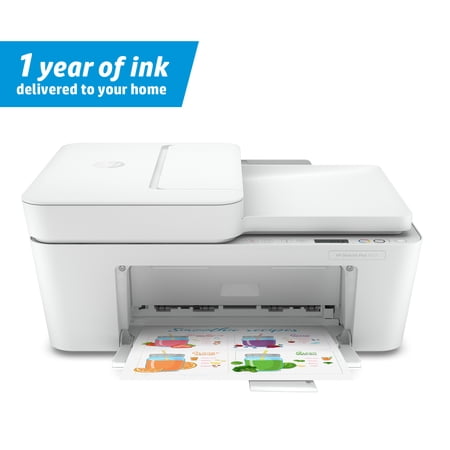
HP DeskJet Plus 4122 All-in-One Printer
- Brand:
- HP
- Model Number:
- HP DJ PLUS 4122
- UPC:
- 195122721978
- EAN:
- 0195122721978
- Walmart SKU:
- 609219478
Current pricing at $98.90 reflects recent market activity, running 0.0% below the 90-day average.
| Price Type | Price | Date |
|---|---|---|
|
Highest Price
|
$98.90 | |
|
Lowest Price
|
$98.90 | |
|
Most Recent Price
|
$98.90 |
Tracking History: We have tracked HP DeskJet Plus 4122 All-in-One Printer since 12/5/2024. The most recent price update was on Apr 5, 2025.
Price Range: Over the past 90 days, the price has ranged from $98.90 (lowest on 12/5/2024) to $98.90 (highest on 12/5/2024). The average price during this period is $98.90.
Current Trend: No Walmart.com pricing data available for analysis.
Customer Insights: Rated 3.4/5 from 376 reviews.
I had some challenges setting up this HP printer. It's different from my regular printer because this HP 4100 is entirely wireless. There is no cord that you can attach to your laptop or computer. I followed the instruction manual. After turning it on I downloaded the HP Smart app on my cell phone which is required for setting up the printer, and registered on HP Smart. I was having difficulty connecting the printer to the app (internet issues). It took almost an hour for me to set it up. You just follow all of the instructions on the app - it guides you through the entire set up. It comes with 2 ink cartridges (one black, one tricolor). I had a hard time inserting it in the ink socket because I couldn't figure out which way it was supposed to go in (it was not described in the manual). I played around with it and followed the icon that was inside the printer and was finally able to insert the cartridges. You have to make sure it clicks. Once the printer was connected to the app, I tested it. I was able to print documents from my phone. It came out very nice, crisp and clear with dark ink. I was excited being able to print using my phone because my other printer doesn't have this feature. In fact, you can print from anywhere as long as you have the app connected to this HP printer. A bonus I got with this printer was a one year supply of ink. This is also a smart printer in that it knows when you've run out of ink and it will automatically order more ink for you if you set it up that way. Overall, I'm very happy with this printer especially with being able to print from my phone. They have a mobile fax option too but requires a subscription.
This is really cool. It has everything that you would need, and more. It is a printer. A scanner. A copier. It has mobile print. HP instant ink ready.. Plus it can work with Alexa. It is heavy duty and well made. Durable and made to last. It is so easy to use. The buttons are clearly marked. And are easy to push. I love the size of this. Can easily be placed just about anywhere needed.
This is a review for the HP DeskJet Plus 4122. A very nice compact all in one printer, scanner, and e-fax machine. Set up was pretty easy. You have to use your phone to download an app, or on your PC, and it will walk you through the entire process. Once you complete a step, it continues on. You must have wireless internet in your home. There is no external connections to this device. You can print from your phone, tablet, PC, and be pretty much anywhere to do so. Contains 2 ink cartridges, one tri-color ink and one black ink. The ink can be on a subscription service or you can purchase on your own. Take the #67 cartridges. They are not very expensive. If on the subscription service, the printer will automatically order ink when it is low. You have three services to choose from...light printiing for 2.99 per month, or heavy printing for 9.99 per month. You can choose to stop at any time. This one currently has a promo of a year\s worth of ink for free. Then the subscription kicks in. Will give you time to adjust. It has an auto document feeder that will scan 35 pages at one time. Holds 60 sheets of paper, can scan in color or B/W. Will do 8.5-5.3 pages per minute b/w and color respectively. Has a small footprint, and has eco systems to power to low or off at your choosing. So far impressed with it's speed and capability for doing basic things for the general home owner. I would recommend!
When I unpacked the printer I was a little disappointed that it didn't come with an instruction booklet. You have to download an app for your printer that walks you through the setup. It can be downloaded on your cell, laptop, computers, etc. This was a plus for me so if I wanted a picture or a document printed it was easily accessible through the Bluetooth connection. Yes, no cords hooked to your electronic devices, another perk. It comes with ink as most printers do these days and a program to get ink refills for up to a year. I compared prices for this and the ink refills program actually saves you money if you use your printer a lot. If you don't then it wouldn't be a benefit for you. It also has a scanner which is a plus for me for work. The printer is not bulky or huge but it has the capacity to run like a big one. I do recommend this printer for your home or a small office.
Set up requires downloading an app to your phone. You cannot set up from the printer itself. If that's ok with you, then everything about this printer/scanner is awesome. It comes with 12 months free auto ordering ink too, so don't throw away the few papers that come with it because there's a small PIN on one of them to redeem the ink offer. The test pages that print serve a purpose to calibrate the scanner and input codes to your computer to install the printer. The app used to install the printer is neat because you can print from your phone directly to the printer...from Google Drive, the Cloud, FB, your device, etc. So far the quality is crystal clear and nice. It prints quickly efficiently. I really like this printer. I hooked it to my iPhone as well as my ASUS laptop and my HP laptop with ease.
The setup of the multifunctional was easy and --for the first time-- completely wireless! I really didn't have to plug any cable other than the AC to have this printer configured and running from both my computer and mobile phone. The footprint is adequate for a desk. I like the fact of black and white and color copying, as well as the scanning as a plus to the printer. The Instant Ink subscription services guarantees constant supply of ink ... the printer will order more ink itself before running out for a monthly fee (this doesn't mean you'll get more ink cartridges every month ... you pay monthly, and cartridges are delivered as needed). I've only had the printer for one week, and I keep it for light home use; so of course I still don't know how the whole ink supply will work over time, but I like the concept.
Set up was the most annoying of any printer I've ever had. The website was down and wouldn't load properly. I had a hard time connecting it to the internet and tried on four different devices (two laptops, a tablet and a phone). Customer service was responsive pretty quickly. Once the website worked we were able to get it running. It came with 13 months of free ink which is nice. You get to pick a plan based off of how much you typically print. It does print very clearly. We got it to work on all our devices my only issue is with iPhones you have to connect it to the printer via the WiFi settings to print and then reconnect to your WiFi after. It says you can print directly from the app without doing that but it didn't work for me only on my iPhone. The printer does troubleshoot itself and keeps track of its paper usage, ink issues and even tells you when the door is open (slightly creepy). It does have a scanner, fax and copier. Printing does move a little slowly compared to other printers but it's also clearer than others so it seems worth it. You can scan from the top feeder or from opening the lid. All in all it's a great printer beyond the set up.
I really like this printer it has a cool retro-style, but it's not bulky while incorporating a flatbed scanner. Which is great that it doesn't take a lot of space because I have little room for a lot of things in a full house! A compliment to the printer is the HP Smart app that's needed to set up your printer. It's a fast process that doesn't take a lot of time, and you're guided through the setup step-by-step via the app. It took me about five or six minutes to go through without a hitch. No super tech savvy experience required the HP Smart app will handle it all once you've provided a few basic answers about your network. But if you want to set up the printer through a non-wireless route, I found that it's possible to connect the printer with a USB cord. The printer doesn't come with a provided USB cord, but if you have one on hand, then you can connect it from the printer to your desktop. I recommend visiting the HP website to download the latest driver to make the connection a smooth one if you go the non-wireless route. Mind you, if you connect this way, you'll miss out on the notable features that come with the HP Smart app. Speaking of notable, imagine never worrying about running out of ink at the worst moments. I like to sell my excess items online and I can't tell you how often I've printed out shipping labels only to run out of ink with only 20 minutes remaining for the postal office to stay open. It's calming to know that the printer ships out the ink once it realizes you're running low, and before you know it, the ink arrived safely at your home. No fuss or muss, and during these stressful times it's a relief I have one less worry to shoulder. The other feature I liked about connecting the HP Smart app to my printer is that I have on-demand printing capabilities. I can search through social media, come across a cooking recipe or find some helpful notes for DIY home projects, then print them out without having to jump onto the desktop. It's a great multitasker, though I have a few cons about it. The first was that when I printed a page, then photocopied that same page, the copy came out much lighter instead of duplicating its color/tone completely. There also wasn't an instruction booklet provided, though you can visit the HP website for more details. My last nitpick is that this printer was slightly louder than my HP officejet printer but again that's a personal peeve of mine. The bonus on-demand printing and worry-free ink delivery is icing on the cake. It also comes with a tri-color ink and black ink in the box. The document feeder copies or scans, and the paper loads vertically in the back. Some might not like that feature, but it makes it easier to load forms into it that way. As for quality and speed, I printed about 70 sheets. They came out beautifully crisp while the paper tray held them all well without a single page flopping or curling over on itself. Overall, it works fast and prints well for home use and home business needs.
This is a great office printer. Because you're able to scan multiple documents at one time. The printing is great quality too. I took off a star because the set up was not as easy as it should've been. Unfortunately I had to resume the set up using the desktop computer and downloading HP on the desktop computer. It had connection issues with finding the printer using the app. Once I got it connected using the desktop, it was fine. Everything is connected using wireless. I took off another star because I'm going to have to contact each P in a couple of days, because it keeps coming disconnected from the app. I'm on able to scan my documents when I need to. This could be a connection issue with my home or this could be an issue with the printer. I've never had wireless issues before so I'm leaning towards it's the printer. I still recommend someone buying it and trying it out. Because it's connected with no issues, it really is a good office printer to have
The device itself is multifunction. I had some problems just switching from an all inclusive wireless home service with a contract that expired to a prepaid hotspot plan. This left me at a disadvantage regarding the 12mo free ink (I cannot redeem it). HP needs you to have a constant wireless network of your own to use any of the free months of service, and you must redeem them in 7 days from setting up and registering your printer. I had two other issues anyway, in addition to the lack of my own wireless network, my printer model was not listed on instantink and my SN according to the company could not be found, though they said if I interested in enrolling in the instantink program they would assist me. Now I did think the plans for ink were nicely priced. I think that if all had ran well for me, I would be already enrolled in one of their plans, and yes I do believe it saves money. The idea is that your printer notifies the company when you are low on ink, and sends cartridges based on your needs to you through the mail. I wish I could say more, but this has been my experience so far, and I still have an open ticket to help me with an instantink enrollment.
Detailed price history for the past 90 days
No Walmart.com pricing data available for analysis.