
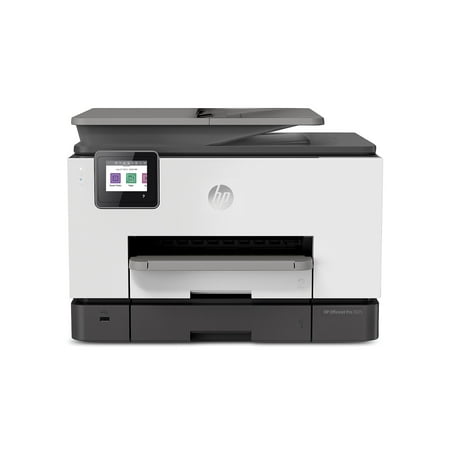
HP OfficeJet Pro 9025 Wireless All-in-One Color 1MR66A#B1H
- Model Number:
- HP OfficeJet Pro 9025 All-in-One Printer
- UPC:
- 193424191826
- EAN:
- 0193424191826
- ASIN:
- B07N1DH6MC
- Walmart SKU:
- 584527776
Market rate of $429.99 positions buyers 0.0% under the established average.
| Price Type | Price | Date |
|---|---|---|
|
Highest Price
|
$759.99 | |
|
Lowest Price
|
$389.99 | |
|
Most Recent Price
|
$449.99 |
| Price Type | Price | Date |
|---|---|---|
|
Highest Price
|
$434.84 | |
|
Lowest Price
|
$429.99 | |
|
Most Recent Price
|
$429.99 |
Tracking History: We have tracked HP OfficeJet Pro 9025 Wireless All-in-One Color 1MR66A#B1H since 12/5/2022. The most recent price update was on Jul 23, 2023.
Price Range: Over the past 90 days, the price has ranged from $429.99 (lowest on 7/23/2023) to $434.84 (highest on 12/5/2022). The average price during this period is $433.22.
Current Trend: No Walmart.com pricing data available for analysis.
Customer Insights: Rated 3.67/5 from 24 reviews.
I recently got the HP OfficeJet 9025 and this thing is a beast! I can honestly say that printers have come so far in technology. This thing is completely wireless from everything to installation (there is no install cd anymore!) to printing from your phone. When I first pulled this out of the box, I realized its pretty big. Its big in terms of height rather than width. Its the same width as my other wired printer so it doesnt take up much room on the desk. The height of it is about double a traditional printer but honestly thats ok for me because it has the dual paper tray so you run out of paper not as frequent! After I got it plugged in and turned on, I stuck in the ink fills. These are a little different from what Ive used in the past. We have all dealt with the ink that leaks all over your hands and creates a hot mess. These dont leak-like at all. The best part is that its instant ink. That means that you can sign up with the HP site and when your ink gets low, your printer sends a message to HP and they send the ink before you run out! All you have to do is send back the empty ones. It does cost money but its honestly cheaper this way. If you print 100 pages a month its $2.99. For each addition 10 pages its $1. Breakdown of this is if you buy the HP ink from say Walmart, you are paying $50 a cartilage. So $100 for all colors (tricolor is one set). If you do this 2x a year, you are spending $200. If you just "rent" the ink, its only $36 a month. If you print more then, you can up it (I think it goes up to $10,99 a month). Even at the highest level its still cheaper than buying the cartilages! After you get the ink installed its time to set up the printer. At first I was a little confused because there was NO install kit. Im old school on somethings. After I found the QR code to scan, the install took less than 3 minutes. I will never go back to having a cd to install software after that. lol. Basically the printer connects to your wifi. These means that you can connect it to anything that runs on wifi whether its your tablet, phone, ipad, whatever! So after the whole 3 minute install I tested out my print page. As you can see in the video, it prints fast and the ink comes out dry so you dont have to worry about smearing it or letting it dry. The print itself is fairly quiet so it doesnt sound like a jet airliner taking off. The best feature for me about this is that I can print from my phone. I hated how I would get something in email and I would have to log into my laptop to be able to print. With this I can just hit print from my phone (I dont even have to be in the same room!) and it prints. I can print from google drive, my photos, whatever. This is definitely a game changer. IF I want to install it on other computers or tablets (my husbands phone so he stops bothering me to print. lol), all I need to do is send an install link to them and boom its done! Overall I at this time, I am impressed beyond words with this. It prints based off wifi. It prints quietly and fast with no dry ink time. I am super pleased with this purchase!
Setup was as easy as it gets. You browse to a website, pick your printer model and one click later the printer is being installed. It took 1 minute to run the install.
Overall pretty happy with this all in one printer. Easy to set up, had some issues with getting photos to print out of the paper tray on photo paper, as the software kept telling me I couldn't print the size and quality I wanted on HP photo paper, but found a work around in the end. It is noisy printing which I wasn't expecting as our previous printer was very quiet. Quality is good and HP support is easy to get.
I've only had it for a week, and so far I am very pleased with the OfficeJet Pro 9025. It prints letter size and legal size without having to reload it.
I'm still not entirely sure how I feel about this. I've been using this to print homeschool workbooks for the last month and it's already starting to have issues. It's much more expensive than other heavy duty printers. The output tray is awful and I can see this breaking soon. It doesn't push back into its slot very smoothly, so it needs to be jammed in sometimes. The paper jams a little too frequently. Trying to print double sided pages ends in missed pages, paper jams, and long wait times for the ink to dry before it can flip the page. I have not yet used the other functions so I cannot comment on the scanning capabilities at this time. So far, I'm not super excited about this.
I found this item when searching for a specific ink cartridge size but upon delivery I found out that it was not compatible with that ink cartridge
Geek Squad spent 3 hours trying to set up the printer. I took it back for a refund. The touch screen is way to small.
Ordered in June and is almost August still haven't received item while I've been charged for it since June
This is the master in paper jams that's all I get from this big printer regret purchasing this printer
great opportunity to install some malware
Detailed price history for the past 90 days
No Walmart.com pricing data available for analysis.