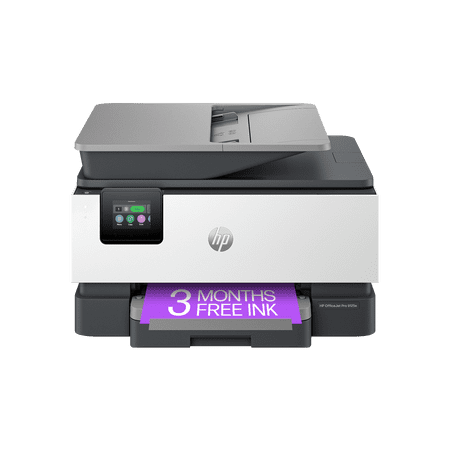
HP OfficeJet Pro 9125e All-in-One Inkjet Printer with Automatic Document Feeder, Color, Letter
- Brand:
- HP
- Model Number:
- 403X0A#B1H
- UPC:
- 196337284807
- EAN:
- 0196337284807
- ASIN:
- B0CFM82NS2
- Best Buy SKU:
- 6565475
- Walmart SKU:
- 5193278547
Market rate of $309.99 positions buyers 0.0% under the established average.
| Price Type | Price | Date |
|---|---|---|
|
Highest Price
|
$337.93 | |
|
Lowest Price
|
$179.89 | |
|
Most Recent Price
|
$337.93 |
| Price Type | Price | Date |
|---|---|---|
|
Highest Price
|
$309.99 | |
|
Lowest Price
|
$199.89 | |
|
Most Recent Price
|
$309.99 |
Tracking History: We have tracked HP OfficeJet Pro 9125e All-in-One Inkjet Printer with Automatic Document Feeder, Color, Letter since 5/13/2024. The most recent price update was on May 2, 2026.
Price Range: Over the past 90 days, the price has ranged from $199.89 (lowest on 3/2/2025) to $309.99 (highest on 12/19/2025). The average price during this period is $247.03.
Current Trend: No Walmart.com pricing data available for analysis.
Customer Insights: Rated 3.7/5 from 786 reviews.
It was not the easiest to install but it is done and it does a good job. This is for personal use and larger than I wanted but I chose one that has a fax feature. I like the larger paper tray. This printer is louder than the HP Officejet that it replaced. It prints well and has a lot of options. The function screen is small, but it does tilt to make it more convenient to use. I am not a big fan of having to use multiple ink cartridges but that is what HP is going to. I am also pleased that it will print legal size if needed.
This printer is incredibly fast & has virtually no defects. My previous HP Smart Tank 7602 was slow, had fewer functions and almost a 23% defect rate. I wouldn't recommend that printer to anyone except a very casual user. If you want a printer that meets the needs of someone in business or community service, I'd highly recommend this one.
I've had mostly good experience with HP printers however the earlier models (10 years back) were more solidly built and didn't use as much plastic. My previous HP 8025 and this current 9125e, the paper trays are very flimsy in my opinion... if not careful when pulling them to load paper, you could break the end of the tray which I did on my previous 8025 model. I also don't like the fact that there isn't a paper adjusting slider inside the tray in the front of both these models, only for the sides of the paper (not a plus). The biggest complaint about this 9125e model is how LOUD it is each time it's sits idle and when you're ready to print something... it goes thru it's automatic cartridge adjustment internally and is makes a very loud banging sound like there's something ready to go inside! Would be nice to have a "quiet" printer... this model by far is the loudest I've had but everything runs as it should, color quality is reasonable, digital display is a nice, visible size. I did refer to YouTube for help setting up this printer to my WiFi... found a good tutorial that was much easier to follow than the info from HP's website.
To the point - overall, my new OfficePro 9125e printer is a good replacement for my previous HP OfficeJet Pro 6978. On the whole, I am satisfied with it. I had one or two of my apps have some initial trouble properly connecting to the printer but with a little help from one of the AI apps, I was able to get this resolved. My biggest complaints deal with the front panel display and printing envelopes. Regarding the display, I have found typing in alphanumeric characters is a bit difficult because the characters are small and your finger position has to be fairly precise. This, however, is not a show stopper for me as I seldom have to do this. I am disappointed that HP does not allow some customization of the front panel functions through the computer app. Having this ability would allow me to have most-used functions where I can most easily get to them. Also, the printer only has one tray so when you want to print an envelope you have to swap out paper with an envelope. This is not a problem as I had to do this with my previous printer. What is a bit more cumbersome is that apparently even if you specify say a #10 envelope in the print settings on your software (such as Microsoft Word), you still have to tell the printer you are using a #10 envelope on the front panel and as I mentioned, the front panel is not customizable so you have to go 3 button presses down into the menu to select the #10 envelope then when you are finished, you have reverse this to return to normal pages. Again, this is not a show-stopper for me since I rarely have to print onto envelopes but I'm again disappointed that HP doesn't make printing envelopes a bit easier. Finally, I obviously cannot comment on long-term reliability as I have had this printer for less than two months but hopefully, with regular maintenance, it will perform as expected for several years.
I have bought HP products for over 30 years starting with the HP 12C calculator, then PCs and printers. This new HP OJ Pro 9125e is OK but does not match the quality of our previous 8600 ink jet which failed after a reasonable number of years. After my Spectre PC's battery failed I bought a new Spectre PC which shows defects when I type emails and is inferior to the previous Spectre. I regret to write that HP products are decreasing in quality and reliability. This will be ok until it no longer is and long time clients like me migrate to other brands. HP used to be the gold standard.
This certainly is great if working from work. However, I would have preferred a less stressful printer than this, since I'm only using it for home use. I should have researched a little more before purchasing. To me it's too complicated with too many features. Also, not happy about cartridge refill replacements. Too much technology is not always a good thing!
As someone who has worked in the tech field for over 30 years, I can honestly say I would never buy an HP printer after this. The interface for this printer is terrible. The little screen on the printer is basically worthless if you have large hands/fingers and don't have a magnifying glass to try to read the extra small fonts. I ended up returning this printer.
After a decade of using only Brother printers (office and home office/personal), I decided to switch to this HP for home office / personal. Honestly, I was just curious in trying another brand, Brother was mostly fine, and I did research before purchase. I am technically proficient. I'm very surprised how clunky the entire HP system is after all these decades, for a company whose focus includes printers/scanners. There are various restrictions on what works vs. what does not and how it works / what program you need to use depending on whether you are WiFi, USB, or ethernet connected. Every single basic function has foolishly complicated processes. "HP Smart Print" will do X, but not Y, and maybe sometimes Z? What the heck...JIMINY CRICKET, I JUST WANT TO SCAN A SINGLE PAGE. I've spent hours trying to get basics done.
I'm techy, and after three days with AI and people with HP, I gave up and donated this to my church. The printer might be fine, but HP service is terrible. Because of the customer support for this printer, I'm shifting my 30 year relationship with HP to other manufacturers.
Display screen is too small. Can't get it to print just black and white without changing the setting every time you make a copy. Took about 3 hours to set up. Won't print without color ink without pressing the override button every time. Color ink is super expensive for this machine.
Detailed price history for the past 90 days
No Walmart.com pricing data available for analysis.
Third-Party Sellers prices have ranged from $199.89 (Jun 23) to $337.93 (Sep 14) over the past 90 days. Current price is close to the 90-day average of $314.94.
| Date | Price | Change | % Change |
|---|---|---|---|
| $337.93 | $+0.00 | +0.0% | |
| $337.93 | $+0.00 | +0.0% | |
| $337.93 | $+0.00 | +0.0% | |
| $337.93 | $+0.00 | +0.0% | |
| $337.93 | $+0.00 | +0.0% | |
| $337.93 | $+0.00 | +0.0% | |
| $337.93 | $+0.00 | +0.0% | |
| $337.93 | $+0.00 | +0.0% | |
| $337.93 | $+0.00 | +0.0% | |
| $337.93 | $+0.00 | +0.0% | |
| $337.93 | $+0.00 | +0.0% | |
| $337.93 | $+0.00 | +0.0% | |
| $337.93 | $+0.00 | +0.0% | |
| $337.93 | $+0.00 | +0.0% | |
| $337.93 | $+0.00 | +0.0% | |
| $337.93 | $+0.00 | +0.0% | |
| $337.93 | $+0.00 | +0.0% | |
| $337.93 | $+0.00 | +0.0% | |
| $337.93 | $+0.00 | +0.0% | |
| $337.93 | $+0.00 | +0.0% | |
| $337.93 | $+0.00 | +0.0% | |
| $337.93 | $+0.00 | +0.0% | |
| $337.93 | $+0.00 | +0.0% | |
| $337.93 | $+0.00 | +0.0% | |
| $337.93 | $+0.00 | +0.0% | |
| $337.93 | $+0.00 | +0.0% | |
| $337.93 | $+0.00 | +0.0% | |
| $337.93 | $+0.00 | +0.0% | |
| $337.93 | $+0.00 | +0.0% | |
| $337.93 | $+0.00 | +0.0% | |
| $337.93 | $+0.00 | +0.0% | |
| $337.93 | $+0.00 | +0.0% | |
| $337.93 | $+0.00 | +0.0% | |
| $337.93 | $+0.00 | +0.0% | |
| $337.93 | $+0.00 | +0.0% | |
| $337.93 | $+0.00 | +0.0% | |
| $337.93 | $+0.00 | +0.0% | |
| $337.93 | $+0.00 | +0.0% | |
| $337.93 | $+0.00 | +0.0% | |
| $337.93 | $+137.94 | +69.0% | |
| $199.99 | $+0.00 | +0.0% | |
| $199.99 | $+0.00 | +0.0% | |
| $199.99 | $+0.00 | +0.0% | |
| $199.99 | $+0.00 | +0.0% | |
| $199.99 | $+0.00 | +0.0% | |
| $199.99 | $+0.10 | +0.1% | |
| $199.89 | $+0.00 | +0.0% | |
| $199.89 | — | — |