
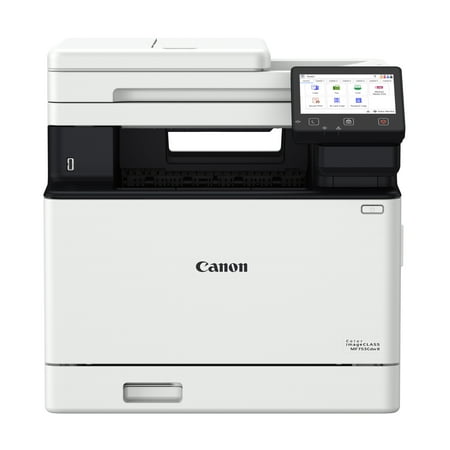
imageCLASS MF753Cdw II
- Brand:
- Canon
- Model Number:
- 7185C011
- UPC:
- 013803387438
- EAN:
- 0013803387438
- Best Buy SKU:
- 6644347
- Walmart SKU:
- 17920319436
Market direction turned downward with current $499.00 representing 0.0% under standard pricing.
| Price Type | Price | Date |
|---|---|---|
|
Highest Price
|
$702.99 | |
|
Lowest Price
|
$494.95 | |
|
Most Recent Price
|
$494.95 |
| Price Type | Price | Date |
|---|---|---|
|
Highest Price
|
$549.00 | |
|
Lowest Price
|
$499.00 | |
|
Most Recent Price
|
$499.00 |
Tracking History: We have tracked imageCLASS MF753Cdw II since 2/28/2026. The most recent price update was on Jun 26, 2026.
Price Range: Over the past 90 days, the price has ranged from $499.00 (lowest on 6/11/2026) to $549.00 (highest on 2/28/2026). The average price during this period is $515.67.
Current Trend: Walmart.com prices have ranged from $499.00 (Jun 25) to $499.00 (Jun 25) over the past 90 days. Current price is close to the 90-day average of $499.00.
Customer Insights: Rated 3.68/5 from 28 reviews.
Very pleased. The downloaded driver works well. no need for the pcl or ps drivers. One very big difference between this and an older xerox 6515 is that the initial power draw does not dim the lights! The power requirement listed in the specs is a little misleading, but technically correct. An ordinary 15-amp outlet works just fine. Print quality is excellent. The warranty is very good. I did purchase the extra 2-year warranty as well because I have had trouble with xerox scanners not working just after the warranty period. Setup was not difficult.
753 IS AN EXCELLENT MACHINE BUT THE DOWNLOADS FOR DRIVERS WAS ABSOLUTELY HORRIBLE. HAD TO DOWNLOAD A WINDOWS PRINTER DRIVER TO OPERATE THE CANON SCANNER. TECH AT CANON TRIED TO HELP BUT WAS LOST ON HOW TO GET THE COMPUTER TO ACCEPT THE CANON
Very impressive printing. images are sharp and crisp with excellent color rendition. Figuring how to set up was not so easy. I still have not got the scan functions to save to my computer yet. My brother printer puts an icon on my computer which makes it easy. Cannon is way more complicated. It would have been nice to have received the setup cd in the package that you could have just had a simple install. So many choices on their wesite you don't know what to choose. Hopefully I will get this set up to be able to scan.
I recently received the Canon Color imageCLASS MF753Cdw II for free in exchange for an honest review, and it's been a great addition to my home office. The setup process was super straightforward, and I had it connected to both my phone and laptop in no time. Wireless printing has been seamless, and I've been able to print easily from any device without issues. The print quality and speed have been outstanding and easily meet my needs for everyday documents and flyers. I also used the duplex (two-sided) printing feature, which worked perfectly and definitely helped save paper. Just to keep it real, it is a bit on the heavier side, so you'll want to make sure you have a good spot for it. That said, it's a solid, reliable printer, and overall I'm really happy with how it fits into my daily workflow.
I received this printer for free for my honest review after installing it an using it. The set up was extremely easy. My spouse did the install as a total tech novice and found it straight forward and no problem at all . . It literally is just plug it in a quick install on your computer and it is ready to work for you through Wi Fi.. You can also use it corded if needed. It was very easy to print from both by phones and my laptop. The WiFi connection process is very easy for a novice. It prints very well as far as text and photos look amazing. Printing on both sides of the paper was very easy. And is a big help in not having a huge stack of documents vs printing on only 1 side. The interface makes it very easy to print for anyone. It is so quick. My old printer took forever. This one is fast. We are using it in a home office . We also used it to scan a ton of the kids art work. I also appreciate the faxing capabilities. It was in my opinion in every way equal to the massive commercial printer at work but so much smaller and compact. It fits easily in the home office space without being huge. As silly as it is the kids wanted to try it out and scanned the face of a stuffed animal. The scan looked great and absolutely delighted the kids. I am very impressed with the printer.
I received a free printer to review. I have experience with wireless printers, but I have never owned one in my home. Since I've had it installed in my home, I've printed from my phone and laptop. The setup process was easy and straightforward it did not take long for me to put the printer together at all. For my small home office the print quality and speed has been great. It surpassed the needs for an at home setup. The 2-sided printing has been great as that makes the job quicker.
I received the Canon ImageCLASS MF753CdwII in exchange for my review and tested it for several weeks in my home office for personal and professional use. Setup was smooth until I hit the scan‑to‑email/computer feature —those instructions were very confusing even though they seemed so simple. Spent way too much time and patience trying to get it to work properly and a few functions like “delete blank pages” still don't work reliably. Copying and printing though, are effortless. Scanning even goes super fast its just the toggling from one to two sided that was the stumper. Im sure I could set custom scanning options but really don't think it should be that complicated. The large paper tray, easy envelope feed, and fast double‑sided scanning with zero jams are big wins. Connecting my iPhone and sending PDFs was also very simple but If you are looking for something to print photos or flyer printing, my experience with it was not good at all. I had tried several different settings to get the photo to print properly and it did not. Photo paper set up is also more confusing then it should be. Ultimately, it is a well built copier and if you are looking for mostly high-volume printing this is a fast, dependable workhorse. Additional features are also available but I have not had a chance to utilize all of them yet.
replacing a brother laser that is old. this one looked good but set up is difficult. cannot get my computer to connect wirelessly even though the printer is online with network. cannot scan from my computer as there is no scanner utility found. scans to thumb drive ok. will probably have to find time to contact support at some point as their web site is useless. UGH
not easy to set up. horrible getting synced with computer for scanning and to connect to wifi to scan and send. Need to return.
There is not a firmware update to allow sacn and email from gmail or yahoo
Detailed price history for the past 90 days
Walmart.com prices have ranged from $499.00 (Jun 25) to $499.00 (Jun 25) over the past 90 days. Current price is close to the 90-day average of $499.00.
| Date | Price | Change | % Change |
|---|---|---|---|
| $499.00 | — | — |
Third-Party Sellers prices have ranged from $494.95 (Sep 17) to $702.99 (Sep 6) over the past 90 days. Current price is 19.4% below the 90-day average of $614.27.
| Date | Price | Change | % Change |
|---|---|---|---|
| $494.95 | $+0.00 | +0.0% | |
| $494.95 | $-3.05 | -0.6% | |
| $498.00 | $-204.99 | -29.2% | |
| $702.99 | $+0.00 | +0.0% | |
| $702.99 | $+0.00 | +0.0% | |
| $702.99 | $+0.00 | +0.0% | |
| $702.99 | — | — |