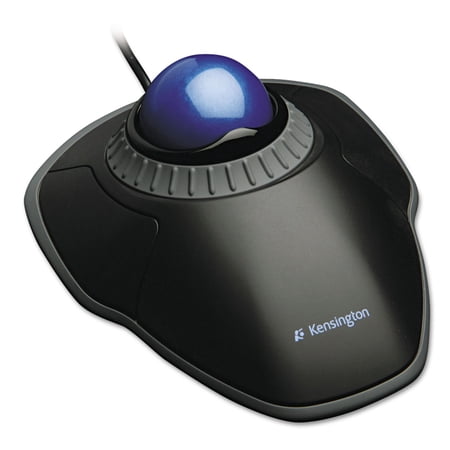
Kensington Orbit Trackball Mouse with Scroll Ring (K72337US)
- Brand:
- Kensington
- Model Number:
- K72337WW
- UPC:
- 012300307086
- EAN:
- 0012300307086
- Walmart SKU:
- 14235498
Significant price reduction expected soon—our analysis suggests a 11.7% drop is imminent after 0 days at $56.26.
Price expected to drop to $49.69 soon
| Price Type | Price | Date |
|---|---|---|
|
Highest Price
|
$59.44 | |
|
Lowest Price
|
$48.50 | |
|
Most Recent Price
|
$54.00 |
| Price Type | Price | Date |
|---|---|---|
|
Highest Price
|
$56.26 | |
|
Lowest Price
|
$39.59 | |
|
Most Recent Price
|
$56.26 |
Tracking History: We have tracked Kensington Orbit Trackball Mouse with Scroll Ring (K72337US) since 9/21/2023. The most recent price update was on Oct 15, 2025.
Price Range: Over the past 90 days, the price has ranged from $39.59 (lowest on 9/21/2023) to $56.26 (highest on 10/15/2025). The average price during this period is $44.18.
Current Trend: No Walmart.com pricing data available for analysis.
Customer Insights: Rated 4.3/5 from 126 reviews.
I've had this same exact model for literally over 20 years. This is the best track ball. It also allows you to use it on either hand and really doesn't take all that much getting used to using your non-primary hand.
Trackballs and mice are a matter of preference. I like this one because the ball is controlled by your fingers rather then just a thumb or moving the whole thing around like a mouse, I have owned several of these Kensington trackballs. I have used the ones controlled by your thumb in the past as well which I also like and find comfortable. Again, it's a matter of preference. I also tend to stick with wired trackballs (which are the minority these days) rather then wireless. But I use them all.... Great trackball if it your style
I live in a small apartment were space is at a premium. I also happen to be left handed. Few of you remember the early days of computers, when they took up entire rooms and input was by punch cards. I built my first personal computer in 1974, input was by 8 toggle switches and output was to 8 LEDs. Then Steve Jobs started a revolution. I was with Honeywell Aero Space in Tampa where we built IBM PCs while IBM built there factory in Boca Raton Florida. My third computer was a Macintosh. I was an early adaptor to the trackball. I got the Kensington Orbit when they first came out. It lasted through two keyboards and three computers. When, after more than six years, the scroll wheel finally became unreliable, I did not hesitate to buy a new Kensington. I had made two modifications. I added a sheet aluminum base, turned up on one side. so I have a 1-½" by ⅜" shield at the bottom of the button to rest my fingers against and keep them from inadvertently triggering that button as I work. On the other side I added a 1/2" square rubber foot from Radio Shack to that button to make it easier to depress it with my thumb. The Track Ball and base are affixed to my computer keyboard tray to the left of the ergonomic keyboard. I have a feeling it will outlast several more computers. I find it accurate to the pixel and has good on line software. It has made my trackpad obsolete, and takes up less than a quarter of the space. It does require I clean off the dust accumulation, with a Q tip, on the three bearings in the ball socket every month or two. The trackball is easy to pop out to do this. I did not buy an extended warrantee - Five years is long enough.
Wired no batteries great product fast delivery
A clean, easy trackball mouse with a great scroll ring function. Now that I have had it, I prefer the scroll ring to a wheel. It could have more buttons, but it is comfortable for both hands to
I'm ambidextrous and wanted a center track ball mouse to use with either hand. When my old one started to give out, I chose this one for its scroll wheel. What a big help! My only criticism is lack of secondary buttons that you can program - you can only left click or right click.
After using a standard mouse for many years, it takes some practice to use a trackball mouse. Not having to move the mouse around on the surface is convenient, but getting the pointer to go where you want and NOT move can be challenging. :) I like that the mouse comes with a 'wrist' extension, and I've tried it with and without the extension. I guess it all depends on personal preference. Good product, good quality.
I personnaly prefer the track ball styles with the ball in the center of the mouse. Kensington makes three that I know of, Logitec only one. I have used both and prefer the Kensington models. One issue I have with this specific model is the 'clicks' are a little more 'positive' than I'm used to, have to press pretty hard. I also think at $32, it's slightlt over priced. I would rate this a 6 on a scale of 1-10. Other than that, I'm satisfied.
You have to press the buttons very hard, there is no reason for how hard you have to press. Also when pressing the buttons they are very loud. Again I do not see any reason for this. If the box was not thrown away, I would have returned this. I do not use it and would not recommend this to anyone unless they wanted an unreasonably loud and hard to press buttons on their trackball mouse. The only reason I bought this was because logitech stopped making their Optical Trackman Marble Mouse, and my old one stopped working.
if you like to work really fast this is not the mouse for you.. slows down my workflow the trackball is not held in place together solidly enough for it to accurately land on a Target like a button for a Faraway Target without you having to slightly so lightly readjust the trackball. if you know your music making software like the back of your hand this mouse will not be able to keep up with you stick to a regular Mouse without a trackball.
Detailed price history for the past 90 days
No Walmart.com pricing data available for analysis.
Third-Party Sellers prices have ranged from $54.00 (Nov 11) to $58.26 (Aug 26) over the past 90 days. Current price is close to the 90-day average of $55.33.
| Date | Price | Change | % Change |
|---|---|---|---|
| $54.00 | $+0.00 | +0.0% | |
| $54.00 | $+0.00 | +0.0% | |
| $54.00 | $-3.94 | -6.8% | |
| $57.94 | $+2.05 | +3.7% | |
| $55.89 | $-0.01 | +0.0% | |
| $55.90 | $+1.90 | +3.5% | |
| $54.00 | $+0.00 | +0.0% | |
| $54.00 | $-4.26 | -7.3% | |
| $58.26 | — | — |