
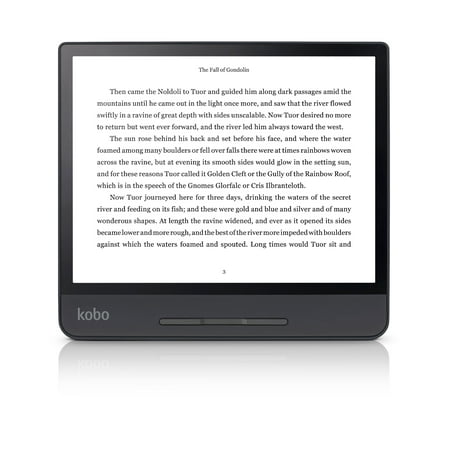
Kobo Forma eReader - 8" HD Carta E Ink most lightweight touchscreen, Page-turn buttons, ComfortLight PRO, waterproof
- Brand:
- Kobo
- Model Number:
- Forma
- UPC:
- 681495007639
- EAN:
- 0681495007639
- ASIN:
- B07J5BXRWM
- Walmart SKU:
- 274436858
At $258.32, pricing shows 0.0% discount compared to typical $0.00 levels.
| Price Type | Price | Date |
|---|---|---|
|
Highest Price
|
$258.32 | |
|
Lowest Price
|
$244.51 | |
|
Most Recent Price
|
$258.32 |
Tracking History: We have tracked Kobo Forma eReader - 8" HD Carta E Ink most lightweight touchscreen, Page-turn buttons, ComfortLight PRO, waterproof since 2/2/2025. The most recent price update was on Oct 2, 2025.
Price Range: Over the past 90 days, the price has ranged from $244.51 (lowest on 2/2/2025) to $258.32 (highest on 3/30/2025). The average price during this period is $252.80.
Current Trend: No Walmart.com pricing data available for analysis.
Customer Insights: Rated 3.6/5 from 55 reviews.
There have been some firmware updates since this came out and it is a fantastic reader now. I love it. Some complaints about darker band down one side of display but unless you are extremely picky you will never notice it while reading. Some complaints about flicker but I have never had anything but a rock solid, clear display. Love this product!
I'm really happy with my Kobo Forma eReader! It's very lightweight, comfortable to hold, easy navigation between pages while reading, and connected easily to our home Wi-Fi. I like that you can interactively look up word definitions as you are reading. The ability to easily adjust portrait/landscape, font size, lighting, etc is very nice. Also able to browse, search, and purchase books from the Kobo bookstore or check books out from my library using OverDrive.
I am very pleasantly surprised! I was hesitant to order this because of all the mixed reviews. I really love how big the screen is, this is the biggest screen I have seen to date. I couldn't stand how small my Kindle Paperwhite was. The Kobo Forma is amazing. The downside is you can't access any kindle books, however you can download epubs on your computer/phone, upload them to dropbox, and have the dropbox sync with your Kobo so you can read all the epubs on there. Also you have access to Overdrive which is nice. It is pricey but honestly so worth it. I love the way the screen looks, super easy on the eyes and doesn't strain them at all. Also everyone complaining about the power button, it's not that big of a deal lol. Doesn't bother me.
I just got my Forma and I have to say it's great. My Kindle Oasis just wasn't cutting it and the Forma is everything I had hoped the Oasis would have been. I've read a lot of reviews here and on Rakuten complaining about the power button being so difficult to work and that made me a little hesitant about buying it, but I did anyway. Most people were saying that you have to push real hard to get it to turn on, so that's what I did the first time and I had the same result as they did. It finally came on and I downloaded some books and decided to put it to sleep and let it charge. I felt around the side for the button and just started to give it a good push when my finger slipped off. To my surprise it went right to sleep. So, to test it again I tried turning it on with just the slightest push, not more than a light tap and it turned right on. Now, it could be that I got a good one and they got defective ones, but I think that they feel like the button needs to actually be pressed in when that's not really the case. It just needs a light press and wait a second or two before it comes on or goes to sleep. If you do press hard, trying to push it in it will cause the difficulties they're complaining about. So, if you're having trouble, try this and hopefully it'll work for you.
We got it only a week ago, but so far, it's great. The screen is just the right size, I personally would not get one with a smaller screen. We bought it mainly to borrow e-books from public libraries. It has built-in access to Overdrive. While this is nice, we often use other e-libraries that our community library gives us access to (CloudLibrary, Hoopla, World Books, etc.). We access those libraries first using a computer and then transfer the ebooks to the e-reader with the USB cable that comes with it and is also used for charging it. It works very well.
Easy to use and read with. Occasional ghost images of previous pages especially if a photo is on it. Books from my Kindle transferred easily after conversion to EPub format. Love the access to Overdrive for borrowing ebooks from libraries. Definitely recommended
It is a great item..like a book in many ways and better than others. I got mine to use at the gym since trying to balance a real book on the treadmill, elliptical, etc. was a very difficult task and sometimes the book would come crashing down. This does not do that. But I have found myself using it to read outside of the gym. It really does look like paper and does not give you eyestrain like reading a laptop/computer screen does. People commented on how the power button is hard to push, this I believe is by design so you do not accidentally turn off the reader by pressing it. The one issue which really is not an issue is that there were reports of the far edge of the screen, or the bottom, where the controls are, there is a slight discrepancy to the light. Its brighter at the very edge, well that is true but for me, I stop noticing it once I start reading. If you are really OCD then it might bug you. But I have noticed this on almost every laptop/portable screen device I have had and at one time kept returning them until I got the 'perfect' one. Well a perfect one may not exist. I felt the Kindle Oasis and while the back of the material is metal and smooth I feel this material is better as it has more grip. Also the screen is bigger than the Kindle yet the body is still VERY small. Bigger screen, almost same size body, grippier feel...and the best thing about this is the ability to borrow books from numerous public libraries! For free. That to me is worth it over the Kindle. If you know a little about how to work computers a bit, you do not need to be a whiz, than you may have to use Adobe Digital Reader software to be able to use some ebooks with your Kobo. I had no problem doing this but if you are completely illiterate with computer type things than a Kindle may be better for you. But you will have to purchase the majority of your books and that will add to the overall cost of this purchase over its lifetime. For me this was a great purchase!
It's beautiful and I really wanted to like it. I couldn't get it to work with Overdrive for library books and neither could my library. Maybe it would be fine for people who mostly purchase books. I also didn't like the on/off button - there's no haptic "click" telling you when you've pushed it enough. I've had a kindle paperwhite for 5 years and LOVE it. Kobo could learn some lessons from kindle! But Kindle won't support epub books -- or I haven't figured out how, anyway.
Page turning buttons are not working. Power button practically non-responsive. Kobo website chat is a joke. Unless Kobo people are reading it and get in touch with me I am returning the e-reader.
I really wanted to like this device but the hardware and software are disastrous. Ive played with the settings and I cant get the touch screen, the power button, or the page turning buttons to wake the device up from sleep mode or from off mode. The only way to get the device to respond in either mode is to plug it in to the power source. Furthermore, I paid double the kind price for the promised 8 inch screen (versus 6 inch on cheaper devices) but found the screen to be 6.25 inches on its longest side. Its negligibly bigger than the 90 dollar kindle. Even when measured w the frame it doesnt measure close enough to 8 inches. Be weary, do your homework. The ereader market could do a lot with better consumer protection.
Detailed price history for the past 90 days
No Walmart.com pricing data available for analysis.