
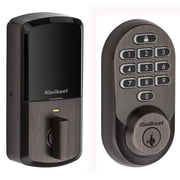
Kwikset - Halo Smart Lock Wi-Fi Replacement Deadbolt with App/Keypad/Key Access - Venetian Bronze
- Brand:
- Kwikset
- Model Number:
- 99380-002
- UPC:
- 883351681940
- EAN:
- 0883351681940
- ASIN:
- B081FYNZ7N
- Best Buy SKU:
- 6525056
- Walmart SKU:
- 403573254
Price has held at $209.99 for 0 days, but a substantial 5.2% decline appears likely within the week.
Price expected to drop to $199.00 soon
| Price Type | Price | Date |
|---|---|---|
|
Highest Price
|
$243.00 | |
|
Lowest Price
|
$129.00 | |
|
Most Recent Price
|
$129.00 |
| Price Type | Price | Date |
|---|---|---|
|
Highest Price
|
$209.99 | |
|
Lowest Price
|
$169.00 | |
|
Most Recent Price
|
$209.99 |
Tracking History: We have tracked Kwikset - Halo Smart Lock Wi-Fi Replacement Deadbolt with App/Keypad/Key Access - Venetian Bronze since 5/27/2023. The most recent price update was on Aug 31, 2023.
Price Range: Over the past 90 days, the price has ranged from $169.00 (lowest on 5/27/2023) to $209.99 (highest on 8/31/2023). The average price during this period is $193.57.
Current Trend: No Walmart.com pricing data available for analysis.
Customer Insights: Rated 4.1/5 from 112 reviews.
I installed this lock exactly two years ago and I love it. Easy installation if you are replacing an existing deadbolt (i.e. there is an existing hole in the door). Easy to set up the software interface with an iPhone and Google Home (I use both). Lock has worked flawlessly for two years, locally and remotely. As secure as any consumer deadbolt. Love that it has a smart keyhole that easily can be rekeyed by the homeowner to work with existing Kwikset keys - serves as a backup or for continued acess for legacy key holders. Easy to assign or remove codes and apply custom limits on each code (e.g. anytime, or certain days/times, one time or repeating). Battery life is adequate but not great (lasts a few months), but another plus is that it uses standard AA batteries so there's no need to stock exotic batteries.
I bought the Kwikset Halo keypad deadbolt at the end of July 2024. Installation wasn't the easiest, but I managed it on my own in about an hour. The trickiest part was getting the Bluetooth pairing to work. I've had very few issues with the lock since installation. I think I've replaced the batteries only 3 or 4 times thus far, but I make sure to use name-brand Duracell batteries. They seem to give the best bang for my buck. The most frustrating issue that seems to recur every few months is that I have to repair my lock with my phone Bluetooth. Not a dealbreaker, but still frustrating. Overall, if given the choice, I would still purchase this lock. The ease of setting up new codes & sharing access in the app is a big selling point for me. However, the Kwikset app could be more user-friendly.
Worked well for about 6 months until the winter. I noticed the battery terminals rusting; cleaned them lightly and it worked fine for a month. After the batteries EMOdied again it stopped working I've tried decal new batteries and nothing works; additionally the entire terminal is rusted. Is this a warranty issue?
I love so many of the features of this deadbolt, but I don't know if I'll keep it because it's so insanely loud. I bought it so my kids could have an easier (quieter) entrance when coming home late, but the noise wakes me up so it defeats the purpose.
We have four of these Halo Keypad Wi-Fi Enabled Smart Locks. Although the lock and keypad work well, the frustration comes from the "Update Now--Firmware Update Available" notification which is on the screen for each of the locks every time I open the app. It instructs the user to get close to the lock and press update. On all four of the locks, I have tried to update, but none of them will connect. Upon a search, the instructions are to toggle the bluetooth button, which I have done, and I receive the same error message every time. I worry that one day the locks will not work in my app because I haven't done the update yet. My husband and son cannot update their apps either. After searching online, I found there are many others with this frustration. If I knew now what I didn't know then, I would have purchased another brand besides Kwikset.
I love the features of this deadbolt, but it is so incredibly loud, I might uninstall it. I got it so my kids would have an easier (and quieter) entrance to the house late at night, but it's so loud it wakes me up every time.
Overall I have been please except for some reason yesterday it lost WiFi connection and our house sitter couldn't get in. I'm 1500 miles away. The point of WiFi is so I didn't have to give her a key. Now I'm up a creek. There should be a way to rest it from outside.
I'll meet you in the middle with 3 stars - when the lock works, it is a wonderful convenience since we live 2.5 hours from this weekend home. Two months ago we left the weekend home on a Sunday to return to regular home. On Monday I went to the app and it asked if I wanted to do firmware update now or later; I chose later and the lock disconnected. I then had to drive back on a Thursday late evening, I tinkered with the lock and it reconnected. It stayed reconnected until a couple weeks later; mom was there and I called her and the lock worked. Today I go to the app and it asks about firmware update; I chose to do it later and the lock disconnects. Absolute disaster - what is the answer/reason - I am not happy. At this point I give one star...actually, no stars since I cannot upload a screenshot showing the disconnect.
The locks work fine, connects to my wifi and can be operated with the App. It devours batteries. 4 AA batteries every two weeks. I have 3 of them so I can't afford to use them.
Lock keeps on saying jammed!!! The battery holder sometimes does not hold correctly. I had bought an off-brand before, it was junk so I decided to buy Kwikset, still garbage.
Detailed price history for the past 90 days
No Walmart.com pricing data available for analysis.