
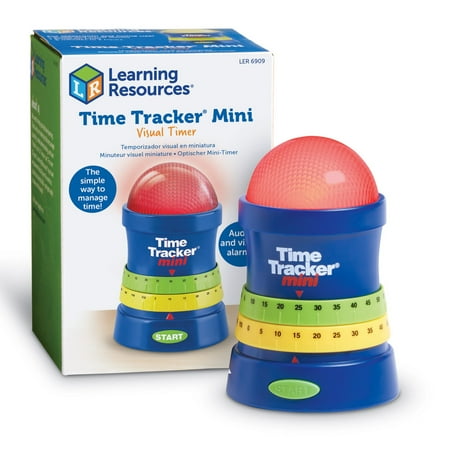
Learning Resources Time Tracker Mini Visual Timer - Audio and visual Alarms
- Brand:
- Learning Resources
- Model Number:
- LER6909
- UPC:
- 765023869095
- EAN:
- 0765023869095
- Walmart SKU:
- 16497629
Price momentum shifted downward , bringing the cost to $29.30. This represents a 0.0% discount to typical levels.
| Price Type | Price | Date |
|---|---|---|
|
Highest Price
|
$34.99 | |
|
Lowest Price
|
$15.65 | |
|
Most Recent Price
|
$29.30 |
Tracking History: We have tracked Learning Resources Time Tracker Mini Visual Timer - Audio and visual Alarms since 12/11/2022. The most recent price update was on Sep 10, 2026.
Price Range: Over the past 90 days, the price has ranged from $15.65 (lowest on 1/21/2026) to $34.99 (highest on 6/7/2026). The average price during this period is $26.71.
Current Trend: Walmart.com prices have ranged from $29.30 (Sep 9) to $29.30 (Sep 9) over the past 90 days. Current price is close to the 90-day average of $29.30.
Customer Insights: Rated 3.2/5 from 68 reviews.
I like the light but the alarm could be louder. I also would like to choose time increments less than 5 minutes.
I wanted something to help keep track and limit my son's video game time. Many times I would set limits but would be involved with my other child or tending to the dog and forget. With this timer I can give him a set amount of time to play and when it goes off his time is up. I like that there is a warning that the time is ending soon so he can wrap up what he needs to do before time expires. The timer is adjustable from 5 minutes to 2 hours and the warning time is adjustable from 5 minutes remaining to 115 minutes remaining. When the timer is counting down the light is green, when it hits the "warning time" mark you set there is an audible tone and the light starts flashing yellow. Once time is up there is another tone and the light changes to red. This timer has helped eliminate arguments over whether time is up or not. The timer is super easy to use as well.
This timer is a great tool for those who need a visual aid when cooking & baking. I am visually impaired and found it works for me too. Setting the pre-timer to go off (there is a ring too) before the actual time gives you time to prepare whatever it is you need for when the ending timer goes off. This timer also shows a red light (start), yellow light (pre-timer) and then a green light (end). I highly recommend this timer for those who have a lot going on at once in the kitchen or any other occasion when you need a timer.
My original purpose for picking the Time Tracker Mini was to use it for working with my nieces, nephews, and grandchildren. I am always looking for ways/things that would expand their attention, motivate them more to follow directions, and most of all - speed up the time it takes to completes desired tasks, especially clean up and put away activities - that's the best part from my perspective. For them - it makes the challenges both for personal best, and to out do their friends. The Time Tracker has a small "footprint" - 3 1/4" diameter, less than 5" tall - the lights are bright and be seen from just about anywhere in a medium to large room. Once I had the Time Tracker in hand I knew I would be using it frequently between my kitchen and living room. My house is modest, I am 68 and am finding over time that I don't hear my kitchen timers like I use to - but have been aware that I had to watch a clock in the living room to be sure to be aware of something cooking/baking, etc. I now set the Time Tracker on a 1/2 wall that separates the kitchen and living room. I can set a warning tone and light at any specified time ahead of my target time, as a safe guard - the alert tone is loud but but muted - the dome light then flashes pale yellow until the original set time is reached - dome light turns red, and hear a triple tone. The lights are bright, and the tones are pleasant - certainly worth the peace of mind it gives me when I'm doing some type of cooking in the kitchen - stove top is the one that concerns me most as I get older. When I'm working outside - I will set the time I work, by putting it on my deck railing (my back yard is over 1/4 acre) I can easily see the light ( and which color) and sometimes hear the tones. The lights are just fine - puts me in the target time frame I am aiming for.
I received the Learning Resources Time Tracker Mini Visual Timer a couple of days ago. The outside packaging is very descriptive and looks like a fun toy This is the first item I had to purchase something additional so I could review the product. I put in (3) AAA batteries using a table knife to access the battery compartment. The timer has a wide enough base so it would not tip over but I think small hands would have a hard time setting a time on the dials. I really like the visual effect of the timer. The yellow dial sets the warning time and the green dial sets the actual time -both at 5 minute intervals up to (2) hours. It is easy to see the clear dome that lights up green for actual time and/or yellow for warning time. It uses a yellow flashing light to indicate set time is coming up and a red flashing light when the set time is up. There is also a alarm tone that has an adjustable volume control. It is meant for use in the classroom and at home. This is great even for a kitchen timer -the flashing light caught my eye. I see it having possibilities that would even help those with low vision and maybe even the deaf.
My ten year old has huge time management issues - they have used a visual timer with him at school with good results. So I thought this would be the item that might work for him at home. He was super excited to open the box, install batteries (not included), and set it to work. The use of this item is kind of limited though. First off, you can only set time in increments of 5 minutes. We could work with this for most uses. When you have set it, turn it on, and press the start button, the top dome lights up green. There is otherwise, no indication how much time has elapsed until you hit the warning time. They actually suggested a timer that does not count down at school since, a timer ticking or counting down was too distracting for him. You set the top or green ring to the total time that you have given for the task - only in 5 minute increments. The bottom or yellow ring gets set to when you want a warning. This in my opinion could be the greatest asset, but works out to be a huge weakness. Say you set the total time to 20 minutes, with a 5 minute warning (you can't do less than 5 minutes) - only 15 minutes have passed, a tone sounds and the light changes from green to blinking yellow. For me as an adult, I found the blinking yellow light to be so completely distracting I had to move the timer behind something because it was driving me crazy. For a distractible kid, I can imagine it would be disastrous. So, in theory, it could be just what we need. But I simply can't use the warning setting. I wish they would make it a solid yellow, and that you could set it for only 1 or 2 minutes. And my 10 year old really said he wishes that the top dome was the start button.
For most things, I just use a regular timer to keep track of an activity or put a time limit on something (time-out, clean-up, etc.). This is definitely a more interactive and fun way to keep track of time! Here are so neat things about it: 1) You are given a warning for when the time is almost up (yellow timer) and a warning light shows for as long as the yellow tracker is set for. This gives everyone time to wrap-up an activity if needed. Note: You can ultimately use it to track two different activities (one activity using the green light, another activity with the yellow light). 2) Kids can be more involved in setting the time and learning about time-limits even if just for one activity. 3) Volume can be adjusted depending your need. Louder for activities that are noisier and quieter or almost silent for more quiet activities. 4) Easily visible and brightly lit. Some additional notes and comments about this tracker include: - The timer only allows for 5 minute intervals. That's probably great for classroom situations but for home use, smaller increments would be useful. - Warning tracker is also in 5 minute increments so the earliest warning time is 5 minutes. - The warning tracker (yellow) cannot be the set to the same time as the time tracker (green). If they are set to the same time, the time won't start. - You can stop the timer before the time is up. It does not keep track of when you stopped the timer, but starts over again based on the time setting when you press start again. - Timer can track up to 120 minutes (2 hours). -Requires 3 AAA batteries (not included)
This is a very convenient device. Because of its prewarning setting (warns before time) and the flashing light when time runs out. Better than setting the oven, microwave or toaster oven timers. The light in particular helps as all other timers are difficult to hear most of the time. Although I must say the beeper on this time would be great if it was somewhat louder. Easy to set and manipulate. Plus you can take from room to room to monitor what ever you are timing, not just food. ANYTHING. Makes a very convenient device to have around. My wife uses it for hair coloring and loves it.
Surely something as simple as a timer should not need an instruction manual, I thought to myself as I whipped around the green dial, set the yellow and pressed start. A beep alerts you that you have successfully set the alarm. Ten minutes later we checked the timer to see how much time we had left and the dial had not moved at all. Never have we seen any kind of timer where the timer dial did not move as it counted down the time remaining. However that is exactly the case with this timer. Nowhere in the guide (or the packaging even) was it mentioned that this particular visual timer was purely a light display timer that would not show time elapsed. Perhaps this particular item was intended to be purchased only by consumers who researched it before, I can only say with certainty that it took us by surprise. Once set and that fact established this timer became merely a way to alert us when bread or cookies were done. It was ineffective for timed play or learning activities simply because the warning timer was akin to a raid siren and upon going off there was no continuation of our activities since my grandchild's concentration was thoroughly broken. If the warning timer was not set we had no way to know when our time was nearly up so we could start winding down. Overall this was a nice timer for simple use and perhaps would be better utilized in a large busy classroom rather than an intimate home setting.
Was disappointed when this timer did not work properly. Also disappointed when I had to pay the postage to return it for credit!
Detailed price history for the past 90 days
Walmart.com prices have ranged from $29.30 (Sep 9) to $29.30 (Sep 9) over the past 90 days. Current price is close to the 90-day average of $29.30.
| Date | Price | Change | % Change |
|---|---|---|---|
| $29.30 | $+0.00 | +0.0% | |
| $29.30 | $+0.00 | +0.0% | |
| $29.30 | $+0.00 | +0.0% | |
| $29.30 | $+0.00 | +0.0% | |
| $29.30 | $+0.00 | +0.0% | |
| $29.30 | — | — |