
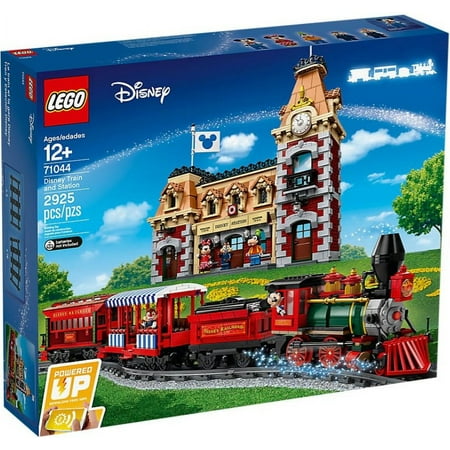
LEGO Disney Train and Station 71044 Building Set (2925 Pieces)
- Brand:
- LEGO
- Model Number:
- 71044
- UPC:
- 673419303194
- EAN:
- 0673419303194
- ASIN:
- B07WDVQ87N
- Walmart SKU:
- 921486817
| Price Type | Price | Date |
|---|---|---|
|
Highest Price
|
$784.00 | |
|
Lowest Price
|
$587.99 | |
|
Most Recent Price
|
$615.00 |
Price history data is not available for this product at the moment.
Current Trend: No Walmart.com pricing data available for analysis.
Customer Insights: Rated 4.4/5 from 64 reviews.
Both the train and station was really enjoyable to build, the detail with the station is great and the mini figs are fab. I like the detail in the station, from the weighing scales to the mini trains and photos on the walls. The train comes with the motor which is great, this is also well detailed, I really enjoyed building this set and the best part was having a running train on the included tracks around the station. Thank you for this great set lego.
Being a HUGE Disney fan & having ridden the Disney Train many times I knew I had to get this set. I have started my own ‘Disneyland' at home & seem to be adding more pieces weekly lol As others have stated there are MANY stickers in this set. I'm on the fence when it comes to stickers but these definitely add to the finishing touches. Although one piece in this set is ‘printed' so I don't see why the pieces that need stickers couldn't be printed as well. Also there are many repeated steps in the Station build but the overall finished product imo is worth it. Felt it a little expensive for the piece count but taking into consideration the motor/hub included in this set doesn't make it overly expensive. I would have preferred to run the train by remote, not by an app on my phone but it's something I can live with. I also purchased the City Tracks #60205 as they are compatible with the tracks as I wanted to extend the track to travel around the Disney Station & the Disney Castle. Presently working on a new piece to add to my own little Disneyland so I'm happy to be able to extend the tracks to travel around the entire thing. I just love that Goofy was included with this set as he has always been a favorite, Overall happy with purchase and looking forward to adding Disney pieces to my own happiest place on earth
Really nice Disney train set, it's expensive but a lot of fun to build. The train motor goes really fast and it's easy to control with the phone app. 5 Disney characters look great and the set looks very much like the real thing in Disney. Great for all ages comes in 4 book of instructions.
I received this big huge set of LEGO's from my family and I screamed with excitement when I opened the present. I already have SteamBoat so this is a great one to work on next before the big big one the Disney LEGO castle. If you LOVE DISNEY you have to have it all! I am one of those people! I opened the box Christmas night with my kids and husband and there were so many pieces and a lot are very small, so the little ones were quickly moved away. My older kids decided to work with me on this and I love when I get these because they always want to help. All of the little intricacies blow my mind. Down to Walts caboose and the little objects inside such as the tea set make it more intimate as you build the set. For those of us that are Disney fanatics this set will be a perfect set to build and put away as an art piece. Also if you have kids it is fun to build together and talk about memories of Disneyland or DisneyWorld as you build the set. We did that and it was a very touching time. The set was difficult to do. Definitely not a set for younger children and remember the small pieces. I think ages 10 and up could do this set. It may be a challenge but with patience it could be done. It takes time and you have to really pay attention to the directions. I put it in my cabinet where I have other Disney LEGO items, it is fragile so if you are going to keep it out keep it somewhere safe. Love this and can't say enough about LEGO. They always get it right!
I also have issues with all the stickers. Mainly that the ones for the long mat dont match up. Also there is a colour issue in my instruction book that says to use a dark red brick when it should be a brown one.The app is fun to use, but if this is the reason the set is pricey compared to the castle I dont think it is value for money. Also you cant use the battery pack to power any lights. Other than that it looks great with the castle.
A lot of pieces fall off of the train which takes away from playability, unless you plan on leaving it purely on display. Also not a big fan of putting on stickers, why not just print them on? Also noticed some of your stickers do not match, the print design is incorrect and presents an eyesore! If you are going to charge as much as you do for a set like this you should at least provide a flawless product.
I love this set. I got it for Christmas. The train was so much fun to put together. It looks so beautiful on display. The only thing I couldnt get past was how the colour choice of the train station reminded me to much of a fire station so I decided to change it. Over all this set was so much fun to build, it has absolutely fantastic detailing inside and out and it's fun to play with. Good job Lego. I'd recommend.
I'm not the biggest Disney fan, but I am a huge train fan, and aside from the cycle of passenger and cargo trains they release every few years, we don't get a lot of interesting sets for train fans. Aesthetically, this set is really beautiful. It steps out of the usual 6-stud wide train builds, and gives a solid 8 wide build that, given the scale, works better, in my opinion. The train looks great, but it causes problems if, like me, you do something like put the train on your Winter Village track. It hits both the Winter Village Train Station and the gates on the railroad crossing. Some quick modifications fix it, though. Unlike some of the other reviewers, I did not have a problem with instructions or misprinted stickers (although, for sets this large and costly, I would have preferred printed bricks). Unlike previous large sets I've built, there is only one numbered bag used at a time. That avoids a lot of confusion and makes it a lot simpler, as you don't have to wonder why there are three bag 1s, and only two bag 2s, but 4 bag 3s... you know you are getting the right parts for each set of steps in the instructions. If you're old-school, you can still feel free to dump them all in a giant pile from the start and have fun digging for bricks. This is my first Powered Up (PU) train, and unlike the other PU train sets (Cargo and Passenger trains), this does not include a remote, which means you will need a mobile device - Apple or Android, to control the train. Make sure your device can handle it. You otherwise might want to buy a remote control separately, which is a lot cheaper than getting a whole new mobile device. If you are using the app to control the train, it's got two "modes," one regular and one winter. The interface gives you a different appearance, and the optional background music (very nice touch) is different. The app lets you ring the train bell, blow the train whistle, and control the speed of the train. All in all, it's a pretty nice system. Note, you cannot do ANYTHING else with your device while playing with the train, as switching apps causes the system to disconnect automatically. There's nothing you can do about it. It's a fine default behavior, but there's no settings where you can adjust it. That leads me to some of the bad things about this system, and it's mostly related to PU, and not the Disney Train, but since that's what it comes with, I think it's fair to include it here. Firstly, it's supposed to automatically disconnect and shut down the hub (the controller for the train - the "brains" that attach to the motor) when you exit the app. The light on the hub does go off, but then I have no explanation for the miserable battery life of the hub. 6 brand new AAA batteries were gone before a week was up, and I only ran the train a few minutes at a time, maybe a dozen times, before the batteries wore out. 6 new batteries to play with programming the hub, and in less than 20 minutes the train was going noticeably slower. I have now ordered two sets of rechargeable batteries. For a company that seems so concerned about the environment, the miserable battery life is really quite bad. The other thing, as I mentioned, is that PU lets you create your own controls - it lets you "program" the train. The screen that lets you build your own gives you a number of pages of different icons that you can link together to make stuff happen; it includes several computer programming concepts that should allow a novice to learn a little bit about programming logic. Great bonus, right? Except there's no documentation for ANY of the icons/constructs that are included, or how to use the interface at all. Some are easy to figure out, some not. There are other concepts, like being able to create sub-blocks of "code" that I figured out after some time, but I look at this and shake my head at the idea that someone who doesn't already know how to program could figure any of this out. I'm a professional computer programmer, and I had trouble trying to figure it out. Do you know the different between local and global variables? I do. Not so sure a 10 year old with no programming experience would. It's also quite difficult to do all this on a little phone screen. If you have an Android or iOS tablet, that might ease the pain. Being able to do something really cool on my laptop would be great, but there's no Windows interface available. How does the LEGO Group create a programmable device like this without getting the resources out there for people to program it? And there's really no excusing it - the Boost system has been out for at least two years. I ultimately was able to make a little program and, using the color sensor from boost, have the train run independently while occasionally stopping at the Winter Village Train Station for a few moments before proceeding around the track again. Despite the issues and lack of documentation, that's the kind of cool thing both adults and kids could get into.
I'll start off by saying I'm more of a Disney guy than a LEGO guy so my experience with LEGO's isn't as extensive as most reviewers probably have. This was a fun set to build and I enjoyed it. There were a a few steps, especially as you got to the station building parts, where it seems more easy to miss a brick than in other building phases. I liked the details of the station to include pictures of the monorail, trains, etc... What I didn't like was how many stickers there were. I also have the Steamboat Willie set. I don't remember there being many (if any) stickers with that set. I am not a big fan of stickers because you never place the exactly right. For the price point, I would have liked to have seen bricks that already had their stickers applied or preferably, printed on.
I purchased this set on the 13th September. When I finished the build I was very happy with the set. The only modifications I've done to the locomotive were changing the color of the boiler, I did this with spare bricks and this did not have any affect on how the train ran. I've been running this set round my Lego city, and I haven't had issues until recently. I noticed the train struggles going round corners; the train won't even move unless the speed "level" is on 3 or over (using my phone as a controller) I tested this with and without the cars. Testing the tender itself, you can hear and see it slowing down while going round the corner (I have not modified the tender in any way). I've looked at reviews, forums and videos online and this issue hasn't been raised. I've tested 3 different types of triple A batteries, and I think there could be a problem with the motor itself. Is there anyway to resolve this? Thank you
Detailed price history for the past 90 days
No Walmart.com pricing data available for analysis.
Third-Party Sellers prices have ranged from $599.99 (Jun 26) to $615.00 (Sep 5) over the past 90 days. Current price is close to the 90-day average of $610.00.
| Date | Price | Change | % Change |
|---|---|---|---|
| $615.00 | $+5.01 | +0.8% | |
| $609.99 | $-5.01 | -0.8% | |
| $615.00 | $+0.00 | +0.0% | |
| $615.00 | $+10.00 | +1.7% | |
| $605.00 | $-10.00 | -1.6% | |
| $615.00 | $+0.00 | +0.0% | |
| $615.00 | $+15.01 | +2.5% | |
| $599.99 | $+0.00 | +0.0% | |
| $599.99 | — | — |