
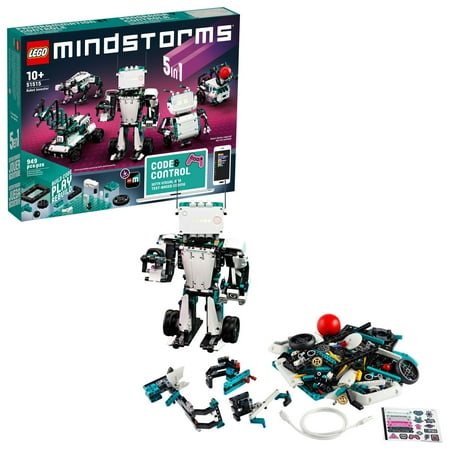
LEGO Robot Inventor 51515 Building Set (949 Pieces)
- Brand:
- LEGO
- Model Number:
- 51515
- UPC:
- 673419304764
- EAN:
- 0673419304764
- Walmart SKU:
- 541983319
| Price Type | Price | Date |
|---|---|---|
|
Highest Price
|
$1,000.00 | |
|
Lowest Price
|
$519.99 | |
|
Most Recent Price
|
$519.99 |
Price history data is not available for this product at the moment.
Current Trend: No Walmart.com pricing data available for analysis.
Customer Insights: Rated 4.08/5 from 48 reviews.
I have been a huge fan of Lego and robotics for a number of years, so the Lego Mindstorms series is something that naturally caught my attention. My experience with Mindstorms started with the EV3 set. I originally purchased a set for personal use. I then used my role as a Primary School educator to introduce EV3 into classrooms. When I heard about the next iteration in the Mindstorms series, Robot Inventor, I couldn’t wait to get my hands on it. I had heard a few negative comments about the 51515 set before purchasing it, which raised a little bit of doubt in my mind that it would be a worthwhile purchase. Thankfully, those doubts have been firmly put to rest. The new Mindstorms set looks fabulous straight out of the box, You receive lots of little bags packed full of colourful parts, some stickers and a small booklet with some links. There are no instructions in the box, with digital instructions being favoured instead. The model instructions, as well as videos, code examples and the coding software are all contained within the new Mindstorms app. The app is well designed and easy to navigate. My one complaint so far would be the difficulty I had locating the Windows version, which was tucked away in the Microsoft App store. I would have expected the PC software to be easier to find for a new premium product such as this. A more visible link on the product page would help. The Mindstorms Robot Inventor kit features 5 new robot designs out of the box. Personally, I think these new robots are an upgrade on the models that come with the EV3 sets. Each robot model starts with a basic build. You then have the option to choose one of many additional activities to further develop and refine your robot. Charlie, which is the first robot I built, has ten additional activities to add to the base model including: a golf multiplayer game, a drum kit and a ski board. This new approach is a welcome improvement over the EV3 set. When you wish to start a new project, you can simply remove the additional parts/code and start again with your base model already built. This is in contrast with the EV3 kit, which only has one mode for each of the 5 robots. Once you get bored, you have to tear the entire thing down and start again. The biggest improvement that the 51515 Robot Inventor kit brings is in the coding software. The new Mindstorms app allows you to choose from Scratch or Python style coding, giving the user the option of block base coding or text based coding. This is such a drastic improvement over the coding software provided with the previous EV3 system. Speaking as an educator who has used the Mindstorms sets in school classrooms, this new approach to the coding is a game changer and will allow so many more children (and adults) of just about any ability to enjoy playing and learning with Lego Mindstorms. There are a few complaints from hardcore Mindstorms users which cannot go unmentioned. Robot Inventor 51515 does remove the option to daisy chain blocks. The wires are also hard wired rather than removable. Users will need to be more careful when pulling robots apart, because snapped cables will be a lot more expensive to replace now that they are built into the motors. It is a little disappointing that this new kit appears to be less flexible in its design than the previous EV3 was. Overall, I am really pleased with my purchase of the Lego Mindstorms Robot Inventor kit. The base package is a smart upgrade on the previous entries in the series with hours and hours of content to make and play with out of the box. This is before you factor in all of the fantastic creative possibilities that users will be able to design & make for themselves. The new coding software is head and shoulders above the previous EV3 software in accessibility and user-friendliness. I hope that Lego will continue to support the 51515 kit with extra features and add-ons for users to enjoy later down the line. Hopefully some of the negative aspects that current hardcore Mindstorms enthusiasts are disappointed with will be addressed throughout the product’s life.
Using a 10 year old laptop updated to windows 10 and a Bluetooth 4.0 USB dongle, works fine with the new Mindstorms software. The programme supports either the Xbox or PlayStation 4 controller for use with the M.V.P. driving challenges, which makes it much easier to control than with a phone or tablet. To show it's versatility, have built the colour sorter from the EV3 set, see uploaded image. This new set as some great potential and I hope Lego keep supporting it.
This is not another Lego set. This is the best Lego set EVER. It enables your child to design robotic machines that work (while learning the first year curriculum in computer science and engineering), even if your child is as young as nine. It's not about building the designs included. It's the total freedom to materialise any mechanical logically controlled idea. Enables your child to take a gaming remote control, and control a car they designed and built them self. (unlike the "predecessors" Mindstorms 31313, and Boost, the Scratch language and editor are intuitive for kids (as in "explain me like i'm 5")). Lego deserve the ultimate praise and accolades for designing this ultimate accessible product. Thank you LEGO!
I own several robotic platforms including the VEX, Mindstorms NXT, NXT2 and EV3. Thay are all good, but this is what makes the newest set the best: 1. All of the electronics work great from sensors, to lights, to hub, to motors, to mobile device app. 2. The example models really demonstrate what else you can build with a little imagination. 3. The programming is clear, concise and filled with options for all kinds of robots. 4. The lessons are engaging with great feedback that makes you want to go further. I advise getting a set and regardless of your experience level, start at the beginning and follow through the examples as they are in the app.
Bought for a project. I bought the yellow version of the hub, but its EXACTLY the same as the Turkoise one. The microprocessor is very powerful and uses Micropython, which is great for someone with programing experience. The code blocks are not bad either. To the haters: code block style of coding can guarantee program correctness in more advanced situations, so don't dismiss the idea too quickly. Its kinda like functional programming. The actual processor has sensors(accelerometers) that can tell yaw, pitch, etc. It works very well. The only drawback: the cables cannot be extended. It has 4 motors of sufficient strength but you can also use the motors from Control+. For example, I bought several large angular motors that came in the Volvo Hauler and they work with the hub. The app for both iOS and Mac OS are both really well made. I highly recommend them
Love the sets BUT they need a water safe option ... The idea of making a lego nautilus that actually submerges would be AWESOME COOL .. or a USO UFO ... or anything that goes on the water ... including boats etc ... great for those days when swimming in the pool is too chilly but playing with lego in the pool would be an all day activity ... ;)
its not too complicated to build and does not take long to finish one of the Robots. the App is great and offers Dozen more cool builds. the App lets you build body parts step by setup and after setup is done you test with a little premade program, which motivates you to finish the complete model. nice video explanations and help system inside the app. latest updates also add basic machine learning features. overall big improvements from last Mindstorm EV3.
I got it as a Christmas present I was so happy. When I opened it there were a lot of pieces and a sorting system in the box. When I started building it took less than an hour but sometimes the pieces wouldn't fit together but I got it. Honest ly I really like it I would recommend it to a friend
I originally purchased this as I wanted to have a new Mindstorms set. My first set was the RTX series. I would say that the big things that are keeping me from giving this a good rating is lack of expansion parts and hidden features. I know from my electronics knowledge that the light sensor can detect ambient light (though there is no option to do so). I also feel that I should decide when to turn on/off the external LED's of the color sensor also "no option". A "internal" sensor block for reading battery life/voltage not available... A block to use the force sensor used in the Spike prime set not found. In the end it is the features I know it has that are blocked or just simply not added that frustrate me the most. It's fun, but it could be a lot better with just some simple adds. + rechargeable battery + smaller hub + large part count + variable creation + large sound library - hidden features - no expansion parts - fixed cables - long charge time
I have had this Mindstorm for 4 months and it has been the most frustrating Lego I have ever owned. I own the EV3 which works great. The problem with this new Mindstorm is it does not do what it is told to do. 70% of the time it does its own thing even if I stop the program. I Would not recommend to anyone!!!
Detailed price history for the past 90 days
No Walmart.com pricing data available for analysis.
Third-Party Sellers prices have ranged from $519.99 (Oct 11) to $519.99 (Oct 11) over the past 90 days. Current price is close to the 90-day average of $519.99.
| Date | Price | Change | % Change |
|---|---|---|---|
| $519.99 | $+0.00 | +0.0% | |
| $519.99 | $+0.00 | +0.0% | |
| $519.99 | — | — |