
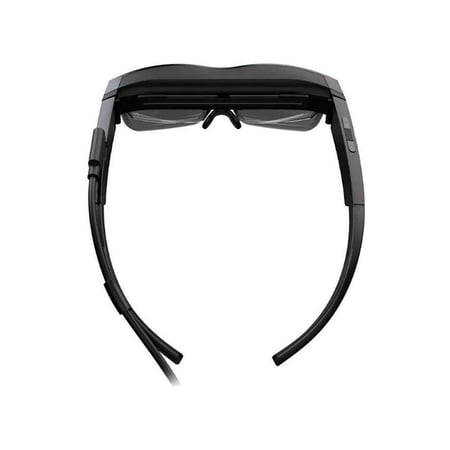
Lenovo ThinkReality A3 Smart Glasses
- Brand:
- Lenovo
- Model Number:
- 20V7Z9AKXX
- UPC:
- 195713815031
- EAN:
- 0195713815031
- Walmart SKU:
- 635208057
| Price Type | Price | Date |
|---|---|---|
|
Highest Price
|
$1,660.01 | |
|
Lowest Price
|
$700.00 | |
|
Most Recent Price
|
$1,660.01 |
Price history data is not available for this product at the moment.
Current Trend: No Walmart.com pricing data available for analysis.
Customer Insights: Rated 3.24/5 from 25 reviews.
[This review was collected as part of a promotion.] Setup was a snap and little to now SAS from long time use age.
[This review was collected as part of a promotion.] Being able to take my multiple monitor setup on the go is a game changer. I primarily work between three locations, our main plant, our new plant jobsite, and my home office. Previously I always felt less productive when I was away from my home office and my multiple screens. Now I'm able to take that with me no matter where I go. The A3 is extremely comfortable, even for extended periods. Though they do get warm after a while.
[This review was collected as part of a promotion.] I wanted to love these and I almost do. Pros: I like the design. They are lightweight and the image quality is excellent. The tracking is pretty much spot on, and the sense of there being a virtual display hanging in space is solid. The text is easy to read and colors look great. The build quality of the hardware is very nice and the glasses feel pretty comfortable. Cons: On the downside the virtual monitory app on the PC version is not really usable because of the limited FOV of the display; it doesn't feel like looking at a big monitors, but more like looking through blinders at a little bit of a monitor at a time. It's easy to lose the cursor. The industrial version with the phone is nice but not really very functional. It only lets you look at 2D displays (only chrome and youtube). The software environment seems extremely limited. Only Unity is supported and even then it's a very complex set of steps to get something together. For something that is an early adopter product it would make sense to expose multiple development options. I personally would love to see WebXR supported. The phone itself runs WebXR perfectly but none of the sensor data is exposed from the A3 as far as I can tell. A final note: even thought the glasses seem light and comfortable there's a noticeable sense of relief when I take them off so there still some strain.
After using these for a few weeks. I couldn't give it anymore the 2 stars. The first star was for its lightweight design. Not bad compared to others. The other star was for how many screens you can add in the display. I was working with 9 screens. I know, crazy! Now for the problems. The refresh rate on these at 60hz is way too slow for just 1 display. As I looked around the one display it was a blurry image until I stopped moving. then it cleared up. If I added more screens, it just got worse. The cable that comes with the glasses are too short. No hand gestures didn't help. Trying to type was a pain. Had to keep lifting the glasses to see the keyboard. The unit also got hot on my head. I had to cool off every 30min. All jokes aside I would look at other Options.
[This review was collected as part of a promotion.] Do not expect much. The technology is too early stage.
[This review was collected as part of a promotion.] The software on the Virtual Desktop is actually quite impressive, and works exceptionally well. You can adjust the monitors with relative ease, and it's extremely cool to see them extend your existing setup. I'm a software developer who was extremely excited for the potential to use these things and not need to bring two extra monitors with me when I travel. Well, my hopes were dashed. There are two or three problems here which make this unusable for actual day-to-day use for anyone trying to create something of a remote virtual office. First: The field of view is just simply too small for any meaningful usage. I spent a long time trying to figure out what the actual field of view would look like, or how to picture it. Well, you can picture it like this: Put your arms straight out, exactly shoulder width, meaning don't move them left or right, just stick them straight out, palms facing each other. Your arms will create a gap that is about 16" or so wide. Now imagine that creates a square, about 16" by 16", at the end of your fingertips. THIS IS YOUR FIELD OF VIEW. This far away, and this big. It's relatively tiny. If you're trying to read any type of text, you won't be able to see the entire screen at once, of a single virtual monitor. You never realize how much peripheral vision helps in a multi-monitor setup until you try to work like this. It's cumbersome. Second: As briefly mentioned above, you just can't read text while keeping one entire monitor in the field of view. Which is to say that if you want text to be crisp, you have to "drag" the virtual monitor so close to you that it's just disorienting needing to move your head so much to see anything other than the center of that screen. I have 1080p physical monitors and I do not believe that these replicate the crispness of a physical 1080p monitor, sorry. The text test just doesn't add up. Third: Comfort. These are not "heavy", but they are definitely uncomfortable to wear for any extended period of time (1 hour+). There could be more thought into how they could be more gently propped on the forehead (like the hololens' forehead padding). The nose-pieces are also surprisingly less-than-comfortable. They aren't bad, they're just bad for glasses of this weight. They aren't quite cushioned, which is more than necessary given the heftiness here. Fourth: You can't use your existing monitor while wearing these. Sorry. The glasses create an environment that is too dark. I was under the impression that I could have my monitor open and have my virtual monitor above, and everything would be grand. Well, you "can" do this, but you will have quite a hard time seeing your physical monitor. The tint on the glasses is too severe. It is again very disorienting trying to do such a thing. I honestly have never been more excited to leave these triple-physical-monitors behind, and I was so ready to have an amazing virtual office for a more remote or nomadic lifestyle, but this came so far from fitting the bill. It's an amazingly exciting peek into what will be possible in the future, but it's just not ready yet. I'm happy to see how simple the Virtual Desktop Software was, and I was thrilled that it worked on my non-lenovo laptop. If you're looking to replace your desktop monitors while travelling or working remote, this isn't going to cut it, but I sincerely hope that Lenovo continues improving these glasses because the thought of creating a completely virtual office is mind-blowingly cool, and exceedingly valuable.
[This review was collected as part of a promotion.] These smart glasses had limited use due to the requirements in order to use them. It seems that a Lenovo pc is required to use these glasses. I have a pc that meets the requirements and the glasses did it work. I returned the glasses, never able to get it to work.
[This review was collected as part of a promotion.] I think the glasses didn't seem to work right. It would also be helpful if the mentioned computer system they were compatible with, right up front. Say not for apple products. I did not see that information on Lenovo, up front and clearly. It also would be helpful if they had a startup/how to video and show what we should be seeing, to make sure we are doing it right. I sent the glasses back.
[This review was collected as part of a promotion.] They definitely aren't for a normal consumer, they require all kinds of licenses and specific programs to work and it's really nit stated in the product page
Not compatible with windows 11 or 10, or my android phone. Very disappointed for a 1600 pair of glasses
Detailed price history for the past 90 days
No Walmart.com pricing data available for analysis.
Third-Party Sellers prices have ranged from $1,594.30 (Aug 21) to $1,660.01 (Sep 19) over the past 90 days. Current price is close to the 90-day average of $1,605.25.
| Date | Price | Change | % Change |
|---|---|---|---|
| $1,660.01 | $+65.71 | +4.1% | |
| $1,594.30 | $+0.00 | +0.0% | |
| $1,594.30 | $+0.00 | +0.0% | |
| $1,594.30 | $+0.00 | +0.0% | |
| $1,594.30 | $+0.00 | +0.0% | |
| $1,594.30 | — | — |