
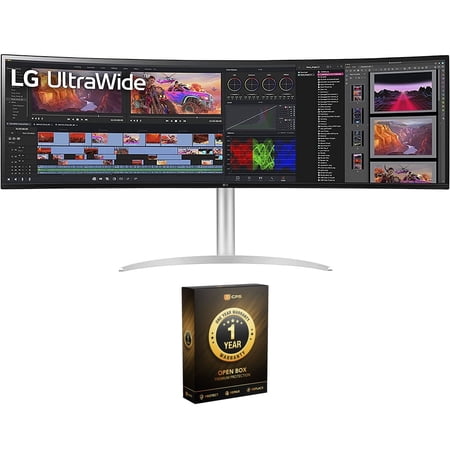
LG 49\" 5120 x 1440 LCD Auto Brightness Control (ABC), Flicker-free Curved Gaming Monitor, 49WQ95C-W
- Brand:
- LG
- Model Number:
- 49WQ95C-W
- UPC:
- 195174035139
- EAN:
- 0195174035139
- ASIN:
- B0B5K851GV
- Best Buy SKU:
- 6513289
- Walmart SKU:
- 1207792403
Current pricing at $1,096.99 reflects recent market activity, running 0.0% below the 90-day average.
| Price Type | Price | Date |
|---|---|---|
|
Highest Price
|
$1,699.99 | |
|
Lowest Price
|
$996.99 | |
|
Most Recent Price
|
$1,699.99 |
| Price Type | Price | Date |
|---|---|---|
|
Highest Price
|
$1,474.99 | |
|
Lowest Price
|
$1,070.87 | |
|
Most Recent Price
|
$1,096.99 |
Tracking History: We have tracked LG 49\" 5120 x 1440 LCD Auto Brightness Control (ABC), Flicker-free Curved Gaming Monitor, 49WQ95C-W since 8/21/2023. The most recent price update was on Sep 29, 2023.
Price Range: Over the past 90 days, the price has ranged from $1,070.87 (lowest on 9/6/2023) to $1,474.99 (highest on 8/21/2023). The average price during this period is $1,203.66.
Current Trend: No Walmart.com pricing data available for analysis.
Customer Insights: Rated 4.29/5 from 28 reviews.
I'm a CGI/Viz Artist and I must say, this monitor looks and performs amazingly! It offers everything I need. It to me the most complete monitor in the market. Ended up buying one for the office and another one for home office. Highly recommend!
the product is only listed on lg's website but not available for purchase anywhere. poor service by lg
[This review was collected as part of a promotion.] I received my monitor 2 weeks ago and have been absolutely loving it. Upon opening up the box everything was packaged very nicely and easy to access. After removing the monitor the assembly of the stand was extremely easy and connecting to my laptop was very simple with just 1 usbc cable. The monitor also provides power to the laptop via the usbc any time the display is on which allows 1 extra port on the laptop for accessories. Once I had everything put together I was surprised with how much adjustment the stand offered. Connecting to my laptop was super simple and just required adjusting the resolution to fit the monitor. Once I was setup the clarity of the screen is unlike anything I have used before. My previous setup had a 27 inch monitor and my laptop screen beneath it and the sheer size of this monitor has increased my efficiency exponentially. I comfortably fit all 4 of the applications I regularly monitor along with a full sized browser window in the center of the display. Every form of media I have consumed has been crystal clear and the colors are excellent. I was also surprised with how good the built in speakers are. Great for listening to music while working. The controls for monitor settings (volume, brightness, etc) are very intuitive. Overall I have been extremely pleased with this monitor and would recommend it to anybody who is looking to improve efficiency while working or even just for personal use
[This review was collected as part of a promotion.] I received my monitor around Christmas time and just recently had the time to set it up. Honestly the size of it is very intimidating. I wasn't sure at first if my monitor mount would be able to hold it up but it's still standing. The resolution is very clear and its very convenient being able to use 3 screens side by side at the same time. The only thing I wish it had were built in speakers but besides that it performs wonderfully.
[This review was collected as part of a promotion.] I was super excited when my LG monitor arrived! I have been using a laptop screen along with a small second screen but knew I needed even more screen space to be as efficient as possible. The LG UltraWide 49-inch monitor is big, really big! It provides all the space I need! I can have at least 4 full-size browser windows open at a time and many more smaller windows open if I choose. The unboxing and stand assembly was super easy. The stand attaches without tools and I had the monitor together and on my desk within minutes. I very quickly realized my existing desk setup was not going to be deep enough - which is not a bad thing! I will trade having this new monitor for an adjustment to my desktop any day! I am very impressed with the stand. You can adjust the monitor to a wide range of heights and you can also tilt the monitor horizontally and vertically to meet your needs. LG hit it out of the park when it comes to the stand! But I am most happy with the screen itself, of course. I have the resolution set as high as it will go - 5120 x 1440 - and it is super sharp and super clear. The on-screen settings are simple to navigate and well engineered. The monitor connected flawlessly with my laptop. One cool perk - the monitor charges my laptop so I don't have to use my laptop's charging cord. Saves on space and cord clutter. I am very happy with my LG UltraWide monitor. I would recommend it to anyone!
[This review was collected as part of a promotion.] This monitor is my first ultrawide monitor, replacing 2 standard monitors. I absolutely love everything about it. After the initial shock of it's size, once I got it on my desk and plugged into my laptop by USB C, it was so easy to set up. I only needed to adjust my resolution. Both my work laptop and personal laptop are not fancy by any means and they both are able to output a full 5120 x 1440. I also no longer need to use my work-supplied laptop dock as the monitor will charge my laptop and also allowed me to plug in my keyboard and mouse to the monitor. My only gripe is that there's only 1 USB port so I had to buy a small USB hub for additional slots. The settings for the device are very easy to navigate and figure out without reading the manual and there's so many different configuration options for multiple inputs to display on the monitor at once. I also appreciate using this monitor with Windows 11 as it's easy to drag a window to the top of the screen and have it take up half, 1/3, 1/4 and a couple other configurations. The speakers for the monitor are also very impressive and loud. As far as I've figured out so far though, my computer can't change the volume of the monitor itself so I set the monitors speakers to the highest volume and then my computers speakers to around 20% for a reasonable volume level for normal use. Overall, this monitor has been great for productivity at work, casual video watching, browsing with multiple tabs or programs, and also gaming. With this monitor you'll wonder how you ever survived with just 1 or 2 normal monitors side by side and you'll never go back.
[This review was collected as part of a promotion.] Getting this monitor out of the box is a blast. It's big and looks great. It replaces two monitors on my desk and it looks slick. The screen quality is amazing. Colors pop and text is crisp and super readable. The curve on the screen is nice and helps me see the whole screen without straining too much. Also, there's a useful On Screen software that lets you split the screen in 2, 3 or 4 equal sections. It helps keep things organized and easily accessible. I'm going to get another one for the desk at my office. This one is for my home office.
Excellent, no issues except for maybe the monitor is a little too quick to go to sleep when it says there is no signal. I also found the 'dual controller' software to be a little buggy, but that's only needed if you want to try and control two computers at once with the same keyboard and mouse. I didn't have the problem that 'SparkyUK' mentioned about power delivery. Connects to my Macbook Pro M1 via USB C power without any problems, and that's with a 2nd external monitor connected as well.
This is a nice screen, but I feel it needs a slightly better arc radius because it's a little too flat. That aside, the main issues with this laptop are if you use the USB-C to power your computer. Nearly every time I wake my computer, the screen wakes up and I have approx 30 seconds of usage before it claims there's no signal, and then goes to sleep. This is not an issue of the computer as we've tried many of them. The only way to wake the monitor again is to unplug and replug in the USB-C cable (we're using the ones supplied from LG). Additionally, we also have issues with items plugged into the USB host (using the USB-A ports) such as web cams. These are often not available after waking and we have to unplug them and then plug them in again after a moment - otherwise they don't appear available to the host computer. There is clearly some issue with the monitor supplying power to UBC-C and USB-A ports. Once the power is removed the computers lock and then you have to unlock them (by opening the lid), logging in and then the external source works again. Doing this 3 or 4 times in a day for each monitor has made us realise we'll not buy from LG next time. It's a real shame about these 49" monitors - we're not seeing this issue with a bunch of the 40" versions, but this model in particular is a massive pain to use with USB-C.
The bezel gap between the glass and frame is terrible, the outer bezel is wobbly with varying gaps between the frame and glass, and the monitor crecks like an old floor. Super disappointed 😞
Detailed price history for the past 90 days
No Walmart.com pricing data available for analysis.
Third-Party Sellers prices have ranged from $1,699.99 (Jul 15) to $1,699.99 (Jul 15) over the past 90 days. Current price is close to the 90-day average of $1,699.99.
| Date | Price | Change | % Change |
|---|---|---|---|
| $1,699.99 | — | — |