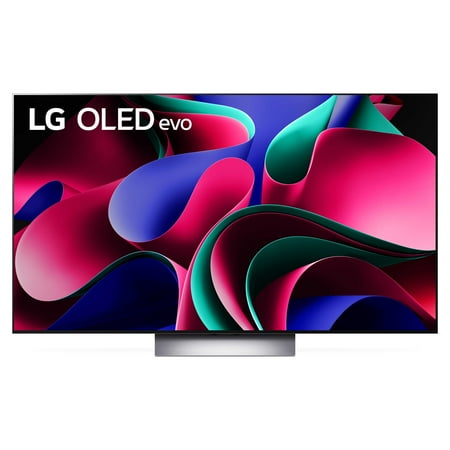
LG 55" Class 4K UHD OLED Web OS Smart TV with Dolby Vision G3 Series - OLED55G3PUA
- Brand:
- LG
- Model Number:
- OLED55G3PUA
- UPC:
- 195174051016
- EAN:
- 0195174051016
- ASIN:
- B0BVX2RLV2
- Best Buy SKU:
- 6535936
- Walmart SKU:
- 2074664061
At $2,496.99, pricing shows 0.0% discount compared to typical $0.00 levels.
| Price Type | Price | Date |
|---|---|---|
|
Highest Price
|
$2,496.99 | |
|
Lowest Price
|
$1,298.00 | |
|
Most Recent Price
|
$1,896.99 |
| Price Type | Price | Date |
|---|---|---|
|
Highest Price
|
$2,496.99 | |
|
Lowest Price
|
$1,796.99 | |
|
Most Recent Price
|
$2,496.99 |
Tracking History: We have tracked LG 55" Class 4K UHD OLED Web OS Smart TV with Dolby Vision G3 Series - OLED55G3PUA since 11/4/2023. The most recent price update was on Jun 14, 2025.
Price Range: Over the past 90 days, the price has ranged from $1,796.99 (lowest on 11/4/2023) to $2,496.99 (highest on 6/13/2025). The average price during this period is $1,971.99.
Current Trend: No Walmart.com pricing data available for analysis.
Customer Insights: Rated 4.6/5 from 401 reviews.
The brightest brights and darkest darks. Seriously, it takes about 6 months to get used to the realistic lighting. Visually stunning movies like Rebel Moon, it's like seeing it for the first time. I watched Chapelwaite and could not get over the dark gloomy feel along with the bright candle lighting and moody skies look fantastic. There is just not enough content to satisfy all craving for this eye candy.
[This review was collected as part of a promotion.] I received the tv a month ago and only have positive feelings. Great picture, good sound and easy to hang on wall with 2 people. This is a buy
Awesome bright and colorful images, feed it good source material and it will be amazing. Easy to setup and used a stand mount, hdmi connections can be used from the sides or from underneath at the back of the tv which can hide the cabling somewhat. Use the wall mount sound setting if stand mounting as it gave a richer sound to my tastes. Using a stand mount enabled the fit of the LG G1 sound bar underneath the tv.
I've had the TV for a week, after purchasing the 55" version a couple of weeks earlier. The 65" version also lives up to my expectations. I used an existing wall mount which worked well (not all do). If I move the TV to another location, I'll use the included wall mount, which is necessary to achieve that super-flush-to-the-wall look. The self-help videos provided by LG are workable, but I suggest searching YouTube videos for greater detail if needed. The routing of cables could use channels that exit the TV in other places, perhaps via the sides or even the top. It seems that the only way to use the otherwise excellent routing system is to create a visibility issue when cables leave the bottom of the TV. That of course can be avoided by cutting into a wall near the existing LG cable routing, though cable routing there requires taking care to be precise in order to meet the channeling on the back of the TV. Related to this: I would have preferred the option to use a shorter, detachable power cable instead of being forced to stick to the longer and fixed power cable, but I understand that most users probably find the length useful whether using external cable management or in-wall concealment. I didn't have that option because I installed the TV up against a brick wall that's behind plaster—that would have been a messy effort to create something approaching an in-wall cabling solution. I was therefore forced to route cables more than once using LG's cabling locks. One of the third-party YouTube videos suggested using Cinema mode instead of filmmaker mode for the screen. I've tried both and the difference is not dramatic, but a bit brighter look on darker images does happen in cinema mode. I like how easy it is to change this setting at any time. And that leads to a more general point about the relative ease of changing settings. In general, making changes to the system is easier than I've found on other TVs that I have owned. Still, there is a learning curve, and I continue to discover more features I can manipulate if I'd like. As I said at the beginning, I'm still quite new to the TV. WebOS is one of the better interfaces out there. I found that I needed to edit LG channels and live TV channels to reduce the amount of scrolling. What really helps is the ability to screen out genres when adding channels or afterward. The only interface that beats WebOS in my experience is the Apple TV box. I move back and forth between both interfaces. It is here that the LG shines: it is a seamless transition from within LG's WebOS interface. If I prefer to use the Apple TV when firing up the TV, eArc works well for that; but even then, it's easy, using the LG remote home button, to immediately be presented with the WebOS. No glitches so far, unlike other brands that are relatively clunky, requiring reboots at times. Native sound is fine for me. However, I use my receiver eArc-ed, which works well. Overall, I expect to stay satisfied with LG's G3 series.
[This review was collected as part of a promotion.] Love my new LG OLED G3! This 77" beauty absolutely blew me away! I used to own G1 model and was very impressed with it, however the all new MLA enabled with Brightness Boost Max G3 is definitely worth your attention. The design of the TV is superb, the silver border bezel complements this set beautifully. Mind you this TV comes with a wall-mount only, since it is a Gallery edition TV and when mounted on the wall it looks amazing and flush with no gap. However, you do have an option to use a specially made table top, however you will have to buy it separately (just heads up, the older model meant for G2 will also work with your G3!). I was able to set this TV up easily with the help on my ThinQ app, however you can also do so without it and just follow step by step directions. There are so many great features in this TV, and for the first time you can use it as a Matter hub for all of your devices that support this new format. I can control all of my LG appliances as well with the help of the Home Dashboard and get notifications when my LG Washer is done or my LG Dishwasher is finished. Very convenient! Picture Quality is out of this world! This TV has been fine tuned so well to display your movie like it was intended to. There are multiple Picture settings and you can pair it up with your LG soundbar and WOWCast device for wireless Audio with no HDMI needed. This TV also comes with a 5 year warranty, which brings me some peace of mind if the panel will need any special attention. Again, LG has implemented several OLED Care options for you to make sure this TV serves you well for many years. I am so pleased with this brand in TV area and will continue recommending it to my friends and family as my number one choice for an OLED TV.
My first oled, the reviews where really good for this so decided to give it a try. This tv doesn't come with a stand but comes with a wall mount. I choose to purchase my own stand and use instead. This was shipped to me and was expecting it to arrive in just the tv box advertising to everyone what it was but was surprised to see they placed it inside a box. Was easy to set up been using for 2 weeks and no issues yet. 4k movies look amazing, regular tv looks good the colors really pop. The price was high but hopefully will last me for awhile. Comes with 5 year burn in warranty.
One of the brightest and clearest pictures I've seen. There are countless reviews, so I won't repeated the main stuff here, but a few of the issues I wrested with beforehand and noticed since purchase. -If you were worried about OLED being too dim, this television will NOT be a problem for you. It's very bright. -The TV is quick to put on a screensaver when idle, so I don't worry about burn in. -Lack of table-top stand is annoying. I purchased a well-rated aftermarket stand as I could not source the LG-brand stand. My research suggest it's flimsy and over-priced anyway. -There's a minor annoying in that the TV will sometimes revert to TV speaker even though a very compatible LG soundbar is attached. This could be a soundbar shortfall (fails to come on with the TV). I've yet to figure this out. But is easily fixed by selecting the soundbar in the sound output quick menu.
Great TV but 1) the mounting screws in the back were screwed in so tight that I had to use special tools to remove them, the power lead is permanently attached so I cannot feed the cable through the buried conduit installed to hide the cables. Why make such a great product then go to such lengths just to P off your customers?
Thought this would of had the same optical features as my old 77c8. It doesn't, if you use the HDMI-ARC, the tv knows it and disconnects optical. NOT good. My wife likes low sound, I like Hi Fidelity. So I need headphones to hear the highs.
I now have significant image retention after only a year and a half of use. I follow the exact same viewing habits on my 2017 OLED--which still performs perfectly--so there's no excuse for this kind of degradation from a flagship LG display. My usage has been very light: just 1 to 2 hours of varied news content, 4 to 5 days a week. then 1 to 2 hours/day of varied content the rest of the time. All OLED care settings are turned on and I have never used the TV at max brightness. Pixel cleaning helped slightly but did not solve the problem. This level of performance is completely unacceptable for a premium television in this price range. I contacted LG several weeks ago and have received no response. Yes, the picture quality was excellent, until the screen became unusable. But what's the point of a high-end TV if you're afraid to use it because the pixels degrade so quickly? Sadly, I regret my purchase.
Detailed price history for the past 90 days
No Walmart.com pricing data available for analysis.
Third-Party Sellers prices have ranged from $1,896.99 (Sep 25) to $1,896.99 (Sep 25) over the past 90 days. Current price is close to the 90-day average of $1,896.99.
| Date | Price | Change | % Change |
|---|---|---|---|
| $1,896.99 | $+0.00 | +0.0% | |
| $1,896.99 | $+0.00 | +0.0% | |
| $1,896.99 | $+0.00 | +0.0% | |
| $1,896.99 | $+0.00 | +0.0% | |
| $1,896.99 | $+0.00 | +0.0% | |
| $1,896.99 | — | — |