
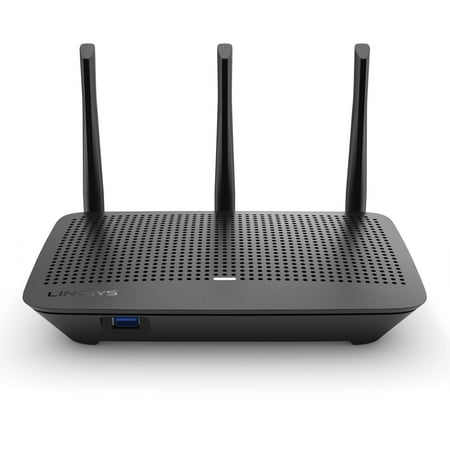
Linksys MAX-STREAM Dual-Band WiFi 5 Router (EA7250)
- Brand:
- Linksys
- Model Number:
- EA7250
- UPC:
- 745883796458
- EAN:
- 0745883796458
- Walmart SKU:
- 668766155
At $99.90, pricing shows 0.0% discount compared to typical $0.00 levels.
| Price Type | Price | Date |
|---|---|---|
|
Highest Price
|
$99.90 | |
|
Lowest Price
|
$16.00 | |
|
Most Recent Price
|
$25.00 |
| Price Type | Price | Date |
|---|---|---|
|
Highest Price
|
$99.90 | |
|
Lowest Price
|
$67.87 | |
|
Most Recent Price
|
$99.90 |
Tracking History: We have tracked Linksys MAX-STREAM Dual-Band WiFi 5 Router (EA7250) since 12/5/2022. The most recent price update was on Aug 28, 2025.
Price Range: Over the past 90 days, the price has ranged from $67.87 (lowest on 12/5/2022) to $99.90 (highest on 4/5/2025). The average price during this period is $83.89.
Current Trend: No Walmart.com pricing data available for analysis.
Customer Insights: Rated 4.3/5 from 130 reviews.
This Linksys MAX-STREAM Dual-Band WiFi 5 Router works great. I have noticed a difference on my wifi since I upgraded to this Router. The design is sleek and effective. It was easy to set up Thanks to the easy to follow instructions. I would recommend if you are looking to upgrade. This router has made a great difference it's more effective has great range and can support multiple devices being used at the same time.
The Linksys Max-Stream Dual Band Wifi Router works great! Instructions were easy to follow and setup was quick. The range works well for our home and each end of the home everyone gets great service for wifi. This is definitely an upgrade from previous routers we've had. I definitely recommend!
As a Sparks Reviwer, I was given the Linksys MAX-STREAM Dual-Band WiFi 5 Router (EA7250) to give you my honest opinion about it. The Max-Stream EA7250 WIFI 5 Router provides absolutely superior speed and a remarkable range for what I need in my home. Living in a rural area there are many challenges with having a good internet connection. This WIFI router has provided me with excellent WIFI that I can count on. Since I also work from home it's important for me to have the security of a good working router and one that doesn't buffer or lag when using it. So far this Linksys MAX-STREAM Dual-Band WiFi 5 Router (EA7250) has not let me down. I was fortunate enough to have my technician install it. Linksys provides you with an App and 24/7 support. I highly recommend this router.
This WiFi booster covers up to 1500 square foot which is pretty accurate covering most of my 2,000 sq foot home with the extra boost needed. First we disconnected our old router and plugged in new one and changed our previous password with the one provided in the instruction pamphlet. The devices we had connected to old router we switched to new one and then successfully streamed all devices to new one. The top speed and preformance showed streaming Amazon Prime and Netflix on our devices before we didn't even realize how slow some of the pictures came through and how long it took to scroll our phones and tablets when connected to the WiFi. Device also comes with 12 month warranty in case of damage or it stops working which is always a plus in my book.
I can confirm that the Linksys router EA7250 is an effective router for extend a home WiFi network after use it the last week. The main cable WiFi router is in the upper level floor for our bedrooms devices but our livingroom and studio had a poor signal, until the installation close to the TV of this Linksys router. Easy to start, and easy to set up in our devices with a high WiFi reception.
This is a phenomenal router. The signal is strong enough to reach all the way outside our house to the mother-in-law sweet and still have great speed. Installation is straight forward and simple. This Linksys MAX-STREAM Dual-Band WiFi 5 Router works Perfect for gaming and streaming with a great internet connection.
My 1st impression of the router, after taking it out of its minimal packaging, is that it seems quite big in comparison to my old router, which was an eero. I did, however, have high hopes for the directional antennas providing excellent coverage for my house as it spans 2 floors! This sadly wasn't the case. I actually only had 2 bars of service in my kitchen which is the next Room over from where the router lives. Aside from the minimal packaging, the instructions were also quite minimal. Thankfully this didn't prove to be much of an issue as the really wasn't much to do. After plugging in the router and of course waiting for it to power up, the 1st thing that I did was come up stairs to my computer and log in with the provided network name and password. You are then instructed to go to a linksys Web site to complete your set up. The initial set up took 15 total minutes, I did have to restart my modem in the middle of the set up, and it did not detect my modem on the 1st try. It did however recognize it easily on the 2nd try and I was able to complete set up without any further issues. Towards the end of the set up you're allowed to change your network name and password to something more personalized. This of course restarted my router and made me re connect to my Wi-Fi with the correct name and password. After completing the set up of the Internet and router I have the option to set up an account with links us to give me access to all of the settings easily on the router. I did go ahead and do that and that only took me an extra 5 minutes. At this point I decide that I'm gonna try the on board speed tests it's right there and all of your little things that you can access once you've set up your account with links us. Unfortunately I could not use their provided speed test because I don't have Adobe eights on my Mac computer and did not plan on installing it. I decide to dive further into the other settings that I'm allowed to change, and see how customizable everything is with this router. I'll do a speed test later after making sure the settings are exactly to my liking. At this time I notice you have the option to turn on or off the guest access accounts. The guest access account makes it so that your guest wouldn't need to enter your password. I have neighbors that live a bit too near for that, so I decided to keep it off and just give my guests the passwords. There is also the option of parental control settings, which easily allow you to set restrictions on any device. You can easily change the name and picture of any of your connected devices, which makes it so much simpler to figure out which ones need parental controls. This is also handy because you can allow things prioritized access to the Internet. So parents your phones can come 1st lol! After digging into all of the settings I decide that now is the time to perform my speed test. Since I can't use their on board speed test, I decide to use my go-to, fast. com. Before I set up this router, I did go ahead and do a speed test with my old router. On my computer I got a speed of 427MBPS download speed. My phone typically only gets about 200MBPS. * It's important that I note here that nothing is directly connected everything is running on the Wi-Fi network as it did with my old router.* I complete the speed test on both the computer and the phone with my new linksys router. The results I got were kind of troubling! My computer was only reading a speed of 130 Mbps, and my phone was only giving me 180MBPS. At this point I'm thinking that maybe I set something up wrong, and immediately dial the provided number to get ahold of support, and of course because of covid-19, there are less representatives available, as everyone is working from home, and I'm placed on hold. In the mean time, I decide to look into things myself, and a quick Google search later, I find out that the lyksis routers automatically default to the 2.4 GHz network. At the beginning of the set up I had chosen to make my 2.4 GHz and 5 GHz network the same name, thinking that would make it easier. But this Google search web page quickly pointed out that they really should be named something different; that way you know that your connected to the faster 5 GHz setting. So I go in and I change the network name of my 5 GHz. I then go and make sure that my computer and phone are both connected to that 5 GHz network. *I'll make a side note here that you do have the option in those settings to actually turn off one or the other.* I did this before realizing that you could change the names of the network. I turned off the 2.4 GHz to see if that made a difference in my speed test. At that point it did not. Once I realized that you could change the network name and did get on to the proper 5 GHz network I went ahead and redid my speed test on both computer and phone. Both my phone and computer are still only reading 190 M BPS. My phone gives me the option to see what's coming in directly rather than the speed I get on my Wi-Fi. My old router would give me an output speed of 500MBPS. At this time I check my phone while connected to the new router and see that the direct input is only giving me a reading of 380MBPS. This is far less than my Internet is capable of as you can see by the provided screenshots of my eero speed in comparison to my linksys speed. I've now been trying this router all day. My husband's computers running slower, my phone runs slower, my son can't even game as well on his switch or on the xbox. The directional antenna I was so hoping would provide extra coverage also was a fail. I didn't receive even full signal in the kitchen which is next to the living Room where the router is placed. I am over all not impressed. It certainly doesn't seem to perform as it states on the box. One thing I will say is if they do provide a ton of customizable and personalized settings, so if your somebody who likes that type of thing, this would definitely be for you. I did receive this router in exchange for my honest review through Walmart's spark reviewer program.
In the beginning it was working fine, we were amazed how this made our internet smoother and faster on our phones and videos loaded faster but the next day it started to go slow and it seemed like it wanted to cut off so we had to reset the Wifi. The directions to set up the WiFi and get it started wasn't clear, the website it tells us to go to didn't work at all so after 20 minutes of trying, I found the Linksys app to set up the box even that took awhile because it wasn't being clear with the directions on how to set it up, so I finally figured it out about an hour later.
I installed this router in my home for two days. The download speed and the upload speed were significantly less than the one I already have. The one I use in my house is just standard cable company equipment. I'm giving it three stars as it really depends on what you're used to as far as speed goes. A plus is it was easy to install and I am not tech savvy by any stretch of the imagination. Bottom line...... It's is hard tell you definitely about whether you will be happy with it or not. It depends on what speed you're looking for. It was a lot slower than my basic cable equipment. I hope this helps.
This router replaced a Linksys E2000 (which lacks those fancy antenna, among several other upgrades) for our household that has been in use for about ten years. Honestly, I can't tell any difference. Where I was hoping to see the biggest change was in the signal strength in one bedroom that has always had trouble staying connected with the old router, and even with the repositioning of the antenna there seemed to be no difference according to the phone and computer used in that room. I must unfortunately continue to use a powerline adapter for the computer to connect to the internet there. There are fewer flashing lights on the front these days, just a small white light that can blink slowly, with the usual connectivity lights on the back of the router where the ethernet cables connect. The user interface changed to the same one that Linksys has been using for the last few years (I have worked with routers newer than what we used at home in recent years), with few changes. One thing I noticed was that the speed test tab inside the router administration page gave an error about an expired license, so that was unavailable to use. As a side note, if you're used to using Linksys Smart Wifi, you'll be able to use that with this router as you're already accustomed.
Detailed price history for the past 90 days
No Walmart.com pricing data available for analysis.
Third-Party Sellers prices have ranged from $25.00 (Sep 20) to $25.00 (Sep 20) over the past 90 days. Current price is close to the 90-day average of $25.00.
| Date | Price | Change | % Change |
|---|---|---|---|
| $25.00 | $+0.00 | +0.0% | |
| $25.00 | $+0.00 | +0.0% | |
| $25.00 | $+0.00 | +0.0% | |
| $25.00 | $+0.00 | +0.0% | |
| $25.00 | $+0.00 | +0.0% | |
| $25.00 | — | — |