
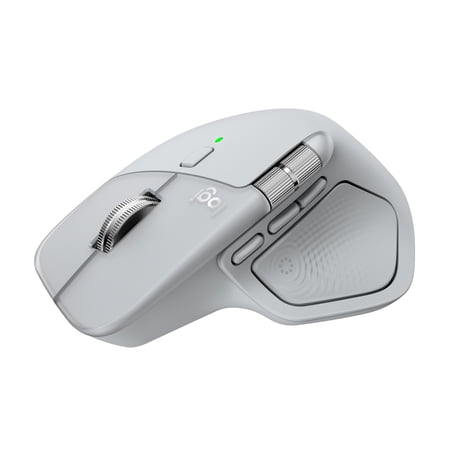
Logitech MX Master 4, Ergonomic Wireless Mouse with Advanced Performance Haptic Feedback, Pale Gray
- Brand:
- Logitech
- Model Number:
- 910-007559
- UPC:
- 097855207579
- EAN:
- 0097855207579
- ASIN:
- B0FC5V3YVY
- Best Buy SKU:
- 6640819
- Walmart SKU:
- 18045615169
Market direction turned downward with current $119.99 representing 0.0% under standard pricing.
| Price Type | Price | Date |
|---|---|---|
|
Highest Price
|
$119.99 | |
|
Lowest Price
|
$109.99 | |
|
Most Recent Price
|
$119.99 |
| Price Type | Price | Date |
|---|---|---|
|
Highest Price
|
$119.99 | |
|
Lowest Price
|
$119.99 | |
|
Most Recent Price
|
$119.99 |
Tracking History: We have tracked Logitech MX Master 4, Ergonomic Wireless Mouse with Advanced Performance Haptic Feedback, Pale Gray since 4/8/2026. The most recent price update was on Sep 1, 2026.
Price Range: Over the past 90 days, the price has ranged from $119.99 (lowest on 4/8/2026) to $119.99 (highest on 4/8/2026). The average price during this period is $119.99.
Current Trend: Walmart.com prices have ranged from $119.99 (Sep 1) to $119.99 (Sep 1) over the past 90 days. Current price is close to the 90-day average of $119.99.
Customer Insights: Rated 4.4/5 from 679 reviews.
Avoid ordering from Walmart. My package never showed up, and the refund process was handled terribly. A chat representative assured me they would issue a refund but never completed it, and I kept being told to wait through the 10-day window. Order from Amazon instead and spare yourself the hassle.
Look, this is a good mouse. All of the MX Master series mice are good. On this edition they changed the material for the thumb rest and pinky rest area. I find this material to be more slippery than the old material used on the last mouse. This kinda defeats the purpose of having rubber in the first place. I've cleaned this rubber numerous times, and I keep waiting for it to sorta "break in" and be grippy, but it's not. It's slippery. I wish I could buy a different thumb rest cover, even hard plastic would be better than the rubber used on this mouse. This is me nitpicking though. The thumb press button is pretty cool when you pair it to a gesture. It's a quality mouse all around. It's a decent upgrade from the last version.
[This review was collected as part of a promotion.] Endlessly customizable, haptic options, full control of everything you work on and removing a lot of tediousness in all programs. The only issue is the low polling/report rate. The mouse is noticeably less smooth than it should be due to this.
I own a couple of MX Master 3 mice and recently replaced one of them with an MX Master 4. The MX Master 3 & 4 mice are the best mice I have ever used. I highly recommend them. The ability to spin the weighted scroll wheel at high speed to quickly scroll up or down a document or web page, or to quickly zoom in and out, is very useful. The MX Master 4 is a great mouse, though the improvements from 3 to 4 seem very minor. I actually prefer the lower thumb-button design and thumb scroll-wheel design on the MX Master 3 over that of the MX Master 4, but they still work great on the 4. I was disappointed to discover that, for my use cases, the new haptics feature doesn't provide value. I do like the addition of the third upper thumb button. I would happily buy either the MX Master 3 or MX Master 4 again.
This mouse has a super comfortable ergonomic design and grip, glides smoothly on the pad, has many configurable options via Logi Options, supports gestures, and offers haptic feedback on the show action ring. My wrist/hand/fingers never get tired after 8+ hours of use. This mouse represents next generation enhancements to the MX series. If you like a very configurable, very comfortable fit, and typical high quality Logitech product, then this mouse is for you.
I upgraded from my MX Master 3 that was falling apart due to the poor material from the older model and it seems that Logitech learned the lessons. From a feel perspective is very much similar than the previous model but the construction feels more premium which is what you want considering the investment it represents. That said, it's worth every penny and I truly appreciate that you can customize the quick action button and adapt it to the different apps you're using. The significantly improved resolution is also a big plus from the previous model. Hopefully this one will last longer :)
This mouse has extra features a standard mouse does not. Unfortunately, some are locked behind the "online" version of Logi Options+ such as the action wheel. So if you work somewhere, you best check with your IT department to see if you're able to even use the mouse as company policy could disallow the app. With that being said, you can still customize a good chunk of the mouse using the "offline" version of Logi Options+. I'm still getting used to the SmartShift feel as it feels off to me. At first I thought it was a QC issue to be honest. The nice thing is you can turn it off if you don't like it which I may end up doing so. So 4* when considered the Logi Options+ nuances.
Meh... not quite as good as the M3 as far as the feel of the mouse goes. It does the same thing, but I don't need the haptics. Horizontal scroll is a little more prominent/easier to utilize so that is nice. Overall I just wish the 3 had better switches and didn't crap out (it seems that this one also has the same switch issues, so it's life is limited as well). Overall, could be better - what needed fixing wasn't fixed and instead I got features I didn't want at a higher price tag, will be exploring other mouse options from now on.
This is the 8th mouse I've bought. Not because I'm replacing mine but because I love mine so much I felt like all my relatives that work from home needed it so I bought them as gifts. They will all tell you they don't know how they lived without it. Awesome battery, love the features and so comfortable.
The MX Master 4 is an exceptional device. Better than ever. I loved my MXVertical. The MX Master 3X topped it. The Master 4 blew my mind and had me asking "how did they think of this?" A truly stellar, feature rich device. It's hard to imaging what Logitech will dream up next.
Detailed price history for the past 90 days
Walmart.com prices have ranged from $119.99 (Sep 1) to $119.99 (Sep 1) over the past 90 days. Current price is close to the 90-day average of $119.99.
| Date | Price | Change | % Change |
|---|---|---|---|
| $119.99 | $+0.00 | +0.0% | |
| $119.99 | $+0.00 | +0.0% | |
| $119.99 | $+0.00 | +0.0% | |
| $119.99 | — | — |
Third-Party Sellers prices have ranged from $119.99 (Nov 5) to $119.99 (Nov 5) over the past 90 days. Current price is close to the 90-day average of $119.99.
| Date | Price | Change | % Change |
|---|---|---|---|
| $119.99 | $+0.00 | +0.0% | |
| $119.99 | $+0.00 | +0.0% | |
| $119.99 | $+0.00 | +0.0% | |
| $119.99 | $+0.00 | +0.0% | |
| $119.99 | $+0.00 | +0.0% | |
| $119.99 | $+0.00 | +0.0% | |
| $119.99 | — | — |