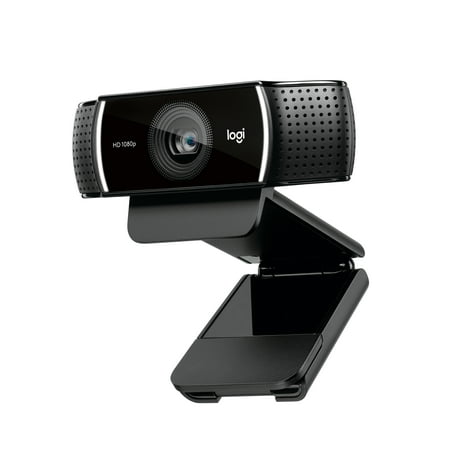
Logitech Pro Stream WebCam, 30 fps at 1080p, Autofocus, Omni-directional microphones, Black
- Brand:
- Logitech
- Model Number:
- 960-001211
- UPC:
- 097855135391
- EAN:
- 0097855135391
- ASIN:
- B07661NX9M
- Walmart SKU:
- 185685796
Significant price reduction expected soon—our analysis suggests a 17.9% drop is imminent after 2 days at $66.97.
Price expected to drop to $54.99 soon
| Price Type | Price | Date |
|---|---|---|
|
Highest Price
|
$66.97 | |
|
Lowest Price
|
$40.00 | |
|
Most Recent Price
|
$49.99 |
| Price Type | Price | Date |
|---|---|---|
|
Highest Price
|
$70.32 | |
|
Lowest Price
|
$50.82 | |
|
Most Recent Price
|
$66.97 |
Tracking History: We have tracked Logitech Pro Stream WebCam, 30 fps at 1080p, Autofocus, Omni-directional microphones, Black since 11/22/2022. The most recent price update was on Sep 4, 2026.
Price Range: Over the past 90 days, the price has ranged from $50.82 (lowest on 11/13/2025) to $70.32 (highest on 7/20/2026). The average price during this period is $59.40.
Current Trend: Walmart.com prices have ranged from $54.99 (Aug 23) to $70.32 (Sep 2) over the past 90 days. Current price is close to the 90-day average of $61.29.
Customer Insights: Rated 4.3/5 from 677 reviews.
This is my first ever purchase of a webcam. After adjusting settings, and testing the picture, photo, video, and mic I am a very happy customer.____Negatives: mic is weak. The closer you are the better, and in my case not so good. Also depends on your environment and settings. Nevertheless, I got myself a lavalier mic. I will be testing it soon.____Positives: The webcam is awesome. Which was the most important part. Now I highly recommend going to the Logitech website and downloading their app called Logitech capture.____From there you can adjust the settings, and these can make a huge difference in how your camera operates. The lighting you use is vital. But once your lighting is good and your settings adjusted, you will get a buttery smooth picture.____I looked up several YouTube videos to understand and explain things in this regard and they were very helpful. This cam uses a usb-a and can be mounted onto a tripod.____If you need a good webcam, give this one a shot, I definitely recommend it.
This is a solid webcam. Unpacking it was okay. It comes covered with that protective plastic all over it. So I unpacked it and it includes the camera with attached USB cable. It's a conventional USB connector. I only tried it on USB 3.0 so can't comment if it works on 2.0 or not. The unit has a neat and sturdy mounting bracket for mounting on the top of your monitor. Quite nice. It also has a provision for a tripod screw which I did not use, but nice to have. Surprisingly, to me anyway, it does not come with software , i.e. when you plug it in to your USB port nothing happens. I went to Logitech's website and downloaded their capture software, installed it and it worked fine after doing that. The quality of the picture is amazingly good. I couldn't detect any fuzziness in movement. Guess the 30 fps helps with that. So in these days of working from home and kids learning from home this is a useful tool and a high quality one.
Way cool! This well designed and precision engineered hardware hangs snugly on a computer monitor. No complicated instructions. Simple to use. Just plug it into your usb and hang it on your monitor and even fits well on my 2” deep tv screen. It is balanced and weighted nicely so once you set it, it stays in place. If you want to use a tri-pod there is a screw hole for it. The adjustable stand allows this to pirch nicely on its own. The video this produces is amazingly clear and crisp. After using it, I don't want to go back to the standard built in. The only down side is it enhances your appreciation for the quality image and when you see your friends on their built in cameras they look terrible.
This little webcam improved my Zoom video 10000%! Crystal clear in any lighting. I can't believe I waited this long to upgrade from my laptop cam. SO EASY to install - simply plug it into your computer and then you will be prompted to restart. Grab this, especially if it is on sale, although I would pay full price for the quality! If you are on the fence, just do it.
Upon receiving and opening up my package with the Logitech 1080p Pro Stream Webcam I was thrilled to see the size of the unit. I t is a very durable webcam, not cheaply made. I have to admit, I was sceptical about using this. I am not very good doing things that would require being techy. I almost always have to rely on calling my daughter(who is extremely techy) or watch a video about it on you tube. But, not this time. When it says to just plug it in and you're ready to go, it means just that. The setup was easy and fairly quick. You didn't really need any instructions to know what to do. The quality was superb. I recorded several things and always, they turned out good. Not bad for a first time user. The built in mic is great so no need to get an additional item to use this. The cost was so low, I seriously had my doubts whether or not this would actually do what I wanted it to and do it so well. The only con to this unit was that the audio quality was not very good. But, other than that, I certainly would recommend this product.
So far, so good with this product! The lighting and sound are good and this camera will come in very handy for working from home. Easy to set up (just plug into a USB port) and easy to operate. I will likely be purchasing a tripod for it as this model does not come with one. If you don't already have video capture/streaming software, you can download some from the Logitech website. I am very pleased with the ease of use and quality of the video and sound this webcam produces! I recorded a review with the Logitech software I downloaded but am unable to upload it.
The first thing I noticed when unboxing the camera was the weight. It is a little heavier than cheaper cameras, which is a good thing. It stays put when placed on top of the monitor. The USB cord is long enough to reach the computer if it's on the floor. The quality of the picture is crisp and clear. No doubt this is a high quality camera. The colors are vibrant and true to actual. I'm not a camera expert but I will say this one is better than many others I've used. I'm very happy with this product.
I haven't used a webcam for my PC for a very long time so I'm not very familiar with the other options out there on the market today. The Logitech 1080p Pro Stream Webcam was easy to use. The epitome of Plug and Play. You plug it in your USB port and it automatically installs the necessary software. I put it on my decade old Windows 10 HP computer and it functioned with no issues. It was actually a lot smaller than I thought it would be. The camera was very easy to adjust (the view, up and down). It just sits on top of your computer screen. You don't have to worry about any damage to your screen because it's not a clamp, but it is secure. I tested the camera on a Zoom music lesson. The video was clear enough. I didn't have any lagging issues but I think that's more of a question of your internet speed (I have cable internet.) if that is your problem. This is camera does have a built in microphone, no speakers. The microphone works great. I didn't have to talk louder; it was very sensitive. The camera is not like a more expensive professional video blogger camera but it works well for casual use, video chats and such. The only thing that I wish it had was a manual PHYSICAL privacy shutter for the camera. I don't like having cameras in my house because if someone really wanted to that can hack anything. (I'm not that tech savvy to stop hackers.) I just put a post-it note on it when I'm not using it or just unplug it all together. This camera does have lights along the sides to tell you that the camera is on though, so that's good.
The item comes pre assembled which makes installment a lot easier, however the hinge design for backing it onto the screen is not that great as it's difficult to get it exactly in the place you want. It is a little difficult to get the tilt correct, but In the end it gets the job done. Chord is a little short so needs to be put directly on the monitor you'd be using and not run from a distance. The driver automatically installs when you plug the USB into the computer which makes things very easy. Picture comes through very clearly, however the 30 frames per second processing speed makes the video choppy and not as fluid as you'd expect. Microphone picks up everything perfectly and comes through clearly with no problems.
Pathetic camera quality, even my friends with cheaper WebCam cameras have better camera quality than me, even though my WebCam camera is way expensive than them, and the image is really granny, so i do not recommend buying this product.
Detailed price history for the past 90 days
Walmart.com prices have ranged from $54.99 (Aug 23) to $70.32 (Sep 2) over the past 90 days. Current price is close to the 90-day average of $61.29.
| Date | Price | Change | % Change |
|---|---|---|---|
| $66.97 | $+0.00 | +0.0% | |
| $66.97 | $-3.35 | -4.8% | |
| $70.32 | $+3.35 | +5.0% | |
| $66.97 | $-3.35 | -4.8% | |
| $70.32 | $+3.35 | +5.0% | |
| $66.97 | $-3.35 | -4.8% | |
| $70.32 | $+3.35 | +5.0% | |
| $66.97 | $+0.00 | +0.0% | |
| $66.97 | $+0.00 | +0.0% | |
| $66.97 | $-3.35 | -4.8% | |
| $70.32 | $+3.35 | +5.0% | |
| $66.97 | $+0.00 | +0.0% | |
| $66.97 | $+0.00 | +0.0% | |
| $66.97 | $+11.98 | +21.8% | |
| $54.99 | $+0.00 | +0.0% | |
| $54.99 | $+0.00 | +0.0% | |
| $54.99 | $+0.00 | +0.0% | |
| $54.99 | $+0.00 | +0.0% | |
| $54.99 | $-15.33 | -21.8% | |
| $70.32 | $+15.33 | +27.9% | |
| $54.99 | $+0.00 | +0.0% | |
| $54.99 | $-15.33 | -21.8% | |
| $70.32 | $+15.33 | +27.9% | |
| $54.99 | $+0.00 | +0.0% | |
| $54.99 | $+0.00 | +0.0% | |
| $54.99 | $+0.00 | +0.0% | |
| $54.99 | $-15.33 | -21.8% | |
| $70.32 | $+15.33 | +27.9% | |
| $54.99 | $+0.00 | +0.0% | |
| $54.99 | $+0.00 | +0.0% | |
| $54.99 | $-15.33 | -21.8% | |
| $70.32 | $+15.33 | +27.9% | |
| $54.99 | $+0.00 | +0.0% | |
| $54.99 | $+0.00 | +0.0% | |
| $54.99 | $+0.00 | +0.0% | |
| $54.99 | $-15.33 | -21.8% | |
| $70.32 | $+15.33 | +27.9% | |
| $54.99 | $-15.33 | -21.8% | |
| $70.32 | $+15.33 | +27.9% | |
| $54.99 | $+0.00 | +0.0% | |
| $54.99 | $-15.33 | -21.8% | |
| $70.32 | $+15.33 | +27.9% | |
| $54.99 | $+0.00 | +0.0% | |
| $54.99 | $-15.33 | -21.8% | |
| $70.32 | $+15.33 | +27.9% | |
| $54.99 | $+0.00 | +0.0% | |
| $54.99 | $-11.98 | -17.9% | |
| $66.97 | $+11.98 | +21.8% | |
| $54.99 | $-15.33 | -21.8% | |
| $70.32 | $+15.33 | +27.9% | |
| $54.99 | $+0.00 | +0.0% | |
| $54.99 | $-15.33 | -21.8% | |
| $70.32 | $+15.33 | +27.9% | |
| $54.99 | $+0.00 | +0.0% | |
| $54.99 | $+0.00 | +0.0% | |
| $54.99 | $-11.98 | -17.9% | |
| $66.97 | $+0.00 | +0.0% | |
| $66.97 | $-3.35 | -4.8% | |
| $70.32 | $+3.35 | +5.0% | |
| $66.97 | $+0.00 | +0.0% | |
| $66.97 | $+0.00 | +0.0% | |
| $66.97 | $-3.35 | -4.8% | |
| $70.32 | $+3.35 | +5.0% | |
| $66.97 | $-3.35 | -4.8% | |
| $70.32 | $+3.35 | +5.0% | |
| $66.97 | $+0.00 | +0.0% | |
| $66.97 | $-3.35 | -4.8% | |
| $70.32 | $+3.35 | +5.0% | |
| $66.97 | $+0.00 | +0.0% | |
| $66.97 | $-3.35 | -4.8% | |
| $70.32 | $+3.35 | +5.0% | |
| $66.97 | $+0.00 | +0.0% | |
| $66.97 | $+0.00 | +0.0% | |
| $66.97 | $+0.00 | +0.0% | |
| $66.97 | $+0.00 | +0.0% | |
| $66.97 | $+0.00 | +0.0% | |
| $66.97 | $+0.00 | +0.0% | |
| $66.97 | $+2.02 | +3.1% | |
| $64.95 | $+9.96 | +18.1% | |
| $54.99 | $+0.00 | +0.0% | |
| $54.99 | $-11.98 | -17.9% | |
| $66.97 | $+7.97 | +13.5% | |
| $59.00 | $+0.00 | +0.0% | |
| $59.00 | $-7.97 | -11.9% | |
| $66.97 | $+0.00 | +0.0% | |
| $66.97 | $+11.98 | +21.8% | |
| $54.99 | $+0.00 | +0.0% | |
| $54.99 | $+0.00 | +0.0% | |
| $54.99 | $+0.00 | +0.0% | |
| $54.99 | $+0.00 | +0.0% | |
| $54.99 | $+0.00 | +0.0% | |
| $54.99 | $+0.00 | +0.0% | |
| $54.99 | $+0.00 | +0.0% | |
| $54.99 | $+0.00 | +0.0% | |
| $54.99 | $+0.00 | +0.0% | |
| $54.99 | $+0.00 | +0.0% | |
| $54.99 | $+0.00 | +0.0% | |
| $54.99 | $+0.00 | +0.0% | |
| $54.99 | $+0.00 | +0.0% | |
| $54.99 | $+0.00 | +0.0% | |
| $54.99 | $+0.00 | +0.0% | |
| $54.99 | $+0.00 | +0.0% | |
| $54.99 | $+0.00 | +0.0% | |
| $54.99 | $+0.00 | +0.0% | |
| $54.99 | $+0.00 | +0.0% | |
| $54.99 | $+0.00 | +0.0% | |
| $54.99 | $+0.00 | +0.0% | |
| $54.99 | — | — |
Third-Party Sellers prices have ranged from $49.99 (Aug 26) to $66.97 (Jul 3) over the past 90 days. Current price is close to the 90-day average of $54.60.
| Date | Price | Change | % Change |
|---|---|---|---|
| $49.99 | $+0.00 | +0.0% | |
| $49.99 | $+0.00 | +0.0% | |
| $49.99 | $+0.00 | +0.0% | |
| $49.99 | $-4.01 | -7.4% | |
| $54.00 | $-0.05 | -0.1% | |
| $54.05 | $-2.17 | -3.9% | |
| $56.22 | $+1.23 | +2.2% | |
| $54.99 | $+0.00 | +0.0% | |
| $54.99 | $+0.00 | +0.0% | |
| $54.99 | $-1.23 | -2.2% | |
| $56.22 | $-10.75 | -16.1% | |
| $66.97 | $+10.75 | +19.1% | |
| $56.22 | $+1.23 | +2.2% | |
| $54.99 | $+0.00 | +0.0% | |
| $54.99 | $+0.00 | +0.0% | |
| $54.99 | — | — |