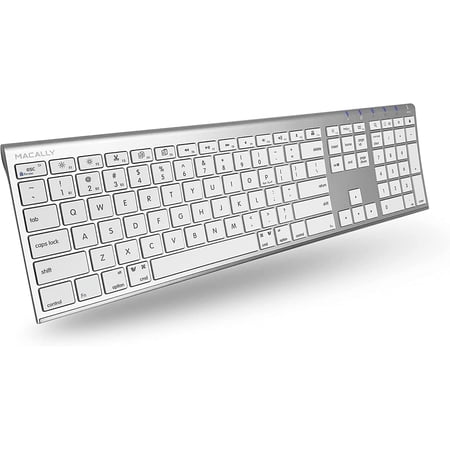
Macally Bluetooth Multi Device Keyboard for Apple, Windows, Android Computer and Tablet - Wireless, Numeric Keypad, Aluminum Silver
- Brand:
- Macally
- Model Number:
- ACEBTKEYA
- UPC:
- 701107498539
- EAN:
- 0701107498539
- ASIN:
- B07SQD723P
- Walmart SKU:
- 876950535
| Price Type | Price | Date |
|---|---|---|
|
Highest Price
|
$59.99 | |
|
Lowest Price
|
$49.98 | |
|
Most Recent Price
|
$49.99 |
Price history data is not available for this product at the moment.
Current Trend: No Walmart.com pricing data available for analysis.
Customer Insights: Rated 4.4/5 from 30 reviews.
This is a great substitute for the official Mac keyboard. I've been using it for the past 2 weeks with no issues. It's not flimsy, paired immediately and is a high quality keyboard. Highly recommend
Absolutely perfect for me to use my two desktops together with a monitor switch it's a seamless production setup.
Quality keyboard very similar to Apple keyboard but much less expensive. Easy to set up.
Works great!
Once I trained myself to use it, it worked very well. I'm typing this review with it. I also like its construction. It performs as advertised (Windows/Linux, but I haven't tried it on MacOS).
It's very similar to the Mac aluminum keyboard with number pad, except the Command key is smaller. It was easy to connect %26 works great.
The command key is much smaller which I knew when I bought it. I didn't think it would be a big deal, but it's actually very annoying. I added a textured tape to help with feeling for it, but it's not a perfect solution. I use it a lot for shortcuts in adobe indesign, photoshop, and illustrator. It has affected my workflow more than I thought. Otherwise it's a good product. I haven't had any issues with keys not working or with double typing, and lagging. I like the feel of the keyboard wrt key height, texture, and feedback. Overall I would recommend it for a regular user but maybe not to someone who is used to the big command key in their workflow.
Poor button layout. The BIG right Fn button is where the Right Control key is supposed to be. If you use R. control a lot , this will be an issue. It's not 1 button switching as claimed. It's 2 button. You'll be charging many more times than other brands that you put in 2AA's and forget about it till the next year. This keyboard, not even close. Power button is a cheap sliding switch. My other wireless brands do not even NEED a power switch..
Set up. Worked properly for two days. Stopped entirely in the middle of a doc I was writing. Power working (light on keyboard), but impossible for Apple MacBook keyboard to be found when searching with Settings/Bluetooth. INSTRUCTIONS WRITTEN FOR A TECHNICIAN OR A BLIND PERSON. ONLY ON E MYSTERIOUS STICK DRAWING OF HOW TO CONNECT (WHICH I DID SUCCESSFULLY EVENTUALLY). TECH SUPPORT GETS BACK TO YOU IN A DAY OR TWO--- USELESS.
Won't work or pair up with my Mac and since I couldn't find a box that size I ran out of time to return it. If anyone wants to purchase this one never used in box with paperwork reply to this review
Detailed price history for the past 90 days
No Walmart.com pricing data available for analysis.
Third-Party Sellers prices have ranged from $49.98 (Sep 7) to $49.99 (Nov 4) over the past 90 days. Current price is close to the 90-day average of $49.99.
| Date | Price | Change | % Change |
|---|---|---|---|
| $49.99 | $+0.00 | +0.0% | |
| $49.99 | $+0.00 | +0.0% | |
| $49.99 | $+0.00 | +0.0% | |
| $49.99 | $+0.00 | +0.0% | |
| $49.99 | $+0.00 | +0.0% | |
| $49.99 | $+0.01 | +0.0% | |
| $49.98 | $-0.01 | +0.0% | |
| $49.99 | $+0.00 | +0.0% | |
| $49.99 | — | — |