
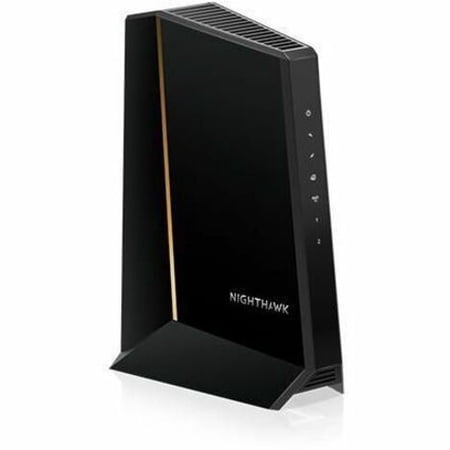
Netgear Nighthawk DOCSIS 3.1 High Speed Internet Cable Modem
- Brand:
- NETGEAR
- Model Number:
- CM3000
- UPC:
- 606449157185
- EAN:
- 0606449157185
- ASIN:
- B0D3FHM3BC
- Best Buy SKU:
- 6577808
- Walmart SKU:
- 10321273317
| Price Type | Price | Date |
|---|---|---|
|
Highest Price
|
$364.85 | |
|
Lowest Price
|
$275.39 | |
|
Most Recent Price
|
$299.99 |
Price history data is not available for this product at the moment.
Current Trend: No Walmart.com pricing data available for analysis.
Customer Insights: Rated 4.8/5 from 251 reviews.
Decided to upgrade my old CM1100 used with Xfinity (300 gbps download / 30 gbps upload) with CM3000 to get the 1 gbps download and 100 gbps upload speed on my revised Xfinity Internet service. Installation of CM3000 was very easy. And activation of new modem with Xfinity was done quickly and was running with upgraded services with CM3000 in less than 30 min. I highly recommend CM3000 if you plan to have more than 1 gbps download/upload speed for your home/office. And you can save on montly renting fee by owning your own modem.
Upgraded to the Nighthawk CM3000 with Xfinity and the difference was immediate. Setup was quick, activation was easy, and I'm consistently seeing near-gigabit download speeds with noticeably improved upload performance. The connection has been rock solid and pairs perfectly with my mesh Wi-Fi system. Great performance and worth the upgrade.
Everything works great, but to be honest I can't tell if it's any faster. I got this cable modem because the coverage ran out on my router, so I figured I may as well upgrade both. The connection was fairly easy, but I had to contact Xfinity. The instructions said I could do it online, but that turned out to not be the case. I was pleasantly surprised that the first person I talked at Xfinity knew what to do. The whole process took about an hour but would have been less had I just called Xfinity right away. I did have an issue with the TV picture after everything was up and running. I had the previous cable modem behind the TV, and it didn't affect the picture, however, I had to move this modem a few feet away. It sits on the floor about three feet below the TV and there's no interference.
I replaced my Netgear CM 500 with the Netgear CM 1000 as the 500 was very updated and could no longer get further updates. without changing my Wi-Fi at all, I went from 50 megs to 200! Everything runs smoothly… I'm thrilled (I was not thrilled with how difficult Xfinity made this to activate!)
The Netgear CM3000 modem solved a problem I had streaming 24 bit / 96 kHz hi res audio files where music would stop after a track or two and not advance to the next track. This problem was with the Netgear CM1200 which I bought in 2024. Not a bad router, Internet speed was decent, ~950 mpbs on my Xfinity 1100 speed plan and I could stream video files fine. But high res audio is different b/c the files are not cached. I figured the CM1200 was contributing to a data latency issue and packets were getting jumbled. The CM3000 was Xfinity recommended (which means they'll push firmware updates to it) so I bought it. It has a little smaller form factor than the CM1200 which is nice. Setup using the Xfinity phone app was a breeze. Solved my high res audio file latency issue immediately. I'm a happy camper.
Unfortunately I was made to upgrade by Xfinity to a new modem even though I had a perfectly fine docsis 3.1 modem not even 3 years old, to access the newly available "next gen" upload speeds. I began searching for a unit that was not some sort of atrocious combination modem/router/ap and came across this. Set up through Xfinity was painless and this modem is running like a champ for a few weeks now. I now have 6x the upload speed as I had before, which is quite nice. Would recommend to anyone in need of a modem certified for mid/high split, "next gen" speed, or whatever terminology your ISP chooses
Xfinity recently did an upgrade on our internet connection. Our old modem did not fully support the upgrade. We purchased the next generation CM3000 to "future-proof" our connection to Xfinity. After a fifteen minute setup we immediately measured an upstream change from 5 Mbps to 120 Mbps. Our downstream change we measured being from 190 Mbps to 330 Mbps. Both measurements were made via ethernet connection to our router. It seems that the CM3000 is doing it's job appropriately. The weak link in our setup is the 6 year old router which is connected to the modem via a 1Gbps ethernet port and cat 6a cable. We were hoping to see 600 to 800 Mbps downstream speeds. It would be great if the modem firmware supported a rudimentary speed test so that it's performance could be more easily validated. Interesting data is available via the modem's web interface, but we don't understand what all the numbers mean.
I had a Cox modem/router which was supposedly their best. Always had problems with speed, connections dropping etc. Purchased my Nighthawk cable modem and Orbi. HOLY CRUD! Blazing speeds both WiFi and Hard wire! So simple to set up and use! I would recommend getting some high end Ethernet cables to keep up with the speed etc. Man I wish I had done this sooner!
Awesome speed and reliability! Far superior to the cable company provided modem it replaced. Lightning fast and works perfectly with my Orbi mesh system. Speeds consistently in excess of 1 GB with dozens of devices active simultaneously. Highest recommendation!
Extremely powerful. Easy to setup, except the additional task of calling Cox to allow it to be recognized, since their online verification of the modem didn't work. But that's not Netgear's fault. Overall I'm getting impressive speeds over 2Gbps to my wired desktop, & over 1Gbps to my phones & iPads.
Detailed price history for the past 90 days
No Walmart.com pricing data available for analysis.
Third-Party Sellers prices have ranged from $299.99 (Sep 10) to $299.99 (Sep 10) over the past 90 days. Current price is close to the 90-day average of $299.99.
| Date | Price | Change | % Change |
|---|---|---|---|
| $299.99 | $+0.00 | +0.0% | |
| $299.99 | $+0.00 | +0.0% | |
| $299.99 | $+0.00 | +0.0% | |
| $299.99 | $+0.00 | +0.0% | |
| $299.99 | — | — |